
If you have a folder full of MP3 files, you can use Excel to create a list of the files, including title, artist, and song duration.
I pulled together a collection of music for a family wedding, and wanted to share the list with the bride and groom. Rather that write some code myself, I checked a few of my favourite Excel sites.
John Walkenbach has a download that looked perfect for the job. I downloaded his MP3 File Lister, opened the file, and clicked the Start button.
NOTE: John’s site is no longer available, but you can get the MP3 File Lister from the archive of his site on the Wayback Machine site.
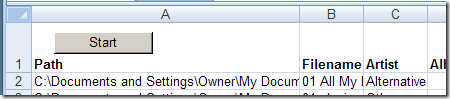
Using the MP3 File Lister
I was prompted to select a folder, and a few seconds later, the list was finished. It had included all the files from the top level folder, and all the subfolders.
The Artist and Genre columns were switched, as were the Album and Duration columns. The code is unlocked though, so you could easily change the headings if you encounter the same problem.
The file ran in Excel 2003 and Excel 2007, without any other problems.
__________________
Is it possible to read mp3 files from several folders, without deleting the rest?
If you’re asking “Can I list files from folder ‘foo’, then list them from folder ‘bar’, and retain the data you’ve already found for ‘foo'”, then no – it clears everything each time it’s run. Copy all the data for ‘foo’ into a separate sheet and append the stuff from ‘bar’ afterwards if you need to play with it.
HTH
OK, thanks!
I have Windows 8 64-bit and when the spreadsheet opens it says I need to change the Declare statements to include PtrSafe. Can someone tell me how to do this?? Thank you so much!
Hi all!! It runs perfect. I read the code but I can not understand because I am a beginner. I want to edit the name of filename, album, album,… Please give me an advice. Example: I want to edit the name “sample.mp3” to “1.01 sample.mp3 with “1.01” is input by inputbox. Thanks!
I’m sure excel could all that you want (after some work!). But sometimes, it’s just not the best tool for the job. I’ve had good luck with this program: mp3tag
http://www.mp3tag.de/en/
You can apply changes like album name, genre to a bunch of files all at once.
That looks like a handy free tool — thanks Dave!
What is the label code for Composers?
Is the composer available in the Excel list of MP3 files? I am running Windows 7. I know that composer is available in the properties of MP3 files, but I have been unable to find it utilizing Excel.
I have about 35,000 mp3 files that I need to make a list of so would dearly love to get that program.
How do I go about it.
Many thanks
Eamon