
If you have a folder full of MP3 files, you can use Excel to create a list of the files, including title, artist, and song duration.
I pulled together a collection of music for a family wedding, and wanted to share the list with the bride and groom. Rather that write some code myself, I checked a few of my favourite Excel sites.
John Walkenbach has a download that looked perfect for the job. I downloaded his MP3 File Lister, opened the file, and clicked the Start button.
NOTE: John’s site is no longer available, but you can get the MP3 File Lister from the archive of his site on the Wayback Machine site.
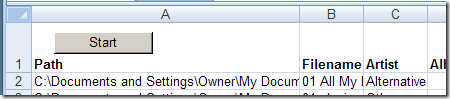
Using the MP3 File Lister
I was prompted to select a folder, and a few seconds later, the list was finished. It had included all the files from the top level folder, and all the subfolders.
The Artist and Genre columns were switched, as were the Album and Duration columns. The code is unlocked though, so you could easily change the headings if you encounter the same problem.
The file ran in Excel 2003 and Excel 2007, without any other problems.
__________________
down load not available on their site, I have this app with me earlier and it was a perfect tool, missed it if any one have please send link or zip on [removed] Thanks in advance
John’s site is no longer available, but you can get the MP3 File Lister from the archive of his site on the Wayback Machine site.
Hi, did anyone get this script working in 64 bit windows? As previously posted back in 2015 by Essjaysays:
I have Windows 8 64-bit and when the spreadsheet opens it says I need to change the Declare statements to include PtrSafe. Can someone tell me how to do this?? Thank you so much!
I’m running Win10 & would love to get this working, but have limited scripting capability
Thanks in Advance
yes two changes ar required. change the declare functions tothe below and in the get function directory section set x as longPTR
Private Declare PtrSafe Function SHGetPathFromIDList Lib “shell32.dll” Alias “SHGetPathFromIDListA” _
(ByVal pidl As LongPtr, ByVal pszPath As String) As Boolean
Private Type BROWSEINFO
hOwner As LongPtr
pidlRoot As LongPtr
pszDisplayName As String
lpszTitle As String
ulFlags As Long
lpfn As LongPtr
lParam As LongPtr
iImage As Long
End Type
Private Declare PtrSafe Function SHBrowseForFolder Lib “shell32.dll” Alias “SHBrowseForFolderA” _
(lpBrowseInfo As BROWSEINFO) As LongPtr
I have the aplication on an old computer with Vista normally perfectly working with old programs Excel 2003 / 2007 (I still use them and prefer to new versions :)).
However after choosing directory by window it stops (VB 6,3) at
FolderLen = Len(Folder)
With Application.FileSearch — and says that
Application.FileSearch =
How to overrun this? I’m not skilled in vb but used many excel macros and some from Walkenbach page tips years ago and there were very helpful, so I believe it is worth trying. Tell me please if it is possible to make it working?
I have MP3 File Lister on an old computer with Vista normally perfectly working with old programs Excel 2003 amd 2007 (I still use them and prefer to new versions :)).
However after choosing directory by window it stops (VB 6,3) at
FolderLen = Len(Folder)
With Application.FileSearch — and says that
Application.FileSearch =
How to overrun this? I’m not skilled in vb but used many excel macros and some from Walkenbach page years ago and there were very helpful, so I believe it is worth trying. Tell me please if it is possible to make it working?