
Last week a client mentioned that he uses lots of message boxes in his Excel code, and finds that users just click OK when a message appears.
Most of the messages are informational, and users have read them before, so a quick click is fine.
Critical Messages in Excel
However, some of those messages are critical, and only appear when an important decision has to be made.
Because the users are so accustomed to seeing messages, they just click OK, without reading. That could cause problems!
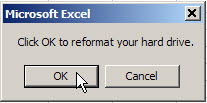
For example, the Excel message shown below says:
- “Click OK to reformat your hard drive”
Busy office worker, clicking the OK button: “Sure, why not!”
Add Icon to Excel Message
I suggested that he add an icon to the critical messages, so they stand out from the rest.
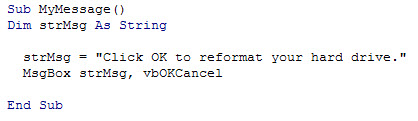
Here’s the current code for this message.
Excel VBA Message Code Revised
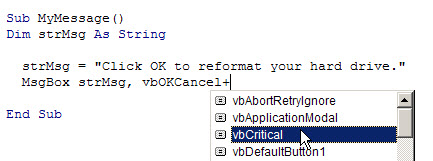
To add a warning icon to the message, follow these steps:
- First, in the VBA message code, type a plus sign after vbOKCancel
- Next, in the drop down list of settings, select vbCritical
- Then, click the Save button, to save the code changes
Excel Message With Red X Icon
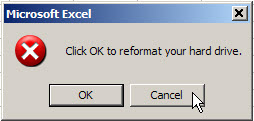
Now when the macro runs, the critical icon (red X) appears in the message.
That won’t force anyone to read the message, but the red X might catch their attention, and make them more likely to read it.
Thanks for your comments! To clarify, the client has hundreds of templates, forms, etc., for his users, and each workbook might have 1 or 2 messages. Many of these just show a bit of info when the workbook is opened, and it doesn’t matter much if they’re read or ignored. The client wanted a quick way to draw attention to the very few important or critical messages that the users might encounter during the day.
Roger, Jon and JP, I agree — the messages should have the logical option as the default, the worksheets should be well designed and that Critical icon should be used sparingly.
Stéphane, I like the idea of temporary messages, and those could be used in any new applications.
Ken and Jan Karel, maybe a few of those cryptic messages would wake up the users!