Select Multiple Items From Long List in Excel

It’s hard enough to select one item from a long drop down list – how can we make it easier to select multiple items for a cell?

In the screen shot below, the worksheet has code that lets you select multiple item from the drop down list. Each new item is added to the cell, instead of replacing the previous selection.
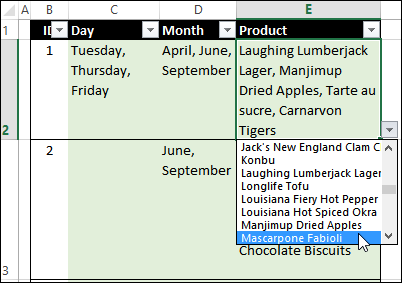
datavalmultiselectproducts01

Use a ListBox

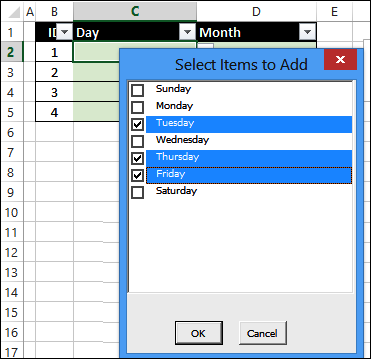
To see more of the list, and select multiple items at once, you can use a ListBox, embedded in a UserForm. When you click OK, all of the selected items are entered in the cell, separated by commas.

This technique works for drop down lists that are based on a named range, such as MonthList, or AllProducts.
multiselectlistbox03

Really Long List

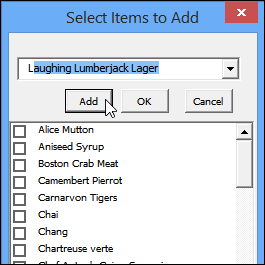
However, if your list has thousands of items, it can take a while to scroll through a ListBox too. So, to make it easier to check items in the list, I’ve created a new sample file, based on the previous ListBox file.

  • It has a combo box at the top of the UserForm, and you can start typing an item name there. When the correct item shows up, click Add, or press the Enter key, to add it to the list.
  • You can also use the ListBox, to check or uncheck items.
  • When you’ve finished selecting items, click OK, to add all the items to the cell.
datavallistboxcombobox01

In the sample file, there are two versions of the technique –

  • one opens the ListBox UserForm when you click on a cell with a drop down list
  • one opens the ListBox UserForm when you double-click on a cell with a drop down list

Download the Sample File

To see how this technique works, you can download the sample file from my Contextures website. On the Sample Files page, go to the Data Validation section, and look for DV0067 – Select Multiple Items in ComboBox or ListBox

The zipped file is in xlsm format, and contains macros. Enable the macros, when you open the file, if you want to test the code.

To see the code, right-click on the DataEntry_Click or DataEntry_DoubleClick sheet tab then click View Code.

________________________

Excel Roundup 20141208

Christmas is only 2-1/2 weeks away, so it’s time to start planning! Of course you’ll want to organize everything in a spreadsheet, so you can download the free Excel Holiday Planner, from my Contextures website.

It has shopping lists, budget sheets, task lists, and even a dinner planner, so get your copy, and get the holidays under control.

Continue reading “Excel Roundup 20141208”

Show Drop Down List With Specific Letters

If you’ve got a long list of items, it can take a while to find what you’re looking for, in a data validation drop down list.

For example, in the screen shot below, you’d have to scroll down to the bottom of this long list, if you want to select the Teatime Chocolate Biscuits (and don’t pick the Tofu by mistake!)

Continue reading “Show Drop Down List With Specific Letters”

Contextures Cyber Monday Sale 2014

Happy Cyber Monday! I hope you didn’t spend all you money at the Black Friday sales, and have a little left over for today’s shopping spree.

To celebrate Cyber Monday, the busiest online shopping day of the year in the USA, you can buy a couple of my Excel products, at 50% off today only. The details, and links to the product pages, are below.

NOTE: Unfortunately, the shopping cart will only discount one item per order — if you want both items, please order them separately.

Continue reading “Contextures Cyber Monday Sale 2014”

Excel Roundup 20141201

Wow! It’s December already – how did that happen? It’s Cyber Monday too – a big online shopping day. Did you find any Excel bargains?

To start the countdown to Christmas, Mynda Treacy created an Advent Calendar in Excel. You can download the file, if you’d like a bit of fun while you count the days until Christmas

You’ll have to answer a quiz each day, to open the calendar doors. To get a head start, you can start thinking about the answer to the December 5th question, shown in the screen shot below.

Continue reading “Excel Roundup 20141201”

Contextures Black Friday Sale 2014

Happy Black Friday! If you celebrated Thanksgiving yesterday, I hope you enjoyed time with your friends and family, and are ready to do some shopping today.

To celebrate Black Friday, the busiest shopping day of the year in the USA, you can buy my popular ebook kit – Excel UserForms for Data Entry – at 50% off today. So, instead of the regular price of $30 US, you can get the kit for only $15 US. The price will be reduced automatically – you don’t need to enter a coupon code.

[Update: This product is no longer available]

The special price ends tonight (Nov. 28, 2014) at midnight, Toronto time (Eastern time zone).

Click here to see the details, and grab a copy of this awesome kit.

Excel UserForms for Data Entry

Continue reading “Contextures Black Friday Sale 2014”

Convert Currency With Different Separators

Happy Thanksgiving, if you’re celebrating today. Tomorrow is Black Friday – the biggest shopping day of the year, in the USA. Up here in Canada, we celebrate the day too, so I’ll put one of my Excel products on sale for the day. Remember to check this blog tomorrow, to get the coupon code.

If you’re doing your shopping around the world, you might end up with a worksheet filled with amounts in a different currency. Let’s see how Excel can help with that problem!

Continue reading “Convert Currency With Different Separators”

Ignore Blank Cells When Pasting

Last week, I was working on a client’s file, and we wanted to get any new information from an update file, and paste it into the current record.

Both files were set up with the same columns, but the update file only had a few of the fields filled in. We could have used a macro to loop through the fields, grab any new information, and paste it to the current record. However, that would be a slow way to update the records, especially in a large file.

Continue reading “Ignore Blank Cells When Pasting”

Excel Roundup 20141117

In this Garage Series episode, Power BI and Excel go to Spain, to expose data patterns in past matches between Real Madrid and FC Barcelona.

“By combining historical El Clásico and player data, outside forces like temperature, humidity and moon phases, Jeremy tries to predict the outcomes and puts these predictions to the test among fans in Barcelona.”

They didn’t use good hair as one of the factors, but they predict 2-1 for Madrid, in the Oct. 25th match. (The final score was 3-1 for Madrid.)

You can watch the video below, or on YouTube: Power BI takes on El Clásico

Continue reading “Excel Roundup 20141117”