
In this week’s roundup, combine data, select multiple items, power query tips, better reports, and much more.
Data Validation Multiple Selection Edit
If you select an item from a data validation drop down list, it’s entered in the cell, replacing any existing data in the cell. If you’d like to add more items to the cell, instead of replacing the current text, you can use a bit of programming, to allow multiple selections from a data validation list.
In my sample file that shows how to do this, I’ve added new code, to prevent a problem that occurs in one type of situation.
Excel Roundup 20151019
In this week’s roundup, delete sheets, hide passwords, use Boolean logic, and many more tips. I hope you’ve recovered from your Spreadsheet Day celebrations, and are ready to start a new week.
Happy Spreadsheet Day 2015
Happy Spreadsheet Day 2015! Thanks for stopping by, and please vote in the survey below, for the Spreadsheet Hall of Fame.
We celebrate on October 17th because that is the date on which VisiCalc was first released, way back in 1979 – and that was 36 years ago. How time flies when you’re having fun with spreadsheets!
Count Items Based on Another Column
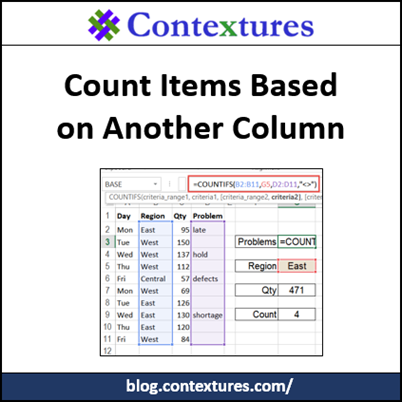
How can you count items in one column, based on criteria in a different column? We’ve shipped orders to the East region, and want to know how many of those East orders have a problem note in column D. Instead of the COUNTIF function (1 criterion) we’ll use the COUNTIFS function (multiple criteria).
Excel Roundup 20151012
In this week’s roundup, listing comments, LEGO, option buttons, and inheriting an Excel workbook.
Option Button Scores With CHOOSE Function
You can use option buttons on a worksheet, to make it easy for people to pick just one item from several options. There’s no programming required – just set up a group box, add option buttons, and link the buttons to a cell. The video at the end of this post shows you those steps.
The option buttons send a value to their linked cell, and we’ll take a look at how you can use those numbers.
Continue reading “Option Button Scores With CHOOSE Function”
Excel Roundup 20151005
In this week’s roundup, get started with Office 2016, nominations for a Spreadsheet Hall of Fame, and much more.
Happy 30th Anniversary Excel!
Today is the 30th anniversary of the first release of Microsoft Excel. To celebrate this auspicious occasion, I invited you to share your memories of getting started with Excel, and thank you for your contributions!
In 2005 there was a 20th anniversary celebration, and I wasn’t invited to the party, but I was at Microsoft that day. There was a party that night at Seattle’s Experience Music Project, and we formed a band – Excelerongs – for a special one-night appearance. That’s Dick Kusleika at the left, and I’m 3rd from the right.
So take time to celebrate today, and form your own band to sing the praises of Excel.

Excel Roundup 20150928
In this week’s roundup, Excel history, Office 2016 reviews, add-ins to reduce Excel errors, and much more.