Have you used PowerMap in Excel? Microsoft’s Excel team used it to illustrate the White House budget in 3D. You can read the details, and download the Excel file from their blog.
Author: Debra Dalgleish
Find and Fix Pivot Table Source Data
After you create a pivot table, you might add or change records in the source data. Sometimes the pivot table does not update correctly, to show the new data. Or if you’ve inherited the pivot table file from someone else, you might not even be able to find the source data, in a large workbook.
To help with these problems, I’ve added a new page on my Contextures site, with tips for finding and fixing the source data for a pivot table.
Excel Roundup 20150316
In this short video, Sara Silverstein shows how to analyze several years of NCAA revenue data, by using a pivot table. Can you predict which sport brings in the biggest revenues?
Or watch on YouTube: Use Excel pivot tables to analyze massive data sets
Contextures Posts
Here’s what I posted recently:
- Highlight numbers that are found in another list, with conditional formatting. This example uses lottery numbers, and you could use the same technique for other types of lists, such as names, or dates.
- For a humorous peek at what other people are saying about spreadsheets, read the latest collection of Excel tweets, on my Excel Theatre blog.
Other Excel Articles
Here are a few of the Excel related articles that I read recently, that you might find useful.
- Matthew Eaton uses a simple table, and a Pareto chart, to track his personal habits, and calculate his success rate.
- In a follow up to the ActiveX control problems caused by a Microsoft Security update in December, Jan Karel Pieterse announced that Microsoft’s March 10th update should automatically fix the problem.
- Aaron Souppouris takes a look at the new Office 2016 for Mac preview. He suggests that you try it, and warns you to “keep Office 2011 around for the important stuff.”
- Which would you choose to have in your workbook – an Excel Table, or Custom Views? Gašper Kamenšek would like to have both!
- John Weathington lists 5 things that every data scientist should know about Excel. He claims it’s been his secret weapon for decades, but the article’s tone seems condescending.
- Jeff Weir wants to know which features you’d like to see improved in Excel? Or do you thinks it’s perfect, just the way it is?
- In last week’s roundup, Doug Glancy suggested a great story about data interpretation, in an excerpt from the book, How Not to be Wrong. Scroll down to the section titled, Abraham Wald And The Missing Bullet Holes.
- Chris Webb adds the AGGREGATE function to his table, so he can use Slicers to filter his Power Query results. You can download the sample file, to see how it works.
- Is your budget spreadsheet a bully? Kathleen Elkins, at Business Insider, found a way to conquer hers, and find a bit of happiness.
- Ben Orlin, from Math With Bad Drawings, explains that when it comes to calculating area, everything is rectangles.
- Richard Harker shows how to create a dynamic 12 month rolling column chart, from horizontal data.
Excel Announcements
Here are some upcoming events, courses, recently published books, and other new items, related to Excel.
Excel Summit
- Amsterdam Excel Summit, April 13-15, 2015. Mark your calendar for April 13-15, so you can attend this amazing Excel event. Last year’s summit was an outstanding success, and this year should be even better! You can click here to register.
Share Your Events and Articles
If you read or wrote any other interesting Excel articles recently, or have upcoming Excel events, please let me know. Thanks!

Highlight Winning Lottery Numbers
No, I’ve never won the lottery, but that’s probably because I don’t buy lottery tickets! Your odds of winning improve (slightly) if you actually have a ticket for the draw.
However, there are many workplaces where someone has organized a weekly lottery pool, and they have a batch of ticket numbers to check.
Instead of checking those numbers manually (and missing one or two!), you can use Excel to check them for you. It won’t even ask for a percentage of your prize money, if you are lucky enough to win a prize.
Excel Roundup 20150309
Last week, we saw a preview of Tableau’s Elastic app for spreadsheets. This week, you can see another beta add-in – BigPicture, from Palisade. It looks like Visio combined with Excel’s built-in drawing tools and SmartArt graphics.
Currently, you can download a free copy of the beta, to try it out (Windows only, Excel 2007 or later).
Watch this short video, to see how it works — the demo starts at the 1:30 mark.
Ignore Outliers with Excel TRIMMEAN
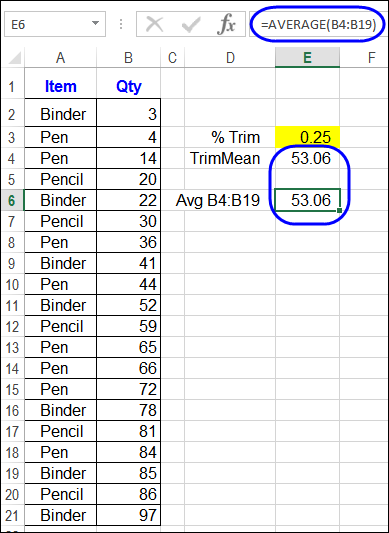
From what I’ve seen in workbooks over the years, SUM is the most frequently used Excel function, and AVERAGE is the runner-up. Would you agree, or do you see other functions used more often than those two?
Excel Roundup 20150302
Spreadsheets are already fun, but Tableau wants to make them even more exciting, with its newest smartphone app, Elastic. In this video, Tableau’s VP of Mobile & Strategic Growth, Dave Story, opens a spreadsheet file (csv format) from his inbox, and shows how Elastic works.
I don’t see any information about the expected release date or pricing.
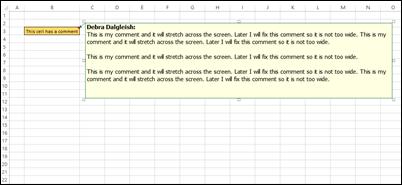
Resize Excel Comments With Macro
Occasionally, for reasons unknown to anyone other than the centuries-old trolls who live in underground tunnels at Microsoft, Excel comments resize themselves. They get really wide, or narrow, and become almost impossible to read.

Excel Roundup 20150223
The cover slide in this presentation, with its 3-D column and pie charts, led me to believe that the content wouldn’t be too useful. However, a different person must have prepared the remaining slides, because they have some useful tips.
The last slide shows that the content is from Mike Alexander’s book, Excel Dashboards & Reports for Dummies, which was published last year.
Excel Roundup 20150216
In this video, Bill Jelen (Mr. Excel) and Mike Girvin (ExcelIsFun) show two different ways to insert an apostrophe at the start of a long column of numbers.
There is an interesting bit of history, starting at the 1:00 mark – Bill shows how that apostrophe, and other characters, affected cell entries in old versions of Lotus 1-2-3.
Or watch on YouTube: Add Leading Apostrophe to Column of Data
Contextures Posts
Here’s what I posted recently:
- Hide pivot table subtotals quickly, using a Ribbon command or a macro.
Other Excel Articles
Here are a few of the Excel articles that I read recently, that you might find useful.
- Here’s another reason to start using Power Query. Gašper Kamenšek shows how to get all the data from a folder.
- Jan Karel Pieterse has updated his comprehensive article on working with circular references in Excel.
- In case you missed any of the new features in Office 365, you can check this list of what was added in January 2015.
- If you don’t mind clicking though the items one at a time, ComputerWorld UK has 10 free apps to boost your Excel and Word 2013 productivity.
- Excel is easier to use if you understand basic math, so your kids might enjoy playing Prodigy, a free online math game. My 7-year-old grandson loves it!
- The Investintech blog shares 9 simple tips for working with Excel data. Of all those tips, I probably use #4 most often. How about you?
- Jordan Goldmeier is presenting at this year’s PASS Business Analytics conference, and has released an hour-long preview webinar for his session – Creating Outstanding Spreadsheet Models.
- Here is another use for pivot tables – Susan Wenograd uses them to visualize search query mismatches, for AdWords reports.
Excel Announcements
Here are some upcoming events, courses, recently published books, and other new items, related to Excel.
Excel Course
- Chandoo has a new online course – 50 Ways to Analyze Your Data. It is not for beginners though – you should have at least intermediate or higher level Excel skills for this course.
Excel Summit
- Amsterdam Excel Summit, April 13-15, 2015. Mark your calendar for April 13-15, so you can attend this amazing Excel event. Last year’s summit was an outstanding success, and registration will open soon, for this year’s event. Registration is now open, and you can click here to register.
Share Your Events and Articles
If you read or wrote any other interesting Excel articles recently, or have upcoming Excel events, please let me know. Thanks!