
One of the benefits to having an Excel website is the interesting questions that I get in my email. I can’t help with every request, but some lead to blog posts or articles on my Contextures website. Like today’s tip – how to remove text in Excel without macros.
Author: Debra Dalgleish
Spreadsheet Tips Workbook Giveaway
Last week, we had a giveaway for Mike“ExcelIsFun” Girvin’s new book, Ctrl+Shift+Enter: Mastering Excel Array Formulas. The publisher, Bill Jelen (Mr. Excel), generously donated 4 copies of the ebook, and here are the winners:
- Barry Charnock, with comment 76
- John Fairlie, with comment 28
- Erica, with comment 41
- Vaibhav Garg, with comment 1
Congratulations to the winners, and thanks to Bill for making this possible! I will send each winner an email, and you’ll have 24 hours to reply, so you can get your copy of the ebook.
Spreadsheet Tips Workbook
This week, we’re having another Excel giveaway! Jon Wittwer, from Vertex42, has just published his new Spreadsheet Tips Workbook, with 140+ Excel tips. All the tips are in an Excel file, with practice areas where you can test the tips as you work through them.
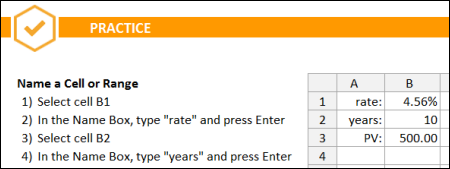
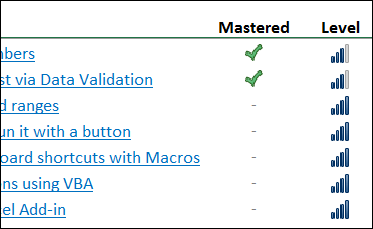
Some of the skills are for basic users, and more than half are at the intermediate to advanced level.
You can mark each section as completed, as you go through each topic, and see your progress at the top of each sheet.
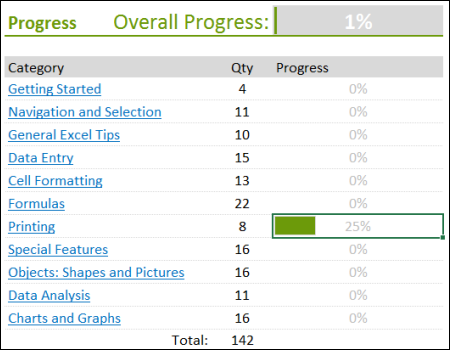
On the main sheet, you’ll see your overall progress, and how much you’ve completed in each category.
There are links to videos and other articles, throughout the workbook, so you can dig deeper into the topics that you’re most interested in.
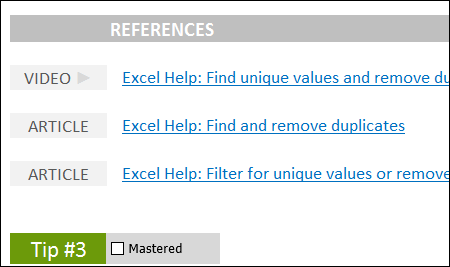
I was impressed by both the content and the layout of the workbook. In addition to learning great Excel tips, you’ll be inspired to try some of Jon’s navigation and design ideas in your own files.
Enter the Giveaway
Jon Wittwer, from Vertex42, has provided us with 2 copies of the Spreadsheet Tips Workbook for this giveaway.
If you’d like a chance to win a copy, please read the rules, and then make a comment below.
- In your comment, tell us one area of Excel where you’re not an expert, and could use a few tips.
- Include your email address, so I can contact you if you win. Your contact information won’t be publicly visible, and it won’t be used for any other mailings.
- The deadline is Wednesday, August 14th, 2013, at 12 noon Eastern Daylight Time.
- One entry per person.
- The 2 winners will be announced on Thursday, August 15th, 2013.
- Each winner will have 24 hours to claim the prize, and if not claimed, another name will be selected.
__________________________
Change Default Chart Type in Excel
On July 25th I announced a giveaway for Jon Peltier’s amazing Chart Utility, and thanks for all the entries! The deadline was yesterday, August 5th, at 12 noon Eastern time, and the winner of the random draw is:
Array Formulas Book Giveaway

It’s August already! How did that happen? Did you know that August is not only a month name, it’s an adjective that means “inspiring reverence and admiration; venerable, impressive”. In Excel, it’s also impressive to know how to use array formulas.
Show Multiple Columns in Excel Drop Down List
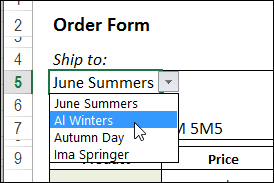
A data validation drop down list in Excel only shows one column of items. See how to show multiple columns in Excel drop down list — we’ll use something different from an ordinary in-cell drop down.
Continue reading “Show Multiple Columns in Excel Drop Down List”
Excel Charting Utility Giveaway
Last week, you had a chance to win John Walkenbach’s new book – 101 Excel 2013 Tips, Tricks & Timesavers, thanks to Katie Mohr at Wiley. Thanks for all your comments – those were great tips!
Show Temperature in Excel Color Scale
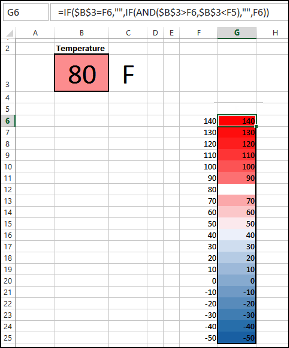
How hot was it in your neighbourhood last week? It was so hot, here in Mississauga, that I stayed inside, most of the week. On the bright side, I got lots of work done, but I’d rather have cooler temperatures, than hot, muggy days.
Remove Picture Background and Excel Book Giveaway

Do you ever put a picture or clip art on a spreadsheet? I don’t use them very often, but occasionally I’ll add a small picture on an instruction worksheet, or insert a company logo on a printable form.
Continue reading “Remove Picture Background and Excel Book Giveaway”
Missing Drop Down Arrows in Excel 2013
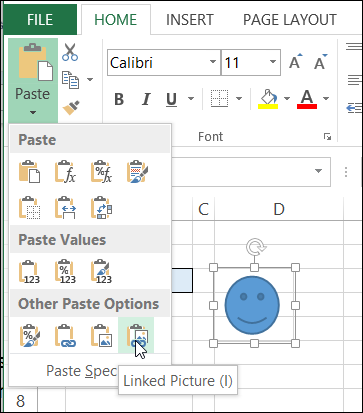
You can create drop down lists on a worksheet with Excel’s data validation feature, and they make data entry much easier – usually! Sometimes things go wrong though, like missing drop down arrows in Excel 2013. Have you seen that problem?
See Formula Results in an Excel Data Table
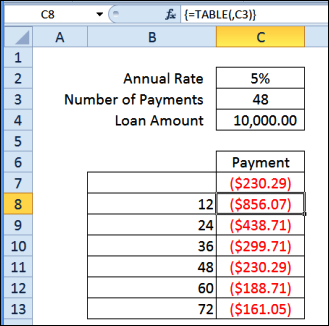
Do you ever use the Data Table feature in Excel? It’s one of the “What-if Analysis” tools, found on the Ribbon’s Data tab, along with Scenario Manager, and Goal Seek.
You can experiment with one or two variables in a formula, and see formula results in an Excel Data Table, in a compact layout.
Continue reading “See Formula Results in an Excel Data Table”