Show Specific Info in Tabbed Excel UserForm

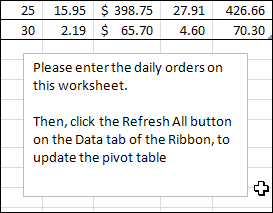
To show instructions to users in your Excel files, you can addworksheet  comments or text boxes with notes.

text boxes with notes

Excel UserForm With Help Info

Another option is to put the notes in an Excel Userform, and add a Help button on each worksheet.

The button can open the Help form to a specific page, and show the relevant Help information.

UserFormHelp02

Worksheet Help Buttons

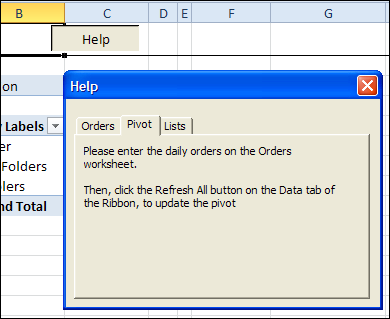
This screen shot shows the UserForm Help page that open when you click a Help button on a worksheet.

In this example, the PivotSales sheet is active in the workbook, and its Help button opens the Pivot page in the UserForm’s MultiPage control.

UserForm opens at specific tab

Download the Sample File

You can download the sample file, and see the written steps, on the UserForm MultiPage Help page, on my Contextures website.

Watch the Video

To see the steps for creating the UserForm and Help buttons, you can watch this Excel video tutorial.

__________

Excel UserForm Data Entry Update

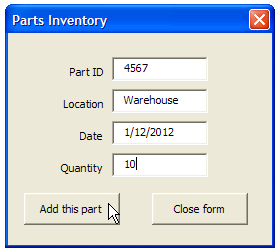
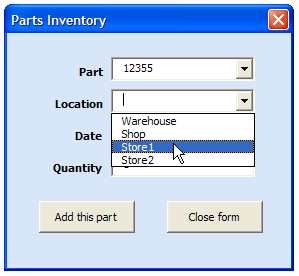
Someone emailed me this week, about a problem he was having with my sample Part Data Entry UserForm.

PartsInventoryUserForm01

When I took a look at the workbook, everything seemed okay, and the code had been copied and altered correctly.

Excel Named Table

Then I noticed that there was a formatted Excel table on the data collection sheet, which wasn’t in my original file.

That can cause problems if you’re using Excel VBA to add data to the first blank row on the worksheet.

Change the Last Row Code

In the comments for my Find First Blank Row blog post, Rick Rothstein suggested this code revision:

LastRow = Cells.Find(What:="*", SearchOrder:=xlRows, 
SearchDirection:=xlPrevious, LookIn:=xlValues).Row

Rick mentioned that this formula ignores cells with formulas that are displaying the empty string. If your situation is such that you need to identify formula cells that might be displaying the empty string, then change the xlValues argument to xlFormulas.

Revised Excel VBA Code

So, I changed the Part Data Entry code, to use the Find method for finding the last row. I replaced this old line of code:

'find first empty row in database
iRow = ws.Cells(Rows.Count, 1) _
  .End(xlUp).Offset(1, 0).Row

With this line of code:

iRow = ws.Cells.Find(What:="*", SearchOrder:=xlRows, _
       SearchDirection:=xlPrevious, LookIn:=xlValues).Row + 1

Parts Data Entry UserForm With Combo Boxes

There is another version of the Parts Data Entry UserForm, and it’s a little fancier, with combo boxes to select parts and locations.

I’ve updated the Parts Data Entry UserForm With Combo Boxes too, with the revised last row code.

PartsInventoryUserForm02

Get the Updated Sample Files

You can download the updated versions of the parts data entry forms on the Contextures website.

Part Data Entry UserForm

Parts Data Entry UserForm With Combo Boxes

_________________

Excel Macro Name Conflicts

Last week I ran into an interesting problem, when trying to fix a macro button in a client’s Excel file. I’ve created a simplified version of the workbook and button, to show you what happened.

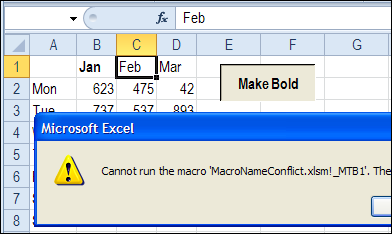
The workbook had been converted from Excel 2003 to Excel 2010, and when the macro button was clicked, it showed an error message.

  • Cannot run the macro…The macro may not be available in this workbook or all macros may be disabled.
macronameconflict01b

Other buttons in the workbook were working fine, so the macros were enabled – that wasn’t the problem.

Assign a Macro to the Button

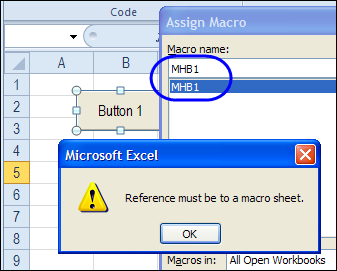
I tried to reconnect the button to the macro, but when I tried, another error message appeared.

  • Reference must be to a macro sheet.

macronameconflict02

Well, I haven’t used a macro sheet for about 10 years, so that was a bit confusing! Didn’t we get rid of macro sheets, several versions ago?

Cell Name Conflict

Finally, I realized what the problem was. The person who created the macro used a very short name – MBT1 – which was fine in Excel 2003, where the last column was IV.

When the file was converted to Excel 2010, the macro name became a problem, because there is a cell with the address MBT1.

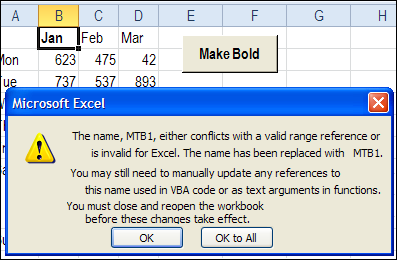
During the conversion, the button’s macro reference was automatically changed to _MBT1 to prevent a conflict with the cell reference.
macronameconflict04

However, the macro name wasn’t changed automatically – it was still named MTB1. So, the button couldn’t find a macro named _MTB1, and the error message appeared.
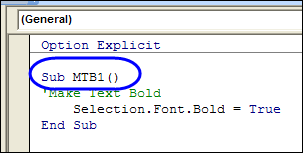
macronameconflict06

Fix the Macro Name Conflict

To fix the problem, I changed the macro name to MTB1_Macro, and connected the button to the renamed macro. Now, the button works correctly, and runs the macro without complaining.
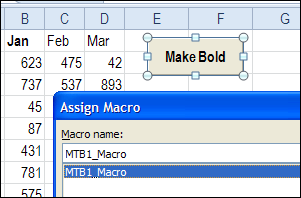
macronameconflict07

Prevent the Problem

When you’re recording a macro, if you use a name that’s the same as a cell name in Excel 2010, you’ll see an error message, warning you about the name conflict.

  • The name conflicts with an Excel built-in name or the name of another object in the workbook.
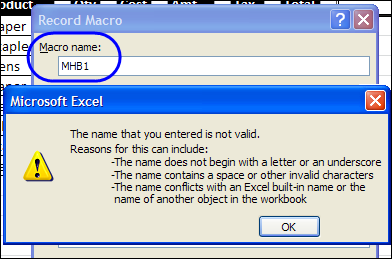
macronameconflict01

Use longer names for your macros, or include an underscore, to avoid problems – now, and in the future. Who knows how many columns the next version of Excel will have?

Other Macro Naming Problems

You can also have problems running your macros if the procedures have the same name as a module in the workbook. To avoid that, start your module names with “mod”, such as modUpdate, and don’t use those names for any macros.

Have you run into any other problems with naming your macros?
____________

Show Excel Comments in Centre of Window

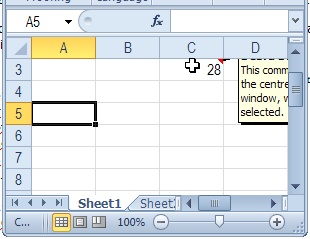
When you add comments to an Excel worksheet, they pop up to the top right of the cell, when you point to a cell with comments.

That’s fine most of the time, but if the cell is near the top or right of the window, you might not be able to read the comment.

commentcentre01

Move Comments with Macro

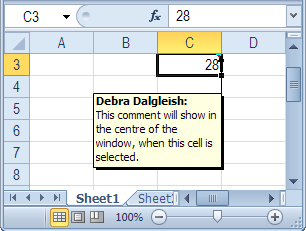
Unfortunately, you can’t control the comment’s popup position, but with a bit of programming, you can show the comment in the centre of the screen, when you click on the cell.

commentcentre02

Centre Excel Comments Code

Paste the following code onto a worksheet module. Then, when you click on a cell that contains a comment, that comment is shown in the centre of the active window’s visible range.

Private Sub Worksheet_SelectionChange(ByVal Target As Range)
 'www.contextures.com/xlcomments03.html
 Dim rng As Range
 Dim cTop As Long
 Dim cWidth As Long
 Dim cmt As Comment
 Dim sh As Shape
Application.DisplayCommentIndicator _
      = xlCommentIndicatorOnly
Set rng = ActiveWindow.VisibleRange
cTop = rng.Top + rng.Height / 2
cWidth = rng.Left + rng.Width / 2
If ActiveCell.Comment Is Nothing Then
  'do nothing
Else
   Set cmt = ActiveCell.Comment
   Set sh = cmt.Shape
   sh.Top = cTop - sh.Height / 2
   sh.Left = cWidth - sh.Width / 2
   cmt.Visible = True
End If
End Sub

More Excel Comment Macros

For more Excel comment macros, please visit the Excel Comment VBA page on the Contextures website.
______________

Calculate Distance in Excel

iconruler How do you calculate distance? In the small town where I grew up, distance was measured in blocks or travel time. For example, my school was about 5 blocks away (much further in the winter!) and my grandparents lived 5 minutes from our house – or 6 minutes during rush hour.
Longitude and Latitude

Sometimes you need more precise measurements, and Excel MVP, Jerry Latham, has an Excel user defined function that will help you. It’s designed to calculate accurate measurements, based on the longitude and latitude of your start and end points.

Why a user defined function? Unfortunately, an Excel worksheet formula isn’t accurate enough, if you need precise distances.

Jerry used to work in air traffic control, and he explains the problem with “almost” accurate worksheet formulas:

Typically they are short by some number of meters, typically about 20 to 30 feet per statute mile, and after flying just 30 or 40 miles, I wouldn’t care to land several hundred feet short of the approach end of a runway, much less be off by over 7 miles on a trip between Los Angeles and Honolulu.

Excel User Defined Function

On the Excel Latitude and Longitude Calculations page, Jerry outlines the problems with calculating distance in Excel, and describes his challenges in creating a solution.

You can read about Jerry’s journey to the final distance calculation solution, and copy Jerry’s Longitude and Latitude code to your own workbook.

Or, download Jerry’s sample file, and work with the code and worksheet examples there.
_____________

Delete Orders with Excel Data Entry Form

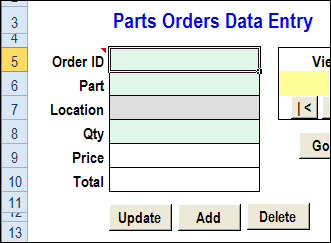
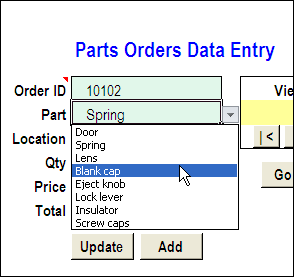
Long ago, Dave Peterson created an Excel worksheet data entry form, so you could enter records on one sheet, and store the data on another sheet. Then, you can hide the data entry sheet, so users don’t accidentally change any of the old records.

Form02

There have been a few version of the data entry form file, including the the previous version, in which you could also update the selected record. This way, the data sheet can still be hidden, but users can make changes to the existing records.

dataentry04

Delete the Current Record

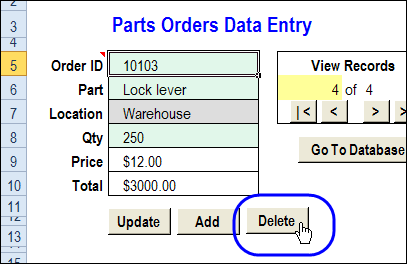
In a comment, Bryan asked for a Delete button too. In this new version, that feature is added. (Thanks, Bryan, for the suggestion!) Use this version if you really trust your workbook users – and keep good backup files!

dataentry12

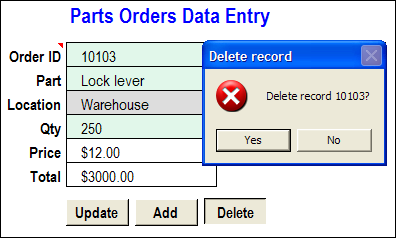
When you click the Delete button, a message appears, asking you to confirm that you want to delete the record.

dataentry13

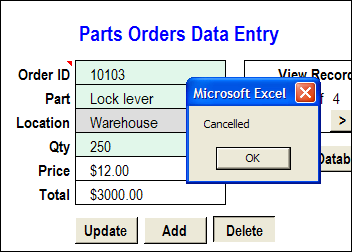
If you click No, the deletion is cancelled.

dataentry14

If you click Yes, the record is deleted from the database worksheet, and the data entry cells are cleared.

dataentry15

Download the Worksheet Data Entry Form

To see how the data entry form works, you can go to my Cotextures website, and download the Worksheet Data Entry Form sample file.

The file is in Excel 2003 format, and is zipped. After you unzip the file and open it, enable macros, so you can use the worksheet buttons.
_____________