
In the screen shot below, one of the report filters in a pivot table is about to be changed. If you have multiple pivot tables in a workbook, you can use programming to update all (or some) of the pivot tables, if one pivot table’s filters are changed.
Pivot Table Report Filter
Here is one of the pivot tables, with a Report Filter being changed.
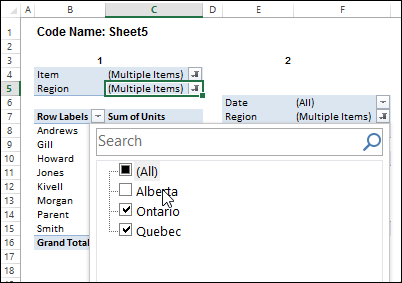
I’ve written sample code that updates multiple pivot tables, and one is changed, and last year, Jeff Weir shared his version of the code, which runs very quickly.
Pivot Table Code Benefits
Jeff’s code has another advantage too – in his version, you can specify:
- any sheets you DON’T want the macro to check
- any specific pivot tables that you DON’T want the macro to synchronize.
NOTE: Jeff’s code is intended for pivots that DO NOT all share the same cache. If your pivots all share the same cache, then you can use my approach set out here: Filter Multiple Pivot Tables With Excel 2010 Slicers
To confirm whether or not your pivots share the same cache, you can use my code here: Excel Pivot Caches
Improved for Excel 2010 and Later
This week, Jeff is sharing his latest version of his code. It now checks the Excel version that you are using.
- If you are using Excel 2010 and later, the code uses Slicers to change any pivot tables that share the same cache, as this is much faster. Any other pivots are then processed without slicers.
Download the Sample File
To download this version of the sample file, with Jeff’s code, please visit the Sample Files page on the Contextures website.
In the Pivot Tables section, look for: PT0029 – Change Pivot Table Fields on Specific Sheets
The file is in xlsm format, zipped, and contains macros. Enable the macros when opening the file, if you want to test the code.
Note: Jeff’s sample file was updated on June 16, 2013, so please download the new version if you have an older copy of the file.
__________________
@Jeff – I will play around with this today and let you know what my findings are. Thanks again for all the help you’ve provided me with thus far.
@Jeff – Hi Jeff. I finally was able to find a solution to my problem. It was surprisingly simple. I simply set up a slicer and then used the “pivot table connections” option with the slicer to connect it to all my other pivot tables and it worked out fantastically! No macro needed!
Hi Steve. Could you record a macro while you do that, and then email me the code? I’d like to see how Excel does this stuff for pivots connected to OLAP sources (and potentially amend my code to suit) , but don’t have such a source.
Glad it’s working. Obviously all your pivots share the same cache. My code is intended for pivots that don’t all share the same cache. It uses slicers for those that do, and another method for those that don’t.
Jeff, just to clarify, you are asking if I could send you a macro of me setting up the slicer to link with all the tables in my spreadsheet, correct?
If, possible, yes. ALso would be good if you would actually use the slicer to select something while the macro recorder is still running. I just need the code, not any actual workbook.
And you don’t need to link it to all tables…just a couple will do. Thanks Steve.
I’ve sent you an email with the attachment, Jeff. Please let me know when you’ve received it.
Hi Jeff, many thanks for taking the time to do this. This exactly the sort of thing I’m looking for.
Now, maybe I’m being a bit thick, but when I look at the sample file referred to above (PT0029 – Change Pivot Table Fields on Specific Sheets)I can’t get it to work. For example, on the ‘Sales Pivot’ worksheet, I change the region from ‘Quebec’ to ‘Ontario’. On the ‘Other Pivots’ worksheet, the selected Region in PivotTable1 remains as ‘Quebec’. Shouldn’t this change? (I have enabled macros and am using Excel2007). Grateful for any pointers… (another) Steve