
In the screen shot below, one of the report filters in a pivot table is about to be changed. If you have multiple pivot tables in a workbook, you can use programming to update all (or some) of the pivot tables, if one pivot table’s filters are changed.
Pivot Table Report Filter
Here is one of the pivot tables, with a Report Filter being changed.
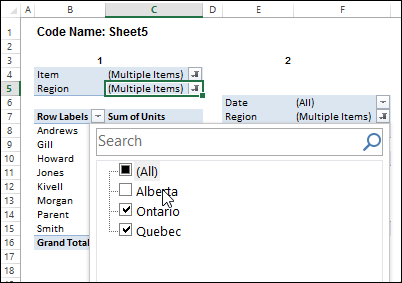
I’ve written sample code that updates multiple pivot tables, and one is changed, and last year, Jeff Weir shared his version of the code, which runs very quickly.
Pivot Table Code Benefits
Jeff’s code has another advantage too – in his version, you can specify:
- any sheets you DON’T want the macro to check
- any specific pivot tables that you DON’T want the macro to synchronize.
NOTE: Jeff’s code is intended for pivots that DO NOT all share the same cache. If your pivots all share the same cache, then you can use my approach set out here: Filter Multiple Pivot Tables With Excel 2010 Slicers
To confirm whether or not your pivots share the same cache, you can use my code here: Excel Pivot Caches
Improved for Excel 2010 and Later
This week, Jeff is sharing his latest version of his code. It now checks the Excel version that you are using.
- If you are using Excel 2010 and later, the code uses Slicers to change any pivot tables that share the same cache, as this is much faster. Any other pivots are then processed without slicers.
Download the Sample File
To download this version of the sample file, with Jeff’s code, please visit the Sample Files page on the Contextures website.
In the Pivot Tables section, look for: PT0029 – Change Pivot Table Fields on Specific Sheets
The file is in xlsm format, zipped, and contains macros. Enable the macros when opening the file, if you want to test the code.
Note: Jeff’s sample file was updated on June 16, 2013, so please download the new version if you have an older copy of the file.
__________________
@Jeff – It is an external database we are pulling all the data from.
@Jeff – I should also include the fact that the filters and fields are the same across all the pivots
Good question…I haven’t tested this with pivottables that share an external data connection. I don’t know if slicers will work or not. We’ll soon find out.
To fix the initial problem you mentioned:
Uncomment the ‘On Error Goto Errhandler’ line (near the top)
Add this:
If strExclusions = “” Then strExclusions = “;”
…in front of these lines (which are found in three places)
varExcludeSheets = Split(strExclusions, “;”)
strExclusions = “”
Give the code a run, and tell me what happens.
Also note that there is a series of comments between myself and IanB dated June 12 2013 at this thread that might be relevant to you:
http://blog.contextures.com/archives/2012/01/03/change-all-pivot-tables-with-one-selection/
The upshot is that if the pivots get automatically refreshed on workbook open, then such a refresh will then triggers the above code, which you probably do NOT want to happen. Rather, you probably ONLY want the code to run when a user manually triggers it.
First, turn “Refresh data when opening the file” OFF for ALL pivots.
Then, add this to the ThisWorkbook code module:
Private Sub Workbook_Open()
Dim wkb As Workbook
Dim pc As PivotCache
Application.EnableEvents = False
Set wkb = ActiveWorkbook
For Each pc In wkb.PivotCaches
pc.Refresh
Next pc
Application.EnableEvents = True
End Sub
That should refresh all pivots when the file opens, but also NOT trigger my code.
After following your instructions from above, I get an error. When I debug, the error states I have an invalid procedure or call arguement. The line is: bFiltered = Not pf_Master.AllItemsVisible from the modSlicers. I really appreciate your help.
Also, the file does not automatically refresh when opened.
Also, I don’t think this code will work for any pivots that are connected to data cubes.
I apologize Jeff, I just saw this. Yes, my pivots are connected to OLAP cubes. Do you think there is any way to update all the filters of my pivot at once or is it not possible because my data source is cube?
I think you might be out of luck. I tried my code with some pivots created by PowerPivot (which creates cubes) and it just doesn’t work. But that said, maybe that’s just because its PowerPivot, and maybe yours will work with my revised code. Let me know either way.
Steve: This might be to do with the fact that your pivot gets data from an external database, or that the pivot is connected to a data cube. Can you share a sample file with me? [email protected]
Also, I’ve got an older version of the code I could send you, that might work. It’s the code that this code replaced, and doesn’t use slicers. So it’s a bit slower. I can email you that, and we can give that a go.
@Jeff – I am out of the office and won’t have access to the file. I’ll have to send you a sample first thing when I get back in the morning. Thanks again!
Jeff – If I could get a copy of the code without slicers that would be great. I would like to give it a try.
In the amended code, you can instruct it NOT to use slicers by changing this line near the top of the SyncPivotsAnyVersion routine :
bUseSlicers = True
…to this:
bUseSlicers = False
I actually forgot to mention that I did turn slicers off. I just overlooked the fact that I turned it off and saw slicers in the code which concerned me for a second. I did use your revised code, first with slicers on, and I received the same error. Then, turning slicers off, I also received the same error, which came from the modSlicers module and not the main code.
Okay. Maybe the approach you will have to take is to NOT sync pivots, but instead use stored procedures at the database end to repopulate the pivots. i.e. someone changes a region to ‘West’, then you use VBA to trigger a SQL Stored Procedure from Excel with Dynamic Parameters so that they are all in sync. THe down side is the delay while all pivottables are refreshed.
This might help:
http://datapigtechnologies.com/blog/index.php/running-a-sql-stored-procedure-from-excel-with-dynamic-parameters/
@All: I’ve made some amendments to the file following Steve’s comments above. You can try the amended file out by downloading it from the following link:
https://www.dropbox.com/s/firfku1vr7dy4o3/Sync%20Pivottables%20using%20slicers%2020130621%20v2.xlsm
Once I know it’s stable, I’ll get Debra to replace the existing file in her link above.
Please post back if you have any problems with the file.
@Jeff
Can you send once again xlm sample with current code?