
In the screen shot below, one of the report filters in a pivot table is about to be changed. If you have multiple pivot tables in a workbook, you can use programming to update all (or some) of the pivot tables, if one pivot table’s filters are changed.
Pivot Table Report Filter
Here is one of the pivot tables, with a Report Filter being changed.
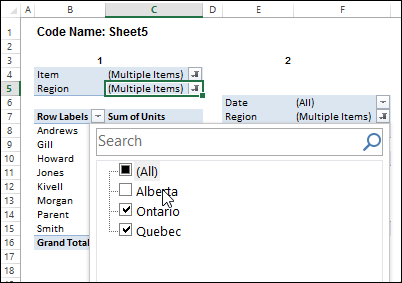
I’ve written sample code that updates multiple pivot tables, and one is changed, and last year, Jeff Weir shared his version of the code, which runs very quickly.
Pivot Table Code Benefits
Jeff’s code has another advantage too – in his version, you can specify:
- any sheets you DON’T want the macro to check
- any specific pivot tables that you DON’T want the macro to synchronize.
NOTE: Jeff’s code is intended for pivots that DO NOT all share the same cache. If your pivots all share the same cache, then you can use my approach set out here: Filter Multiple Pivot Tables With Excel 2010 Slicers
To confirm whether or not your pivots share the same cache, you can use my code here: Excel Pivot Caches
Improved for Excel 2010 and Later
This week, Jeff is sharing his latest version of his code. It now checks the Excel version that you are using.
- If you are using Excel 2010 and later, the code uses Slicers to change any pivot tables that share the same cache, as this is much faster. Any other pivots are then processed without slicers.
Download the Sample File
To download this version of the sample file, with Jeff’s code, please visit the Sample Files page on the Contextures website.
In the Pivot Tables section, look for: PT0029 – Change Pivot Table Fields on Specific Sheets
The file is in xlsm format, zipped, and contains macros. Enable the macros when opening the file, if you want to test the code.
Note: Jeff’s sample file was updated on June 16, 2013, so please download the new version if you have an older copy of the file.
__________________
When I try to use one of the filters on one of the pivot tables in my workbook, I get a “Subscript out of range error.” Do you know what may have caused this?
I apologize, I realize it might help it I put the line of code I get an error at when debugging. Also, thanks for putting this together. I’m very new to writing macros and I am attempting to incorporate your code with an excel workbook at an internship that I am at. Any who, when I debug the code, the error is on this line:
ReDim Preserve varExcludePivots(1 To i)
Hi Steve. This is due to an oversight on my part. I take it you have commented out the strExclusions lines that tell the pivot to ignore particular fields or pages. I’ve got some code in there that writes any exclusions to a variant. Later on that same code checks the dimensions of that variant to see how many items are in it. I forgot to put some code in that handles the situation where there are NO items in it.
Also, I very naughtily did not include any error handling, which is inexcusable really. Currently if the code bombs out, the user is left high and dry because I turned off the application ScreenUpdating and EnableEvents fields. I’ll whip up an error handler and ask Deb to post revised code shortly. (Sorry, Deb)
Actually, I did have error handling, but had commented out the ‘On Error Goto Errhandler’ bit during testing, then forgot to enable it again. Doh!
Hi Jeff. You are awesome. I’ve been playing around with the code all day trying to get it to work and I simply could not figure out how to do it. Again, I really appreciate the time and effort you’ve taken to put this together and share it with everyone here! I have one more question: The excel file I am working with has over 100 pivot tables. These tables pull from the same data source but are not at all related because they are drawing from different parts of a database. Will this have an overall negative effect on how the code will perform?
Thanks again!
By database do you mean external database e.g. Access or SQL Server etc? Or do you mean some data stored in an Excel spreadsheet?