
With Excel’s conditional formatting, you can highlight cells based on specific rules. There are some built-in rules available, and you can use formulas to create your own formatting rules.
Watch the Video
To see the steps for setting up the conditional formatting, watch this short video. The written steps are below the video.
To download the sample file, go to my Contextures website: Highlight Duplicate Records in a List
Highlight Duplicates
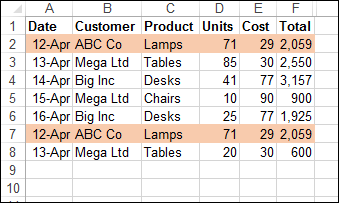
In this example, we want highlight duplicate records in a table. There is a built-in rule for highlighting duplicate values in a single column, but nothing that will check an entire row.
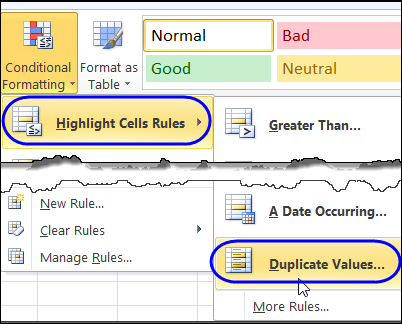
So, we’ll create our own rule, and it will require a new column on the worksheet, before we add the conditional formatting.
Concatenate the Data
In the sample data, there are two identical rows, and these should be highlighted after we apply our conditional formatting.
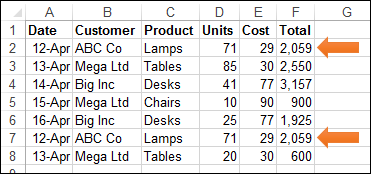
The first step is to use the CONCATENATE function to combine all the data into one cell in each row.
Add a new heading in cell G1 – AllData – and in cell G2, enter this formula, to combine the data from all the cells in that row.
=CONCATENATE(A2,B2,C2,D2,E2,F2)
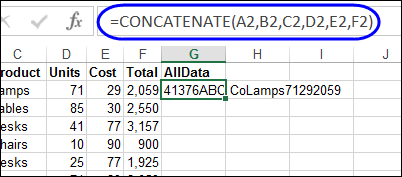
Next, copy the formula down to the last row of data.
Apply the Conditional Formatting
Then, a conditional formatting rule is set, to color the rows that are duplicate records. We’ll use the COUNTIF function to check for duplicates in the AllData column.
=COUNTIF($G$2:$G$8,$G2)>1
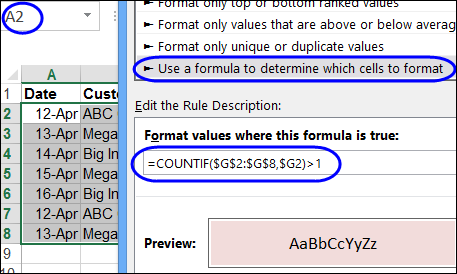
If there is more than one instance of a data combination, that indicates a duplicate row, and the cells in columns A:F will be coloured. The two rows with duplicate records are highlighted, so our conditional formatting formula worked!
Download the Sample File
For detailed instructions, and to download the sample file, go to my Contextures website: Highlight Duplicate Records in a List
_________________________
Cool!
What’s also cool about tables is that you can filter by color. So using a bit of VBA, you can then filter to show only duplicate rows, and then do something with them.
i need your help.i want to edit numbers within an excel cell.how can i do it?.when i hightligght’em and click outside the color’s gone.thanks a lot.
One very rare bug that may happen with this is if the data you have in two columns, when concatenated, looks the same. For example:
Col A   Col B   Concatenated

123     456     123456

1234    56      123456
This will show the rows above as duplicate when they are not.
@John, yes, if that’s a possibility you could put separator characters into the CONCATENATE formula.
On the subject of delimiters, you can’t beat the pipe character | (Shift + \)
Great Tutorial. But is there any way to highlight only a single instance of duplicate records? I mean if I could do so then it would be easier to just sort out the highlighted records and later delete them.
@Ankit Mac, if you only want to highlight the duplicate records, and not the first instance of a duplicated record, use this formula: =COUNTIF($G$2:$G2,$G2)>1
That checks the rows down to the current row for duplicates, so for the first instance, the count would be 1, and that row wouldn’t be highlighted.
I’m working on a project where I need to find records where certain fields are close matches. For example in the Company field one entry may be “SC Johnson Wax” and another “S.C. Johnson Wax” or “S C Johnson Wax”. Another would be where someone has misspelled a word so maybe they typed “Johnston” instead of “Johnson”. These are all things that stick out to the human eye but how to look for them programmatically?
This probably requires VBA. This thread will probably help, Rick:
http://www.mrexcel.com/forum/excel-questions/195635-fuzzy-matching-new-version-plus-explanation.html