
In Excel, you can use the SUMIF and COUNTIF functions, to sum and count values, based on criteria. Did you know that you can also calculate an Excel average, based on multiple criteria?
Average with One Criterion
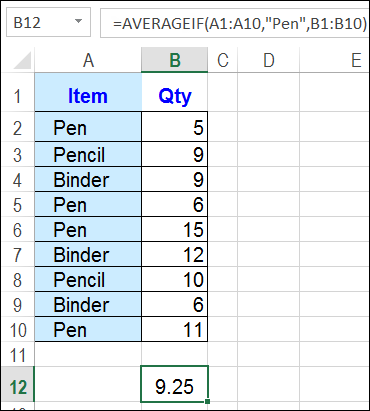
If you only have one criterion, you can use the AVERAGEIF function. In the screen shot below, the average quantity is calculated for any orders where Pens were sold.
=AVERAGEIF(A1:A10,”Pen”,B1:B10)
Average for Multiple Criteria
If you need multiple criteria for the average, and you’re using Excel 2007 or a later version, you can use the AVERAGEIFS function.
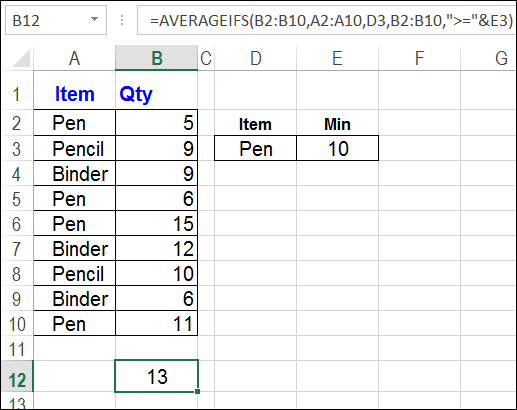
In the next screen shot, the AVERAGEIFS formula checks for Pen in column A, and a quantity greater than or equal to 10, in column B. The criteria values are entered on the worksheet – cells D3 and E3 – where they can be changed easily.
For the rows that meet those criteria – rows 6 and 10 — an average quantity is calculated.
=AVERAGEIFS(B2:B10,A2:A10,D3,B2:B10,”>=”&E3)
Download the Sample File
To see these average formulas, and other examples, you can download the sample file from my Contextures website: Excel Average Formulas.
The sample file is zipped, and is in xlsx format (Excel 2007 and later versions).
__________
i excel i have multiple qty like 10 12 13 14 8 9 i want to change this to single qty in row one by one any formula for this
Hi
I am trying to come up with an average score across multiple retail outlets however the difficulty I’m experiencing is because I have 16 disciplines and 15 of them are the higher the number the better whereas 1 of the disciplines is the lower the number the better.
Can anyone help with how to set this formula.
Thanks
Thank you so much!! This helped me so much. 🙂
What useful information! I would like to make an easily-as-possible understood array function that can calculate summary statistics (average, max, min) for daily averages of hourly data, when there are different numbers of hours in each day (usually 15-24 hours in each day). I work for native american tribal environmental programs, who gather data logged hourly, but need daily averages without having to manually create averages for each day that does not include exactly 24 hours of data in each day. Can you recommend anything? thanks so much!
@mel, you could create a pivot table based on the data, with Date in the row area, and hours in the Values area. Add the Hours field 3 times, and change one to Average, one to Min and one to Max.
There are details here:
http://www.contextures.com/excel-pivot-table-summary-functions.html
Thanks! For some reason, most people I work for hate pivot tables. I think I have found a solution that doesn’t involve pivot tables, which is to first filter for unique values (dates) from the column of date-time, and then using that list of unique dates, create an array and within that an if-average function that looks row by row for the pollutant concentrations that are on those dates. Have you any suggestions on that? I also am working on getting people more comfortable with pivot tables, as they are so useful. Thank you for your help!
Can someone tell me how to average only the values between two other values? Such as, I want to only average numbers that fall between 0 and 8000 in a column. How would I do an AVERAGEIF function? I can do it with either less than 8000 or greater than 0 but not both.