
In Excel, you can use the SUMIF and COUNTIF functions, to sum and count values, based on criteria. Did you know that you can also calculate an Excel average, based on multiple criteria?
Average with One Criterion
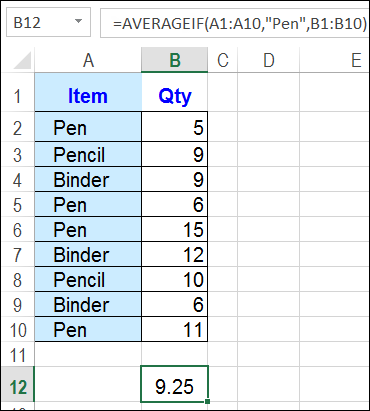
If you only have one criterion, you can use the AVERAGEIF function. In the screen shot below, the average quantity is calculated for any orders where Pens were sold.
=AVERAGEIF(A1:A10,”Pen”,B1:B10)
Average for Multiple Criteria
If you need multiple criteria for the average, and you’re using Excel 2007 or a later version, you can use the AVERAGEIFS function.
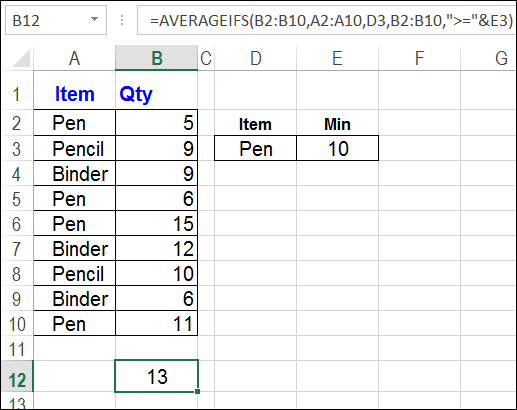
In the next screen shot, the AVERAGEIFS formula checks for Pen in column A, and a quantity greater than or equal to 10, in column B. The criteria values are entered on the worksheet – cells D3 and E3 – where they can be changed easily.
For the rows that meet those criteria – rows 6 and 10 — an average quantity is calculated.
=AVERAGEIFS(B2:B10,A2:A10,D3,B2:B10,”>=”&E3)
Download the Sample File
To see these average formulas, and other examples, you can download the sample file from my Contextures website: Excel Average Formulas.
The sample file is zipped, and is in xlsx format (Excel 2007 and later versions).
__________
I just discovered that 2 hours before I read this post. Amazing!
Maybe I’m getting old, but an array formula seems to be easier to read, and therefore understand, than the AVERAGEIFS:
=AVERAGE(IF((A2:A10=D3)*(B2:B10>=E3),B2:B10))
But then again, the learning curve for AVERAGEIFS vs. arrays is probably quicker for an Excel newbie.
I never knew there is such a function. In such scenarios I also used the method that “Jason” has mentioned in the above comment.
Thanks for sharing such a useful post.
This Site is Very Useful. I learned a lot of Excel Techniques from this Website.
Best Regards,
TAMATAM
Yes I am trying to figure out an “averageif function” off of more than one criteria in the same column if it is even possible. If column “A” has the criteria & column “b” has times how can I get the average time between say three criteria? Example: Criteria column A = Car 1, Car 2 Car 3 Car 4 Car 5 Column B = Time 11:49, 10:30, 9:55, 7:24, 11:34 I want the average time between Car 1, Car 3, Car 5 or should I be using a different function? Any help would be greatly appreciated!
Thanks Ray
How do I get the average if I wanted averageif more than 1 item? Can i still do so and the display cell will actually clever enough to filter based on the item’s name?