
First, some news about the upcoming Office 365 launch, and then a tip on how to sum for a date range in Excel.
Office 365 Launch
Instead of desktop versions of Office, Microsoft is encouraging people to subscribe to an online version. If you’d like to see a preview of Office 365, you can attend Microsoft’s online launch of the Office 365 product tomorrow, Wed. Feb. 27th. There are two sessions:
- 8 AM Pacific Time
- 5 PM Pacific Time
To register, click here, and fill in the registration form: Office 365 Launch Registration
There are lots of required fields in that registration form, but you can use the check boxes at the bottom, to control what type of email you get from Microsoft, after signing up.
Sum Amounts in a Date Range
While you’re waiting for the Office 365 Launch to start, you could calculate how many units of your top product have been sold.
If you’re using Excel 2007 and later, use the SUMIFS function, and for earlier versions, use the SUMIF function.
In this example, a Start date and an End date are entered on the worksheet. Dates are in column A, and units sold are in column B.
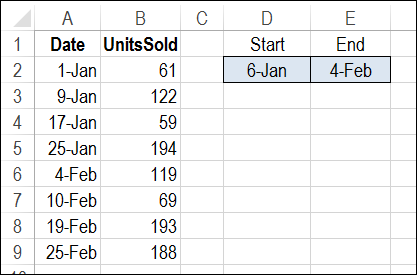
Use SUMIFS to Calculate Total for a Date Range
The SUMIFS function to calculate a total based on multiple criteria. We’ll use a SUMIFS formula to total all the units where the sales date is:
- on or after the Start date
- AND
- on or before the End date.
Here is the formula that is entered in cell D5:
=SUMIFS($B$2:$B$9,$A$2:$A$9,“>=” & $D$2, $A$2:$A$9,“<=” & $E$2)
- Range $B$2:$B$9 has the numbers that we want to sum.
- Range $A$2:$A$9 contains the sales dates.
- The first criterion, “>=” & $D$2, is the range with the value for criteria 1 (the Start date), and the operator to use with that value (greater than or equal to)
- The second criterion, “<=” & $E$2, is the range with the value for criteria 2 (the End date), and the operator to use with that value (less than or equal to)
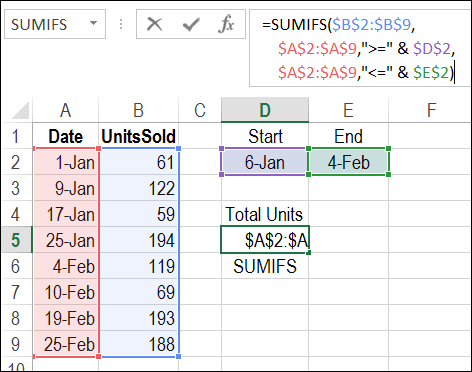
Verify the Total
In this example, the result for the selected date range is a total of 494 units sold. To verify, you can select cells B3:B6, and look at the total shown in Excel’s Status Bar.
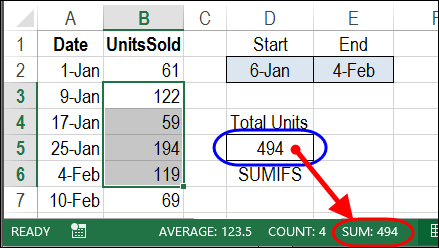
To get the total units for a different date range, change the Start date in cell D2, and/or the End date in cell E2.
Calculate Total for a Date Range with SUMIF
If you’re using Excel 2003, the SUMIFS function isn’t available, but you can calculate the total for a date range with the SUMIF function.
To see the details, and to download the sample file, visit my Contextures website: Sum Amounts in a Date Range with SUMIF
Watch the Video
To see the steps for creating a SUMIFS formula, and verifying the total, watch this short video.
____________________
Thanks a lot Debra, can you also help with the formula for choosing the same with different items. in the same example i have added 2 items, now i want the sum of “CAR”
Date UnitsSoldItem Start End
01-Jan 61 Car 06-Jan 04-Feb
01-Jan 60 Bike
09-Jan 122 Car
09-Jan 100 Bike
17-Jan 59 Car
25-Jan 194 Car
04-Feb 119 Car
04-Feb 120 Bike
10-Feb 69 Car
19-Feb 193 Car
25-Feb 188 Car
Thanks a lot Debra Dalgleish, this formula is very useful.
Debra, I am having trouble with this and I am at loss as to why. I have a file and I use this formula in other tabs and it works fine but for some reason it is not working in another tab.
=SUMIFS(Data!$G:$G,Data!$A:$A,$D$6,Data!$B:$B,$E$1,Data!$C:$C,”MMG”,Data!$F:$F,”<="&$D$7) If I take out the "<="& I get the information for a single month, but when I put it into the equation it give me a zero.
I am assuming it is something simple but I am not able to figure it out.
@Mark, if you cut that formula, and paste it somewhere on the Data sheet, does it work correctly?
There were problems with SUMIFS in Excel 2010 when referencing a different sheet.
Mnay thanks for for this is was ectramely helpfull in what i was doing
To add to the wonderful post…If you don’t want the Beginning and Ending Date to be on your spread sheet, replace the following:
D2 with Date(2016,01,06)
and
E2 with Date(2016,02,04)
Thank you so much for this post…I completely forgot the & with the greater than or less then. Life saver!
YOUR ARE A GENIUS!!! Thank you so much for putting this together!!!!