
If you’re working on a complicated Excel file, or taking over a file that someone else built, it can be difficult to understand how it all fits together. To help understand the file setup, use the following macros to list all formulas in workbook.
Excel has formula arrow, to show dependent cells, but that can get confusing, if there are lots of formula cells.
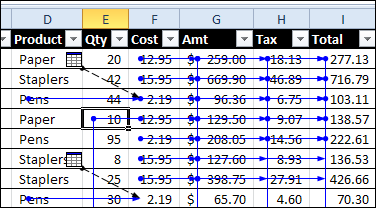
To get started, you can see where the formulas and constants are located, and colour code those cells.
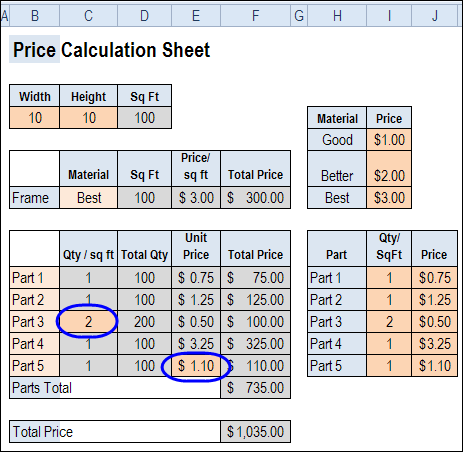
View Formulas on the Worksheet
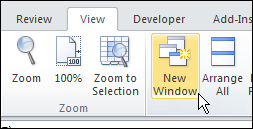
You can also view the formulas on a worksheet, by using the Ctrl + ` shortcut. And if you open another window in the workbook, you can view formulas and results at the same time.
Code to List Formulas
For more details on how the calculations work, you can use programming to create a list of all the formulas on each worksheet.
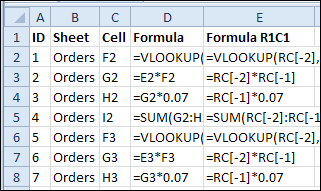
In the following sample code, a new sheet is created for each worksheet that contains formulas. The new sheet is named for the original sheet, with the prefix “F_”.
In the formula list sheet, there is an ID column, that you can use to restore the list to its original order, after you’ve sorted by another column.
There are also columns with the worksheet name, the formula’s cell, the formula and the formula in R1C1 format.
Copy the following code to a regular module in your workbook.
Sub ListAllFormulas()
'print the formulas in the active workbook
Dim lRow As Long
Dim wb As Workbook
Dim ws As Worksheet
Dim wsNew As Worksheet
Dim c As Range
Dim rngF As Range
Dim strNew As String
Dim strSh As String
On Error Resume Next
Application.DisplayAlerts = False
Set wb = ActiveWorkbook
strSh = "F_"
For Each ws In wb.Worksheets
  lRow = 2
  If Left(ws.Name, Len(strSh)) <> strSh Then
    Set rngF = Nothing
    On Error Resume Next
    Set rngF = ws.Cells.SpecialCells(xlCellTypeFormulas, 23)
    If Not rngF Is Nothing Then
      strNew = Left(strSh & ws.Name, 30)
      Worksheets(strNew).Delete
      Set wsNew = Worksheets.Add
      With wsNew
        .Name = strNew
        .Columns("A:E").NumberFormat = "@" 'text format
        .Range(.Cells(1, 1), .Cells(1, 5)).Value _
            = Array("ID", "Sheet", "Cell", "Formula", "Formula R1C1")
        For Each c In rngF
          .Range(.Cells(lRow, 1), .Cells(lRow, 5)).Value _
            = Array(lRow - 1, ws.Name, c.Address(0, 0), _
              c.Formula, c.FormulaR1C1)
          lRow = lRow + 1
        Next c
        .Rows(1).Font.Bold = True
        .Columns("A:E").EntireColumn.AutoFit
      End With 'wsNew
      Set wsNew = Nothing
    End If
  End If
Next ws
Application.DisplayAlerts = True
End Sub
Code to Remove Formula Sheets
In the List Formulas code, formula sheets are deleted, before creating a new formula sheet. However, if you want to delete the formula sheets without creating a new set, you can run the following code.
Sub ClearFormulaSheets()
'remove formula sheets created by
'ShowFormulas macro
Dim wb As Workbook
Dim ws As Worksheet
Dim strSh As String
On Error Resume Next
Application.DisplayAlerts = False
Set wb = ActiveWorkbook
strSh = "F_"
Set wb = ActiveWorkbook
  For Each ws In wb.Worksheets
    If Left(ws.Name, Len(strSh)) = strSh Then
      ws.Delete
    End If
  Next ws
Application.DisplayAlerts = True
End Sub
Download the Sample File
To download the sample file, please visit the Sample Files page on the Contextures website. In the UserForms, VBA, Add-Ins section, look for UF0019 – Formula Info List.
The file is zipped, and in Excel 2007 / 2010 format. Enable macros if you want to test the code.
_______________
hello..may i asking anyone who know how is the formulas to prevent the double entry.thanks a lot for help…
Thanks for the “List Formulas” code, it worked well on a couple of small test workbooks.
I am currently running it on my project workbook, phew is it supposed to take so long, it has been running for over 30 minutes, with no clue how much longer it will be?
Hi, need some help please. I have a monthly budget sheet. If there are 25 days in my month, and the total i need by day 25 is X, what formula can i use for it to automatically work out what i need each day to achieve this. I dont mean X / 25 = Y x 25 = X, I mean on day one I need X to reach X, but on day to i’ll need X – what I did yesterday divided by the remaining number of days. Help ??
=NETWORKDAYS(A1,A2,B1)
Where sample is.
If A1=1-Mar-15
A2=31-Mar-15
B1=23-Mar-15 (Holiday)
The result will be 21 Working Days you can combine more than one formula for your calculations to get the desired results.
in this formula it will not count Saturday and Sunday and the specific holiday other than sat and sun as mentioned in formula regarding 23-Mar-15.
+92 3317506364
In Excel I find a formula which points to two separate workbooks. For example in my Model I might have a link saying =”C:\ABC.xls” + “C:\DEF.xls”.
My problem is if there’s more than one link I have no way of opening those except by manually going into Windows Explorer and then opening them. So I’d like a way of making this much simpler.
My vision would be if I run the macro on a certain cell I get a pop-up giving me a list of all the files referenced in that cell, and it then open whichever I choose.
I thought wow, this is excellent, but as one other person wrote, after it does a few worksheets it pretty well grinds to a stop. Almost need to do each sheet one at a time if the workbook is large.
Hi there
i am working on a result computation and i have got to a point where there is no road again, can somebody help me out
it goes thus;
each grade has point. like
A—–4.0
AB—-3.75
B—–3.0
BC—-2.75
C—–2.25
CD—-2.0
D——1.75
F——1.25
And a students is offering the following courses with course unit
course. units
English. 3
Maths. 4
Chemistry. 2
total units. 9
etc
the student got
English A
Maths. BC
Chemistry CD
in calculating
You needs to multiply point of the grade scores with the unit of the courses and add all the result together and divide it by the total units of the course
pls how do i achieve these by putting all the Grades aligned with the point into drop down
and the moment i select all the grade the student score in each subjects it calculates automatically