
If you’re working on a complicated Excel file, or taking over a file that someone else built, it can be difficult to understand how it all fits together. To help understand the file setup, use the following macros to list all formulas in workbook.
Excel has formula arrow, to show dependent cells, but that can get confusing, if there are lots of formula cells.
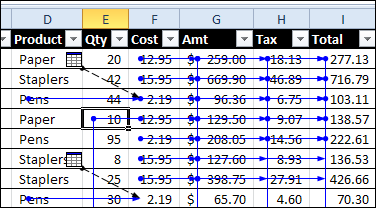
To get started, you can see where the formulas and constants are located, and colour code those cells.
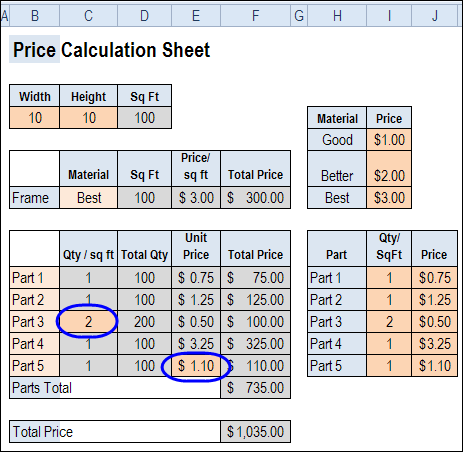
View Formulas on the Worksheet
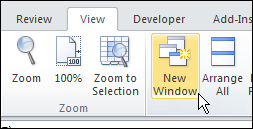
You can also view the formulas on a worksheet, by using the Ctrl + ` shortcut. And if you open another window in the workbook, you can view formulas and results at the same time.
Code to List Formulas
For more details on how the calculations work, you can use programming to create a list of all the formulas on each worksheet.
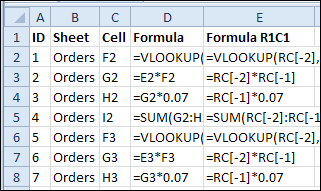
In the following sample code, a new sheet is created for each worksheet that contains formulas. The new sheet is named for the original sheet, with the prefix “F_”.
In the formula list sheet, there is an ID column, that you can use to restore the list to its original order, after you’ve sorted by another column.
There are also columns with the worksheet name, the formula’s cell, the formula and the formula in R1C1 format.
Copy the following code to a regular module in your workbook.
Sub ListAllFormulas()
'print the formulas in the active workbook
Dim lRow As Long
Dim wb As Workbook
Dim ws As Worksheet
Dim wsNew As Worksheet
Dim c As Range
Dim rngF As Range
Dim strNew As String
Dim strSh As String
On Error Resume Next
Application.DisplayAlerts = False
Set wb = ActiveWorkbook
strSh = "F_"
For Each ws In wb.Worksheets
  lRow = 2
  If Left(ws.Name, Len(strSh)) <> strSh Then
    Set rngF = Nothing
    On Error Resume Next
    Set rngF = ws.Cells.SpecialCells(xlCellTypeFormulas, 23)
    If Not rngF Is Nothing Then
      strNew = Left(strSh & ws.Name, 30)
      Worksheets(strNew).Delete
      Set wsNew = Worksheets.Add
      With wsNew
        .Name = strNew
        .Columns("A:E").NumberFormat = "@" 'text format
        .Range(.Cells(1, 1), .Cells(1, 5)).Value _
            = Array("ID", "Sheet", "Cell", "Formula", "Formula R1C1")
        For Each c In rngF
          .Range(.Cells(lRow, 1), .Cells(lRow, 5)).Value _
            = Array(lRow - 1, ws.Name, c.Address(0, 0), _
              c.Formula, c.FormulaR1C1)
          lRow = lRow + 1
        Next c
        .Rows(1).Font.Bold = True
        .Columns("A:E").EntireColumn.AutoFit
      End With 'wsNew
      Set wsNew = Nothing
    End If
  End If
Next ws
Application.DisplayAlerts = True
End Sub
Code to Remove Formula Sheets
In the List Formulas code, formula sheets are deleted, before creating a new formula sheet. However, if you want to delete the formula sheets without creating a new set, you can run the following code.
Sub ClearFormulaSheets()
'remove formula sheets created by
'ShowFormulas macro
Dim wb As Workbook
Dim ws As Worksheet
Dim strSh As String
On Error Resume Next
Application.DisplayAlerts = False
Set wb = ActiveWorkbook
strSh = "F_"
Set wb = ActiveWorkbook
  For Each ws In wb.Worksheets
    If Left(ws.Name, Len(strSh)) = strSh Then
      ws.Delete
    End If
  Next ws
Application.DisplayAlerts = True
End Sub
Download the Sample File
To download the sample file, please visit the Sample Files page on the Contextures website. In the UserForms, VBA, Add-Ins section, look for UF0019 – Formula Info List.
The file is zipped, and in Excel 2007 / 2010 format. Enable macros if you want to test the code.
_______________
I have a large file which consists of item description with details of the vendor or staff name included in the description. There is no staff analysis I can use so that I can use the Vlookup formula to get the vendor name alone without the rest of the item description. For example: April 2015 Salary>Paulo Ngasitia Lonoko>Finance and Grants Manager, Jonglei and Awerial offices. I would have also used the Right or left formula but it happens that some of the item descriptions are shorter than ohers. Thank you in advance for your help.
Regards and waiting
Thank you for this is code
but I need all functions in all work book in one sheet
Debra: I believe there is a tool in Excel 2013 which allows users to list all of the formulas used in a workbook on a new worksheet – if I could only remember what it was.
So, do you know if this is true? If not, I would like to use your solution above, but I am new to entering code into Excel. What is a regular module?
Doug in York PA
Doug, there is a new function — FORMULATEXT — that lets you show the formula from a specific cell.
You can also paste a list of names and their formulas on a worksheet (Formulas tab, Use in Formula, Paste Names, Paste List)
And, if you select a pivot table cell, you can paste a list of any formulas use in it (calculated fields and items)
I don’t know of any built-in tool to paste worksheet formulas though.
I need to see a list of Excel Formulas. I am working on a spreadsheet and I am stuck. I worked with Excel for over 30 years but have been retired since 2005 and I don’t remember the formula for my spreadsheet.
The Problem: I have 6 columns but only three will be in the formula.
column F is an amount that will be in each line of the spreadsheet.
F2 has a forwarding balance of $7572.70. I need to pick up the 7572.70 and add column (4)d3(403.77 and
subtract column 5 E3 0 for a total in column 5.as
When I try this, if there are any cells that reference another worksheet, the row is blank, with no ID number, sheet, etc. but all the other formulae are listed correctly. Does anyone know what I’m doing wrong?
@Greg, the sample file has VLOOKUP formulas that reference another sheet. Does the macro work correctly for you in that file?