
There is a new sample file on the Contextures website, with a macro to change all pivot tables with one selection, when you change a report filter in one pivot table.
Change All Pivot Tables
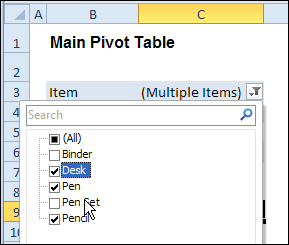
In the sample workbook, if you change the “Item” Report Filter in one pivot table, all the other pivot tables with an “Item” filter will change.
They get the same report filter settings that were in the pivot table that you changed.
Select Multiple Items
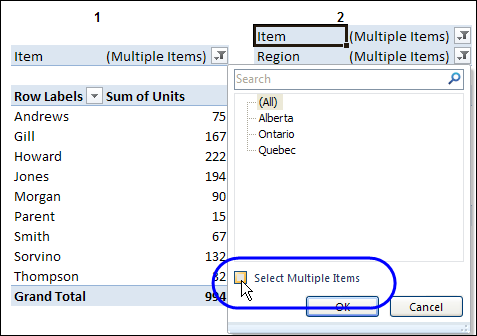
In this version of the sample file, the “Select Multiple Items” setting is also changed, to match the setting that is in the pivot table that you changed.
In the screen shot below, the Item field has the “Select Multiple Items” setting turned off. If any other pivot tables in the workbook have an “Items” filter, the “Select Multiple Items” setting for those fields will also change.
How It Works
The multiple pivot table filtering works with event programming. There is Worksheet_PivotTableUpdate code on each worksheet, and it runs when any pivot table on that worksheet is changed or refreshed.
For each report filter field, the code checks for the Select Multiple Items setting, to change all Pivot Tables with the same report filter field.
The code loops through all the worksheets in the workbook, and loops through each pivot table on each sheet.
Private Sub Worksheet_PivotTableUpdate _
  (ByVal Target As PivotTable)
Dim wsMain As Worksheet
Dim ws As Worksheet
Dim ptMain As PivotTable
Dim pt As PivotTable
Dim pfMain As PivotField
Dim pf As PivotField
Dim pi As PivotItem
Dim bMI As Boolean
On Error Resume Next
Set wsMain = ActiveSheet
Set ptMain = Target
Application.EnableEvents = False
Application.ScreenUpdating = False
For Each pfMain In ptMain.PageFields
  bMI = pfMain.EnableMultiplePageItems
  For Each ws In ThisWorkbook.Worksheets
    For Each pt In ws.PivotTables
      If ws.Name & "_" & pt <> _
          wsMain.Name & "_" & ptMain Then
        pt.ManualUpdate = True
        Set pf = pt.PivotFields(pfMain.Name)
          bMI = pfMain.EnableMultiplePageItems
          With pf
            .ClearAllFilters
            Select Case bMI
              Case False
                .CurrentPage _
                  = pfMain.CurrentPage.Value
              Case True
                .CurrentPage = "(All)"
                For Each pi In pfMain.PivotItems
                  .PivotItems(pi.Name).Visible _
                    = pi.Visible
                Next pi
                .EnableMultiplePageItems = bMI
            End Select
          End With
          bMI = False
        Set pf = Nothing
        pt.ManualUpdate = False
      End If
    Next pt
  Next ws
Next pfMain
Application.EnableEvents = True
Application.ScreenUpdating = True
End Sub
Download the Sample File
To test the Change All Pivot Tables code, you can download the sample file from the Contextures website.
On the Sample Excel Files page, in the Pivot Tables section, look for PT0025 – Change All Page Fields with Multiple Selection Settings.
The file will work in Excel 2007 or later, if you enable macros.
Watch the Video
To see the steps for copying the code into your worksheet, and an explanation of how the code works, watch this short video.
______________________
Hello Debra,
First and foremost, very helpful code!
My question is the following:
The filtering of the tables works just great, all filters are do change as I am moving along the pivot tables, my focus is the following:
Rather than repeat the same filter settings for the multiple pivot tables I have, I want to filter the values just once and compare data, however, If I do want to change one variable, say “Year”, then when I do filter for the year on any of the other Pivots, it automatically filters for the same year on the subsequent pivots, what would you recommend would be the best workaround for this issue?
Regards,
Andres
@Andreas, you could set up a cell where you enter yes/no, and refer to that cell at the start of the code. If it’s yes, then run the filter code, and if it’s no, exit the macro.
That’s exactly what I ended up doing! Great piece of code though, very useful.
Hi Debra,
How about one or two single fields but across all spreadsheets? Could you please post the code for it? Would it go in each spreadsheet or in “thisworkshop”?
Thank you so much
@Edoardo, there is a new sample file that lets you select the fields that you want to update.
The file is on the Contextures website, on the Sample Excel files page:
http://www.contextures.com/excelfiles.html#Pivot
Look for PT0028 – Change Specific Page Fields with Multiple Selection Settings
Hi Debra,
Thank you for the great codes and lessons. They have saved me in several instances. You are really great.
I am trying to filter multiple items in 2 pivot tables in different tabs using the macro in ,”PT0025 – Change All Page Fields with Multiple Selection Settings”. The filter names are same for both pivot tables which the data sources are different. There are common items amoung multiple items to select in the drop down as well as different items ( though the filter name is same).
When I apply multiple filters to one pivot table , the other tables picks listed items and some other non-listed items from the list of items in the 2nd pivot table. At times the 2nd tables picks entirely differengt items, if the selected item in pivot 1 is not available in pivot 2.
Could you please have a look at this issue.
Many Thanks ,
Debra, Great job on this. I have been looking for a solution for this for about six months. I have an issue that when I am refreshing the pivot tables it is taking a very long time, 31 minutes. I have 18 pivot tables on one worksheet, refreshing took less than a minute before I put this code in. I am using 2007. Do you have any ideas on this?
@Kevin, you could check the sheet name, and exit the code if it isn’t the active sheet.
Add this line after the Set wsMain line:
Set wsMain = ActiveSheet
If wsMain.Name <> Me.Name Then GoTo exitHandler
Debra,thanks for this amazing code. However I seem to be having some problems with refreshing pivot. After I refresh my pivot, all my filters are reset and I have to re-filter them. Do you know what might be causing this? Thanks
@Fei, you could try adding this line after the Set wsMain line:
Set wsMain = ActiveSheet
If wsMain.Name <> Me.Name Then GoTo exitHandler
Can the pivot table create time interval? For example, I have a set of data, I would like Pivot Table group the time interval as I wish and plot the chart. Say every 15 minutes or 30 minutes or 1 hour. Can it do the job?
Hi Debra. I have the same question as May Lanie posted on June 27. I am using OLAP cube as the pivot table’s source. Can you please show us how to revise the code when OLAP cube is the data source?
Thank you very much for sharing this great code.