
There is a new sample file on the Contextures website, with a macro to change all pivot tables with one selection, when you change a report filter in one pivot table.
Change All Pivot Tables
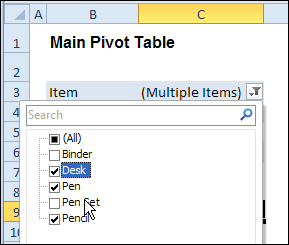
In the sample workbook, if you change the “Item” Report Filter in one pivot table, all the other pivot tables with an “Item” filter will change.
They get the same report filter settings that were in the pivot table that you changed.
Select Multiple Items
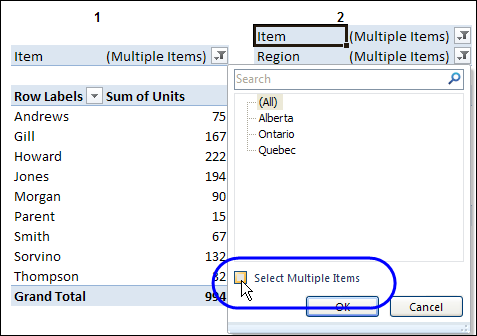
In this version of the sample file, the “Select Multiple Items” setting is also changed, to match the setting that is in the pivot table that you changed.
In the screen shot below, the Item field has the “Select Multiple Items” setting turned off. If any other pivot tables in the workbook have an “Items” filter, the “Select Multiple Items” setting for those fields will also change.
How It Works
The multiple pivot table filtering works with event programming. There is Worksheet_PivotTableUpdate code on each worksheet, and it runs when any pivot table on that worksheet is changed or refreshed.
For each report filter field, the code checks for the Select Multiple Items setting, to change all Pivot Tables with the same report filter field.
The code loops through all the worksheets in the workbook, and loops through each pivot table on each sheet.
Private Sub Worksheet_PivotTableUpdate _
  (ByVal Target As PivotTable)
Dim wsMain As Worksheet
Dim ws As Worksheet
Dim ptMain As PivotTable
Dim pt As PivotTable
Dim pfMain As PivotField
Dim pf As PivotField
Dim pi As PivotItem
Dim bMI As Boolean
On Error Resume Next
Set wsMain = ActiveSheet
Set ptMain = Target
Application.EnableEvents = False
Application.ScreenUpdating = False
For Each pfMain In ptMain.PageFields
  bMI = pfMain.EnableMultiplePageItems
  For Each ws In ThisWorkbook.Worksheets
    For Each pt In ws.PivotTables
      If ws.Name & "_" & pt <> _
          wsMain.Name & "_" & ptMain Then
        pt.ManualUpdate = True
        Set pf = pt.PivotFields(pfMain.Name)
          bMI = pfMain.EnableMultiplePageItems
          With pf
            .ClearAllFilters
            Select Case bMI
              Case False
                .CurrentPage _
                  = pfMain.CurrentPage.Value
              Case True
                .CurrentPage = "(All)"
                For Each pi In pfMain.PivotItems
                  .PivotItems(pi.Name).Visible _
                    = pi.Visible
                Next pi
                .EnableMultiplePageItems = bMI
            End Select
          End With
          bMI = False
        Set pf = Nothing
        pt.ManualUpdate = False
      End If
    Next pt
  Next ws
Next pfMain
Application.EnableEvents = True
Application.ScreenUpdating = True
End Sub
Download the Sample File
To test the Change All Pivot Tables code, you can download the sample file from the Contextures website.
On the Sample Excel Files page, in the Pivot Tables section, look for PT0025 – Change All Page Fields with Multiple Selection Settings.
The file will work in Excel 2007 or later, if you enable macros.
Watch the Video
To see the steps for copying the code into your worksheet, and an explanation of how the code works, watch this short video.
______________________
hi,
i want a code in excel 2007 which will change my pivots fields as i change in my drop down.
please suggest me any code or formula, so that i can apply to my list or combo box. In short, whichever field i will choose from my combo box or from list box, same selection should reflect to over my pivots field..
thanks
Hi Debra,
Thank you for this. How can I work it so it updates dates? It works fine for text etc but when I want it to update for dates it won’t do it! I’ve even tried converting the dates to text and still no joy! Any help would be great.
Kind regards,
Yes I Had the same problem. I had standard short date format, and it worked if I selected one date (multiple items disabled) however once I enabled ‘select multiple items’ and selected two dates, it just made all my other pivot tables set to All. Any help would be much appreciated!
Hi Debra,
I find you blog really very useful but I have still not able to find the solution to my problem. Problem has been narrated by few other users at other places but still solution is missing.
The problem is as follows: (excel 2007)
On double click the pivot table creates a new sheet having the filtered data. I want that on a double click the source data should open sheet having source data and just show the filtered data. This is needed if someone want to do some editing and then see the effect in pivot table. this way can move back and forth and do the fine tuning easily.
After searching the net for almost two days I feel you are the one who can possibly provide a solution. I will be very grateful if you provide some help. Further if you feel it is not possible I would like to hear even that also so that I do not waste any more time on this issue.
Thanx and Regards
SKS, were you able to prevent opening of new sheet on double click of pivot?
i need that since the new sheet that opens, is losing the hyperlink on he data in one of the columns available in the source sheet….so unless someone can help fix the hyperlink on the new sheet, i need to open the source sheet on double click i guess!
Debra,
Great code! I was wondering how to alter it so that I can exlcude one or two worksheets? I still need to be apply a unifrom filter across three sheets, but I’d like to exclude two worksheets from the event. Is this possible? Thanks a ton.
Hi Debra,
Wow.. this the BEST working macro I have ever come across to handle multiple pivots in excel.
The site has taken place in my favorites 🙂
Thanks a lot
Regards,
Amit
Hi,
I tried to use the code but it didnt work for me. I am using OLAP cube as the pivot table’s source.
Can you please show me how to revise the code when OLAP cube is the data source?
Many thanks,
May Lanie