
There is a new sample file on the Contextures website, with a macro to change all pivot tables with one selection, when you change a report filter in one pivot table.
Change All Pivot Tables
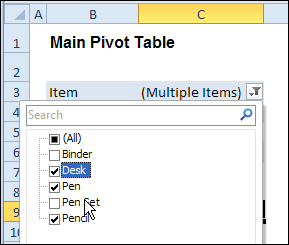
In the sample workbook, if you change the “Item” Report Filter in one pivot table, all the other pivot tables with an “Item” filter will change.
They get the same report filter settings that were in the pivot table that you changed.
Select Multiple Items
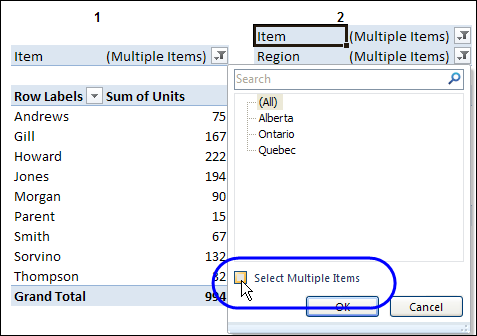
In this version of the sample file, the “Select Multiple Items” setting is also changed, to match the setting that is in the pivot table that you changed.
In the screen shot below, the Item field has the “Select Multiple Items” setting turned off. If any other pivot tables in the workbook have an “Items” filter, the “Select Multiple Items” setting for those fields will also change.
How It Works
The multiple pivot table filtering works with event programming. There is Worksheet_PivotTableUpdate code on each worksheet, and it runs when any pivot table on that worksheet is changed or refreshed.
For each report filter field, the code checks for the Select Multiple Items setting, to change all Pivot Tables with the same report filter field.
The code loops through all the worksheets in the workbook, and loops through each pivot table on each sheet.
Private Sub Worksheet_PivotTableUpdate _
  (ByVal Target As PivotTable)
Dim wsMain As Worksheet
Dim ws As Worksheet
Dim ptMain As PivotTable
Dim pt As PivotTable
Dim pfMain As PivotField
Dim pf As PivotField
Dim pi As PivotItem
Dim bMI As Boolean
On Error Resume Next
Set wsMain = ActiveSheet
Set ptMain = Target
Application.EnableEvents = False
Application.ScreenUpdating = False
For Each pfMain In ptMain.PageFields
  bMI = pfMain.EnableMultiplePageItems
  For Each ws In ThisWorkbook.Worksheets
    For Each pt In ws.PivotTables
      If ws.Name & "_" & pt <> _
          wsMain.Name & "_" & ptMain Then
        pt.ManualUpdate = True
        Set pf = pt.PivotFields(pfMain.Name)
          bMI = pfMain.EnableMultiplePageItems
          With pf
            .ClearAllFilters
            Select Case bMI
              Case False
                .CurrentPage _
                  = pfMain.CurrentPage.Value
              Case True
                .CurrentPage = "(All)"
                For Each pi In pfMain.PivotItems
                  .PivotItems(pi.Name).Visible _
                    = pi.Visible
                Next pi
                .EnableMultiplePageItems = bMI
            End Select
          End With
          bMI = False
        Set pf = Nothing
        pt.ManualUpdate = False
      End If
    Next pt
  Next ws
Next pfMain
Application.EnableEvents = True
Application.ScreenUpdating = True
End Sub
Download the Sample File
To test the Change All Pivot Tables code, you can download the sample file from the Contextures website.
On the Sample Excel Files page, in the Pivot Tables section, look for PT0025 – Change All Page Fields with Multiple Selection Settings.
The file will work in Excel 2007 or later, if you enable macros.
Watch the Video
To see the steps for copying the code into your worksheet, and an explanation of how the code works, watch this short video.
______________________
kajaj – if you are using Excel 2010 or later, use Slicers to accomplish this, as this functionality is built-in and much faster. If using an earlier version, then use my code posted at http://blog.contextures.com/archives/2013/06/18/update-multiple-pivot-tables-20130618/
@Jeff
I tried your code but i got the same thing…..the Region changes in all the sheets but when i change item or employee on on pivot table it affects all the pivot tables.I only what Region to change in all pivot tables.
Kajaj: What version of Excel do you have?
Office 2007
Ok. In that sample file there are instructions on how to amend the code so that it ignores any fields you don’t want to sync (in your case, item or employee). Look at the callout box near PivotTable4 in the ‘Other Pivots’ tab for an example on how to do this.
Jeff, i check it again and it works fine. THanks…I have one more question. Now that my selected Region shows on ALL pivot table, if i wanted to lock report filter to certain pivot tables also Region changes, is that possieble. For example, my region selected is Quebec, but i want the filter on pivottable to to be locked on Employee: Gill and Pivottable 3 i want the filter locked on Item:Desk and pivot table 4 locked on the filter “1/6/11″….but all the Region remains Quebec…..is that possible.
Won’t the existing code do that? Just add the Employee field and the Item field to the exclusions list, so that those fields don’t get synchronized. Or am I misunderstanding you?
Code works flawlessly,however, have an issue when I refresh data for the pivots. The issue is this: When I refresh the pivots the filters filter to some random selections eventhough each filter is filtered to “All” before I refresh. Any ideas why or how to fix so that upon a refresh the filters will keep “All” selected?
Rob – what version of Excel are you using?