
There is a new sample file on the Contextures website, with a macro to change all pivot tables with one selection, when you change a report filter in one pivot table.
Change All Pivot Tables
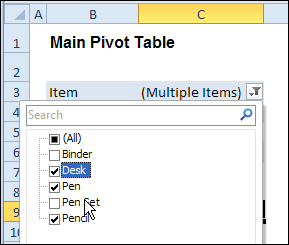
In the sample workbook, if you change the “Item” Report Filter in one pivot table, all the other pivot tables with an “Item” filter will change.
They get the same report filter settings that were in the pivot table that you changed.
Select Multiple Items
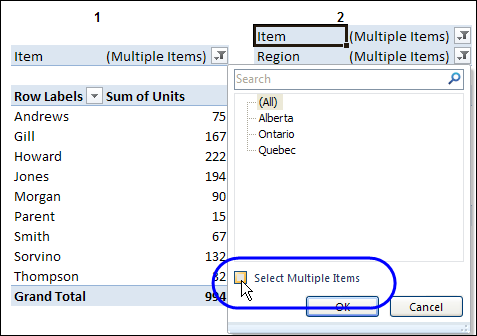
In this version of the sample file, the “Select Multiple Items” setting is also changed, to match the setting that is in the pivot table that you changed.
In the screen shot below, the Item field has the “Select Multiple Items” setting turned off. If any other pivot tables in the workbook have an “Items” filter, the “Select Multiple Items” setting for those fields will also change.
How It Works
The multiple pivot table filtering works with event programming. There is Worksheet_PivotTableUpdate code on each worksheet, and it runs when any pivot table on that worksheet is changed or refreshed.
For each report filter field, the code checks for the Select Multiple Items setting, to change all Pivot Tables with the same report filter field.
The code loops through all the worksheets in the workbook, and loops through each pivot table on each sheet.
Private Sub Worksheet_PivotTableUpdate _
  (ByVal Target As PivotTable)
Dim wsMain As Worksheet
Dim ws As Worksheet
Dim ptMain As PivotTable
Dim pt As PivotTable
Dim pfMain As PivotField
Dim pf As PivotField
Dim pi As PivotItem
Dim bMI As Boolean
On Error Resume Next
Set wsMain = ActiveSheet
Set ptMain = Target
Application.EnableEvents = False
Application.ScreenUpdating = False
For Each pfMain In ptMain.PageFields
  bMI = pfMain.EnableMultiplePageItems
  For Each ws In ThisWorkbook.Worksheets
    For Each pt In ws.PivotTables
      If ws.Name & "_" & pt <> _
          wsMain.Name & "_" & ptMain Then
        pt.ManualUpdate = True
        Set pf = pt.PivotFields(pfMain.Name)
          bMI = pfMain.EnableMultiplePageItems
          With pf
            .ClearAllFilters
            Select Case bMI
              Case False
                .CurrentPage _
                  = pfMain.CurrentPage.Value
              Case True
                .CurrentPage = "(All)"
                For Each pi In pfMain.PivotItems
                  .PivotItems(pi.Name).Visible _
                    = pi.Visible
                Next pi
                .EnableMultiplePageItems = bMI
            End Select
          End With
          bMI = False
        Set pf = Nothing
        pt.ManualUpdate = False
      End If
    Next pt
  Next ws
Next pfMain
Application.EnableEvents = True
Application.ScreenUpdating = True
End Sub
Download the Sample File
To test the Change All Pivot Tables code, you can download the sample file from the Contextures website.
On the Sample Excel Files page, in the Pivot Tables section, look for PT0025 – Change All Page Fields with Multiple Selection Settings.
The file will work in Excel 2007 or later, if you enable macros.
Watch the Video
To see the steps for copying the code into your worksheet, and an explanation of how the code works, watch this short video.
______________________
jeffreyweir – I actually already tried that, but still not doing 100% what I need. (Cool code anyway).
I do have 2 different data sources (Source A & Source B).
Source A contains 20 slicers, source B contains 13 slicers and both do have 4 slicers in common (Let’s say Master-slicer 1, 2, 3 &4).
Example: From source A with 20 slicers, I do make selections on slicer 7, 13,14 and 18 ==> with impact/filtering of Master-slicer 1, 2, 3 and 4.
So now I need the Master-slicer from both sources to be in sync.
Maybe a cryptic explanation, anyway I could send you a copy of my file then it would be clear?
PS. You have already been a great help, thanks in advance.
Flick me a copy to [email protected] and I’ll take a look.
I have two pivot tables that run off the same cache. The code in the base of this post works great for aligning both pivot tables to the same report filter, but when I filter one of the pivot tables using a slicer (Which is connected to both pivot tables) the other pivot table defaults the report filter to all. What adjustments can I make to the code to keep the report filter selection and slicer selection constant throughout both pivot tables.
Bill, if you have slicers, why do you need this code? Slicers can control multiple pivots.
Hi Jeff, sorry, I´m using the PivotMultiPagesChangeSet2010 code on my pivot tables but when filtering, it includes the blank filter along with the one I needed. Is there a way to avoid this?
I used the code to change all Pivots successfully and I was very happy 🙂 that it worked as I had over 30 worksheets.
However, I added external data sources linked to SharePoint and wrote a Macro to perform a refresh and after the macro runs the VBA code no longer works. I added a Test Message and during the refresh the Vba code get’s called, but does not work afterwards.
I am not a VBA programmer I developed an elaborate Excel Dashboard that requires external data refresh, any ideas as to why the VBA code gets nullified.
Your assistance is appreciated.
Also it would be ideally if I can call this “change all pivots” code as a macro on demand as needed.