
There is a new sample file on the Contextures website, with a macro to change all pivot tables with one selection, when you change a report filter in one pivot table.
Change All Pivot Tables
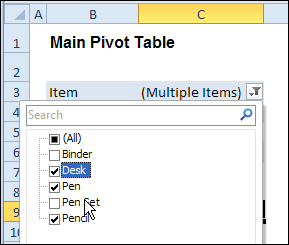
In the sample workbook, if you change the “Item” Report Filter in one pivot table, all the other pivot tables with an “Item” filter will change.
They get the same report filter settings that were in the pivot table that you changed.
Select Multiple Items
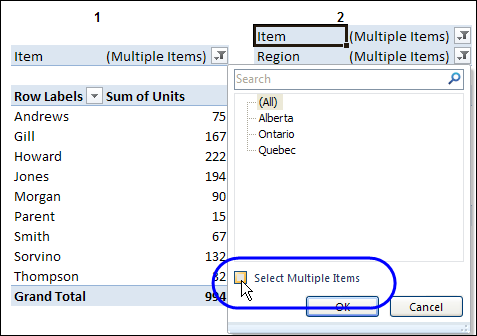
In this version of the sample file, the “Select Multiple Items” setting is also changed, to match the setting that is in the pivot table that you changed.
In the screen shot below, the Item field has the “Select Multiple Items” setting turned off. If any other pivot tables in the workbook have an “Items” filter, the “Select Multiple Items” setting for those fields will also change.
How It Works
The multiple pivot table filtering works with event programming. There is Worksheet_PivotTableUpdate code on each worksheet, and it runs when any pivot table on that worksheet is changed or refreshed.
For each report filter field, the code checks for the Select Multiple Items setting, to change all Pivot Tables with the same report filter field.
The code loops through all the worksheets in the workbook, and loops through each pivot table on each sheet.
Private Sub Worksheet_PivotTableUpdate _
  (ByVal Target As PivotTable)
Dim wsMain As Worksheet
Dim ws As Worksheet
Dim ptMain As PivotTable
Dim pt As PivotTable
Dim pfMain As PivotField
Dim pf As PivotField
Dim pi As PivotItem
Dim bMI As Boolean
On Error Resume Next
Set wsMain = ActiveSheet
Set ptMain = Target
Application.EnableEvents = False
Application.ScreenUpdating = False
For Each pfMain In ptMain.PageFields
  bMI = pfMain.EnableMultiplePageItems
  For Each ws In ThisWorkbook.Worksheets
    For Each pt In ws.PivotTables
      If ws.Name & "_" & pt <> _
          wsMain.Name & "_" & ptMain Then
        pt.ManualUpdate = True
        Set pf = pt.PivotFields(pfMain.Name)
          bMI = pfMain.EnableMultiplePageItems
          With pf
            .ClearAllFilters
            Select Case bMI
              Case False
                .CurrentPage _
                  = pfMain.CurrentPage.Value
              Case True
                .CurrentPage = "(All)"
                For Each pi In pfMain.PivotItems
                  .PivotItems(pi.Name).Visible _
                    = pi.Visible
                Next pi
                .EnableMultiplePageItems = bMI
            End Select
          End With
          bMI = False
        Set pf = Nothing
        pt.ManualUpdate = False
      End If
    Next pt
  Next ws
Next pfMain
Application.EnableEvents = True
Application.ScreenUpdating = True
End Sub
Download the Sample File
To test the Change All Pivot Tables code, you can download the sample file from the Contextures website.
On the Sample Excel Files page, in the Pivot Tables section, look for PT0025 – Change All Page Fields with Multiple Selection Settings.
The file will work in Excel 2007 or later, if you enable macros.
Watch the Video
To see the steps for copying the code into your worksheet, and an explanation of how the code works, watch this short video.
______________________
jeffreyweir – Appr 300 items in the master and appr 500 items in the slave.
Let me put it this way:
– a flow one way is need to have (and I can trigger the script manually).
– a flow both ways would be nice to have (also here I can trigger the script manually).
JHN: Because Slicers generate a Pivot Update event, you should be able to use my code posted at http://blog.contextures.com/archives/2013/06/18/update-multiple-pivot-tables-20130618/ to sync the other pivot, which will also effectively sync the other slicer.
But I’ve just discovered a bug in that code if there is already a slicer in the workbook. Let me fix that bug, and see if the code then will do what you need it to. Might be a couple of days.
Jeff – I hate to ask – but I had posted a few weeks back, and I’m hoping you can help me. 🙂 I’ve been trying to figure out what I need to change in the code, but here’s the situation – the field I need to change, “Wk Ending” is a column header. When I update it while I have this code, it loses all filters in all the pivot tables on that sheet. Can you help me? Again, this is a column header that is a date, and when I update it, it is usually with me using a date filter similar to After 5/13/19.
Hoping you can help. I feel really lost. 🙂 Thank you!
Private Sub Worksheet_PivotTableUpdate(ByVal Target As PivotTable)
On Error Resume Next
Dim wsMain As Worksheet
Dim ws As Worksheet
Dim ptMain As PivotTable
Dim pt As PivotTable
Dim pfMain As PivotField
Dim pf As PivotField
Dim pi As PivotItem
Dim bMI As Boolean
On Error Resume Next
Set wsMain = ActiveSheet
Set ptMain = Target
Application.EnableEvents = False
Application.ScreenUpdating = False
‘change only Region field for all pivot tables on active sheet
Set pfMain = ptMain.PivotFields(“Wk Ending”)
bMI = pfMain.EnableMultiplePageItems
For Each pt In wsMain.PivotTables
If pt ptMain Then
pt.ManualUpdate = True
Set pf = pt.PivotFields(“Wk Ending”)
bMI = pfMain.EnableMultiplePageItems
With pf
.ClearAllFilters
Select Case bMI
Case False
.CurrentPage = pfMain.CurrentPage.Value
Case True
.CurrentPage = “(All)”
For Each pi In pfMain.PivotItems
.PivotItems(pi.Name).Visible = pi.Visible
Next pi
.EnableMultiplePageItems = bMI
End Select
End With
bMI = False
Set pf = Nothing
pt.ManualUpdate = False
End If
Next pt
Application.EnableEvents = True
Application.ScreenUpdating = True
End Sub
Hi Shannon. Sorry I missed your previous reply. Probably best you post this question on either the excelguru forum or the Chandoo forum (google will lead you to either) and upload a sample file there, as this might take quite a bit of back and forth to get to the bottom of.
Jeff-First off I am a novice. Consider me wearing floaties. I am using the code from the PivotMultiPagesChangeSet2010 file to run against a file that has multiple worksheets with pivot tables from a data cube. When I change one worksheet it sets all the others back to unfiltered or a value of “All” so I am thinking it has to do with the bMI parts of the code and charateristics of the cube maybe. I am on 2010 but I have users that will use this file that will be on 2007. Can I do this with data cube files?
MABulator: Unfortunately the code doesn’t work with data cubes, and I don’t have data cubes to experiment with in order to see if it can be amended.
Ok. Thank you jeff.
@JHN: I’ve realised that you can use my code posted at http://blog.contextures.com/archives/2013/06/18/update-multiple-pivot-tables-20130618/ with a very small modification to do what you need. Download that book, copy the code to your workbook, and in the module called modSyncPivotsAnyVersion, look for this line near the top of the routine:
bUseSlicers = True ‘Here’s where we can manually force code to NOT use slicers, by setting this to False
Just replace that TRUE with a FALSE, and you should be good to go.
Note that when you are copying the code across, you also have to put this in each workbook module with pivots in it:
Private Sub Worksheet_PivotTableUpdate(ByVal Target As PivotTable)
SyncPivotsAnyVersion Target
End Sub
Hello,
I just wanted to check again to see if the below was possible.
Le’Nae
August 5, 2013 at 12:38 pm · Reply
I am using Excel 2007. I need to use the “This_Sheet_All_Fields” code, but for the Row labels instead of Report Filter Fields. Is that possible? If so, please assist with modifying the code.