
When you were first learning how to use Excel, you quickly discovered the basic Excel functions, like SUM, COUNT, MIN, MAX, and AVERAGE. Now you’re ready for advanced calculations, like how to find MIN IF or MAX IF in Excel.
Beyond the Basics with MIN IF
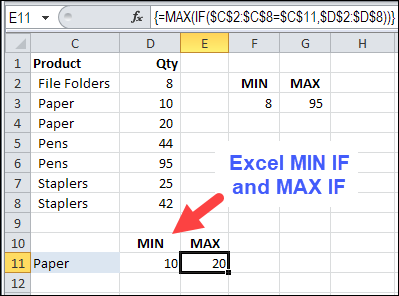
In this example, we want to see the MIN and MAX for a specific product. There is a SUMIF function and a COUNTIF function, but no MINIF or MAXIF.
- [Update]: In Excel 2019, and Excel for Office 365, you can use the new MINIFS and MAXIFS functions. There is more information on the MIN and MAX page on my Contextures site.
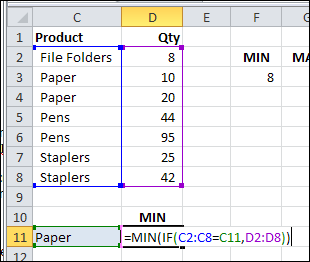
So, we’ll have to create our own MINIF formula, using MIN and IF. I’ve selected a product in cell C11, and the formula will be built in cell D11.
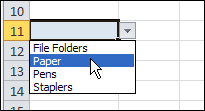
To make it easy to select a product, I created a drop down list of product names, by using data validation.
NOTE: You can also calculate MIN IF and MAX IF with Multiple Criteria
MIN IF Formula
The formula starts with the MIN and IF functions, and their opening brackets:
=MIN(IF(
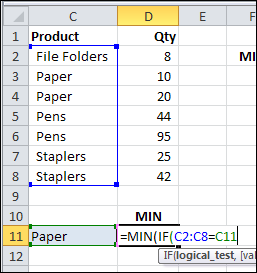
Next, we want to find the rows where the product name matches the product in C11:
- Select C2:C8, where the product names are listed
- Type an = sign
- Click on cell C11
=MIN(IF(C2:C8=C11
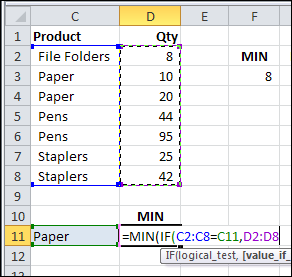
Next, select D2:D8, where the quantities are listed. If the product name matches, we want to check the product quantity
=MIN(IF(C2:C8=C11,D2:D8
To finish the formula:
- Type two closing brackets
- Then press Ctrl+Shift+Enter to array-enter the formula.
=MIN(IF(C2:C8=C11,D2:D8))
NOTE: If you plan to copy this formula down a column, use absolute references to the product and quantity ranges:
=MIN(IF($C$2:$C$8=C11,$D$2:$D$8))
Array Entered Formula
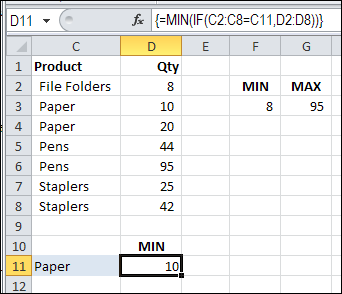
If you select cell D11, and look at the formula in the Formula Bar, there are curly brackets at the start and end of the formula. Those were automatically added, because the formula was array-entered (Ctrl + Shift + Enter).
If you don’t see those curly brackets, you pressed Enter, instead of Ctrl + Shift + Enter.
To fix the formula:
- Click in the formula bar (it doesn’t matter where you click within the formula)
- Press Ctrl + Shift + Enter.
Create a MAXIF Formula
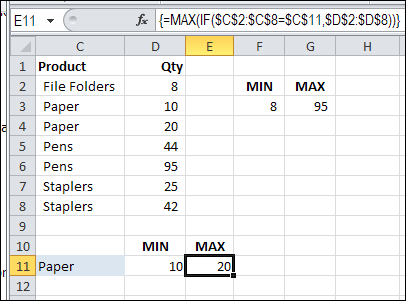
To find the maximum quantity for a specific product, use MAX instead of MIN.
=MAX(IF(C2:C8=C11,D2:D8))
or use absolute references for the product and quantity ranges:
=MAX(IF($C$2:$C$8=C11,$D$2:$D$8))
And remember to press Ctrl+Shift+Enter
Multiple Criteria for MIN IF or MAX IF
These formulas have only one criterion — the product name. If you’re ready for the next challenge, you can also calculate MIN IF and MAX IF with Multiple Criteria
- [Update]: In Excel 2019, and Excel 365, you can use the new MINIFS and MAXIFS functions. For more information, go to the MIN and MAX page on my Contextures site.
Watch the MIN IF or MAX IF Video
To see the steps for creating MIN IF and MAX IF formulas, watch this short Excel video tutorial. The sample file for this video can be downloaded from my Contextures website, on the MIN and MAX page.
________________________
________________
Thank you very much for the guidance
It really helps!
Thank you very much for this explanation. It worked perfectly. Can I ask a question just for lerning purposes: why doesnt it work with out presing ctrl shift enter?
Excel treats formulas as array formulas only when Ctl+Shift+Enter is pressed. In order to do a min of an array, we need to use array formulas. I was looking for a way to avoid array formulas, as they sometimes slow Excel down (if used in thousands of cells). So far, it looks like array formula is unavoidable. This method shown here is the only method I have been using. Thanks.
I don’t like array formulas, because I design spreadsheets for other people to browse and look at data sets from different perspectives. The danger with array formulas is someone can click on your cell and the array designation will disappear. Just something to be aware of if trying to make a fool-proof spreadsheet.
“If you make something fool-proof, the world will create a better fool”
Thank you very much.
It was very helpful.
This is useful! Thank you!
I have a problem with Excel 2007 whilst trying to total max and min in a row for weather recording. The conditional format works on MAX on the row between B34:Y34 but the MIN function does not. I have tried everything I can think of, but nothing works. The conditional format works on columns but not across rows! Do you know why? Would welcome your advice.
Thanks for this. Worked like a charm. I subscribe to PPP, so I’m not surprised at all that I found great advice here. PPP is a great product.
@TJF, thanks, and I’m glad you like the Pivot Power Premium add-in too!