
There is a list of Excel books on my Contextures website, and it hasn’t been updated recently. Today, I checked Amazon, to see what new and exciting Excel books had been released, so I could start adding them to the list.
New Excel Book
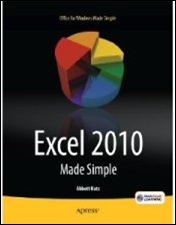
There’s a book – Excel 2010 Made Simple, by Abbott Katz — with a release date of May 31, 2011, from Apress, the publisher of my pivot table books.
Amazon lists the book as “not yet released”, but they show the cover, which you can see below.
Excel Charts Chapter
One of the chapters is on Excel charts, and the book blurb promises that you’ll learn “How to create colorful, meaningful charts”.
I hope the cover chart was selected by someone in the Apress marketing department, and not the author!
Missing Books
I’ll be updating the list of Excel books over the next few weeks, so if you know of any recent books that are missing from the list, please let me know, so I can include them. Thanks!
Make a Simple Pie Chart
And if you do need to make a pie chart in Excel, for a business report, or for the cover of your next book, keep it simple!
This video shows how to make a basic pie chart in Excel, then add formatting, labels, and other features. Use your Excel charting powers for good, not evil!
Excel Chart Links
If you want to learn more about Excel chart, but not the 3-D rainbow-coloured kind, check out the tutorials at the following links:
Box Plot Chart (Box and Whisker)
____________
@Abbott, congratulations on your new book! And next time, make them run the cover art past you. 😉
[…] Would You Approve This Excel Book Cover? […]
Will this do?
http://cid-58382ac201cc36d6.office.live.com/self.aspx/Public/Escher.xlsx
@Ed, nice start, but it need more colours. Or some animation.
Here’s your typical Excel MVP climbing a stairway to heaven after a hard day’s coding. http://www.youtube.com/watch?v=PI-b9ye4RqY
Funnily enough, a printer did something similar to me.
I wanted a couple of nicely printed and bound workbooks to be able to see the sort of quality I could get, and show them to a potential client.
The course I used as an example was my Advanced Excel Charts course, as it had plenty of graphical content (as you might expect) as well as text.
In order to make it look “better” the printer took it upon themselves to take my minimalist cover (company logo + course title basically) and jazz it up with some pictures of “fancy” charts, no doubt googled up from some horrid BI marketing pages.
3D charts, gradient fills, black backgrounds, dials and gauges, every dreadful thing you could think of and totally against all the principles taught in my courses.
I didn’t dare show it to my client, and luckily got the job anyway, but needless to say, I was fuming!