
In Excel 2007, and earlier versions, you can use Excel VBA code if you want to automatically filter multiple pivot tables at the same time. That task is much easier in Excel 2010, thanks to the new Slicer feature.
See the Slicer Steps
This video shows the easy steps for connecting a slicer to multiple pivot tables, in Excel for Office 365. There are written steps below, for earlier versions.
Slicer Intro
We took a look at slicers in October, in the Excel Slicers for Halloween Horror Films blog post and Slicer intro video.
To insert a slicer for a pivot table,
- Select any cell in the pivot table.
- On the Options tab of the Ribbon, click Insert Slicer.
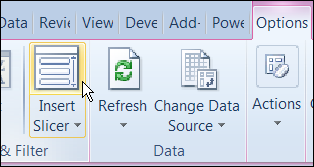
- Check the fields for which you want to add slicers, then click OK

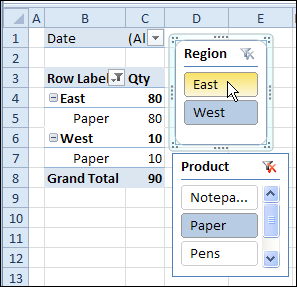
The slicers appear on the worksheet, and you can resize them and move them. Then, click on the pivot items, to filter the pivot table.
Connect Another Pivot Table
If you create multiple pivot tables from the same pivot cache, you can connect them to the same slicers, and filter all the pivot tables at the same time.
To create the Slicer connection in the second pivot table:
- Select a cell in the second pivot table
- On the Excel Ribbon’s Options tab, click Insert Slicer
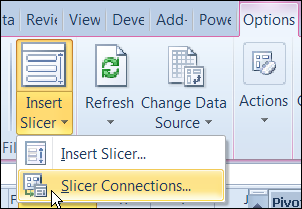
- Click Slicer Connections
In the Slicer Connections window, add a check mark to each slicer.
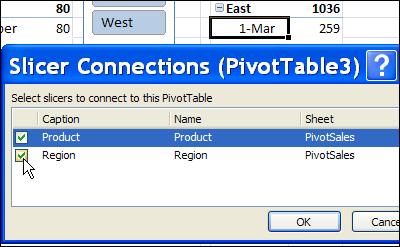
Both pivot tables are now connected to the Slicer. If you select an item in a slicer, both pivot tables will be filtered. For example, in the Product slicer below, Paper is selected, and both pivot tables show only the Paper sales.
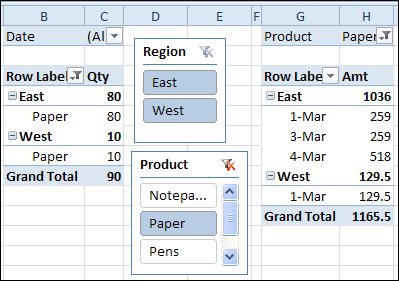
Watch the Connected Slicers Video
To see the steps for connecting multiple pivot tables to a slicer, you can watch one of these short videos.
- The first video shows the steps in Excel 2010
- The second video shows the steps in Excel for Office 365.
Steps in Excel 2010
Steps in Excel for Office 365
________________
Can this work with PowerPivot? I have several pivot tables in one file built with same data tables. I would like to the filter on all of them at the same time.
I am creating an analysis tool that looks at multiple sources of information from the same system, This is then pulled down into excel via different reports due to the differing areas within the system e.g. purchase ledger, sales ledger and nominal ledger.
This info is then customised via individual pivot tables
within each different source lies the same basic criteria . . a code where the transaction has been posted, and a period in which the transaction has occurred
can i use slicers to link this basic filtering criteria amongst my pivot tables?
@Allen…when you say “This is then pulled down into Excel via different reports” do you mean that data is pushed/pulled into separate tables within your spreadsheet, and then each pivot table points to one of these separate tables? If so, slicers won’t work. Slicers only work if pivots share the same cache. But if that’s the case, you can use the code at http://blog.contextures.com/archives/2012/08/28/update-specific-pivot-tables-automatically/