
This week, I’ve been working in an Excel 2007 file that has several named Excel Tables. After adding a column in one table, I copied the entire worksheet column.
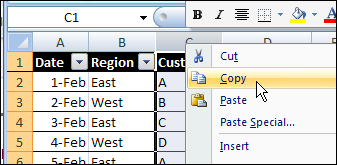
Next, I tried to paste it into another worksheet, where there was a similar table.
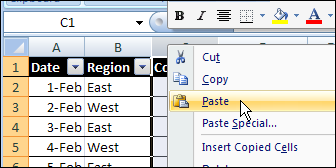
That didn’t go too well. After a few minutes of staring at the hourglass, I gave up, and closed Excel in the Task Manager.
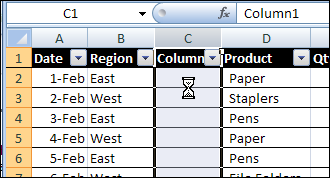
Today, I tried to repeat the column copy and paste, forgetting about the previous problem.
Sure enough, Excel crashed again. Well, technically, I guess it’s a hang, rather than a crash, but it’s still annoying.
A Smaller Named Excel Table
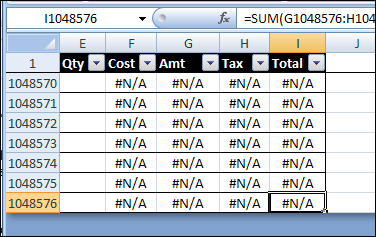
In a smaller workbook, with smaller tables, the copy eventually completed, but with strange results. There was a strange message in the Status Bar.
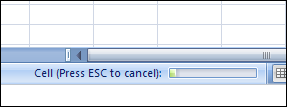
Eventually, the copy completed, but instead of the ten rows from the original table, the paste filled the entire column, so the named Excel Table ended in the last row.
Successful Copy and Paste
Instead of copying and pasting the entire column, you can copy and paste the named Excel table column.
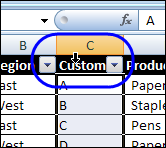
- To select the table column, click, the top of the table heading cell, instead of the column heading button.
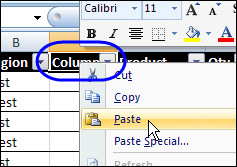
- Then, to paste into the other table, right-click the heading cell, and paste.
Or you can copy the cells, and paste them, instead of copying and pasting the column.
How Do You Crash Excel?
Enough about my problems! What’s your favourite way to crash/hang Excel?
________________
Just wanted to show an obscure way to crash Excel too:
A convoluted way to crash Excel (2007/2010) is by having a userform which is tied to a collection of instances of a class module. Make sure you forget to set all instances of the class to nothing when closing the userform. Closing Excel then causes a crash.
@ Jan;
Can you expand on what you mean by “userform which is tied to a collection of instances of a class module”? I have a spreadsheet that I added an userform to so that the user could jump between sheets, modify the views, etc, and ever since it crashes not when I close, but after a couple of saves. Without the userform, it seems fine, saves properly, and macros run fine. I am using XL2007, with xlsm extensions. This is my first 2007 userform, so not very familiar with the changes.
Slightly off-topic, but the absolute worst is when a workbook or sheet within a workbook corrupts, for no reason. This happens rarely but inexorably. Excel 2007 thank goodness is much better at saving/repairing corrupted files, but even then sometimes you get files that are beyond help.
If you are lucky you can spot it coming, but even then you have to go through a tedious process of copying and pasting (via VBA tools mostly) all the formulae and formatting into a non-corrupted workbook in a way that doesnt take the bad ju-ju with it….
It doesn’t get much worse than this, when it strikes.
Corrupt undeleteable styles and range names are a pain in the a** too!
@Jan
Also having the same issue as Robert.
the workbook works fine in .xlsm and .xlsx but crashes if try to save in .xls after the form has run. could you clarify what that issue is and how to solve it please?
Create a database on excel (bad idea # 1, but try convincing you Job Manager to think otherwise outlining details of various assets: location, value, etc etc around 30 columns and 10,000 rows; attempt a classification methodology using VLOOKUP, feed it into a pivot table, add a drop down menu to select various scenarios and this is the clincher, try automating the whole thing to work at the click of a button using VBA and watch excel crash
I find I can consistently crash Excel 2011 when I fail to select a cell or set of cell before invoking the “Create table from Excel” option in the Table tab. If I click on (for example) A1, then it is easy to create a table. If A1 is highlighted but not specifically selected, the program goes away and never comes back.
I tried to record a macro to do this because I have several sheets that I turn into tables and found that the recorded macro cannot run successfully even over the same sheet and data.
The only workaround I’ve found is to do it over.