
I’ve posted a few versions of the Excel Worksheet Data Entry Form, starting with the original version that Dave Peterson created. Thanks for your comments and suggestions, which give me ideas for enhancing it.
Excel Data Entry Form
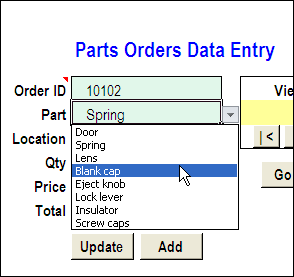
Here is a screen shot of the worksheet data entry form.
Customize the Data Entry Form
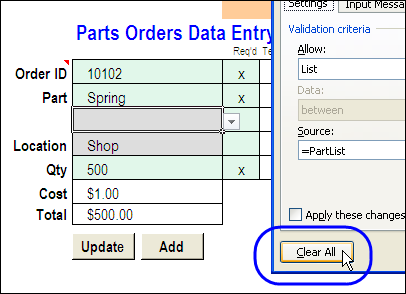
If you download the sample file, you’ll probably want to customize the data entry form, to suit your data. There are instructions on the Contextures website now, that explain how to change the fields, and add new fields.
Get the Worksheet Data Entry Form
The zipped sample workbook can be downloaded from the Date Entry and Update form page on my Contextures site.
There are several versions of the worksheet data entry form, available for download. Check the descriptions, and get the files that most closely match your requirements.
Watch the Customize the Data Entry Form Video
To see the steps for customizing the data entry form, watch this short Excel video tutorial.
_____
HI Debra!
I just want to adapt this Userform for my project in school. Can you do a sample the same as this userform but the Data Entries MUST NOT on the same column like what you have here in your sample video, its in one column, its in Column D. Mine should be entered in different cells like D1, A2, C3, G4 and so fort. Some of the cell will be transferred to the Record Sheet and some will be retained in the form. Can you also give me a code for this especially on how to do the scrolling (NEXT, PREVIOUS. I would greatly appreciate it if you could help me fix this problem. Thanks a lot! and more power to you.
Hi Nats!
On my website, there is another sample file that has two data entry areas, and data is copied to and from these cells by using links on other worksheets.
You can download that file, and adapt it to your own workbook.
http://www.contextures.com/excelfiles.html#UF0022
I would like to password protect the “input” screen and only allow data to be enetered into the white cells. When I do this, the data that goes into the white cells does not disappear when “add to database” is selected. The data does go to the neighboring sheet as designed, the cells on the input sheet just don’t reset.
HI,
Thanks for your “FormSheet.xls” (old version).
This “moddata” macro ( used for update the entered details in “partsdata” sheet is accepting only 53 cells data. (like d1,d2,d3……d53).
If I add more cells than 53 and when the macro run, it shows 1004 error.
How to increase this macro for more than 53 cells data, which is going to update in “partsdata” sheet.
Regards,
sai babu
Is there a way to use your own form? Also what about drop down lists etc.?
Hello Debra, Anytime I update the data and it goes to the database, the formulas disappear from cells that contain formulas. Please what do I do.
Check the named ranges, Wale, to make sure they don’t include the cells with formulas