
To keep your data details confidential, you might want to send someone a copy of a pivot table, without the link back to its source data. It’s easy to copy a pivot table, and paste it as values,but it is difficult to copy pivot table format and values.
No Formatting
After you copy a pivot table, if you try to paste the values and source formatting, you’ll be disappointed by the results. The values are pasted, but not the PivotTable Style formatting.
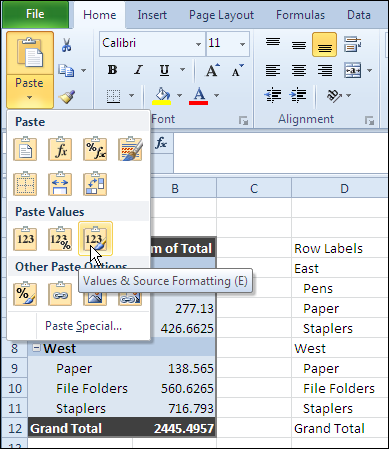
Use the Clipboard
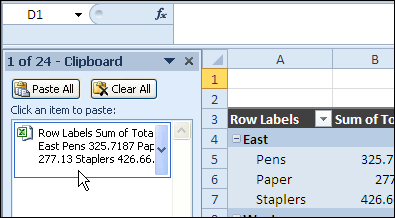
Fortunately, John Walkenbach discovered that you can paste from the Office Clipboard, instead of using the Paste Values command, and the PivotTable Style formatting is pasted too.
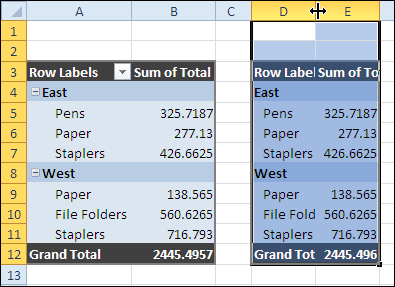
The result is something that looks like the original pivot table, without the link to the source data.
For more information on PivotTable Styles and pivot table formatting see the Contextures Pivot Table Format page.
Copy Pivot Table Format and Values Video
To see the steps to copy pivot table format and values, watch this short Excel tutorial video.
_____________
Hi, Just add another field to the end of the pivot table and select the entire pivot table, except the last column (just added), click copy, and just click paste into another excel spreadsheet. It copies the numbers and format without any links to the old spreadsheet.
So in essence, you’re not copying the entire table. Just stumbled on this solution by luck now.
Hope it works for you..
No, it doesn’t work in Excel 2019.
Hmm, just tried pasting from the Clipboard (Excel 2010), but didn’t get the formatting… any ideas?
Easiest way for me, was to add a field into the filter (whether you use it or not) and copy the table without your filter. It will paste the values and the formatting.
What Susan is telling is correct. That method works. In fact it works even if you just leave the top row at the time of copying. I have been doing it for quite some time.
Hi,
Does anyone know how you put back in the collapsible buttons in the cells after you paste the pivot table? I’m working in 2010 version and my pivot table has pasted over nicely but I wanted to incorporate the buttons into the cells so that the person I am sending it to can minimise the data as and when they want.
Thanks!