
To keep your data details confidential, you might want to send someone a copy of a pivot table, without the link back to its source data. It’s easy to copy a pivot table, and paste it as values,but it is difficult to copy pivot table format and values.
No Formatting
After you copy a pivot table, if you try to paste the values and source formatting, you’ll be disappointed by the results. The values are pasted, but not the PivotTable Style formatting.
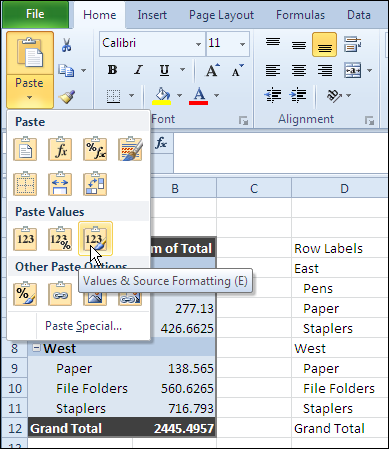
Use the Clipboard
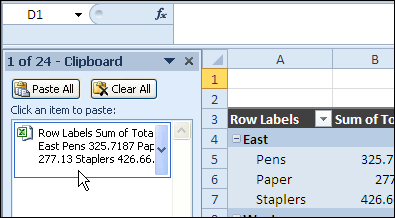
Fortunately, John Walkenbach discovered that you can paste from the Office Clipboard, instead of using the Paste Values command, and the PivotTable Style formatting is pasted too.
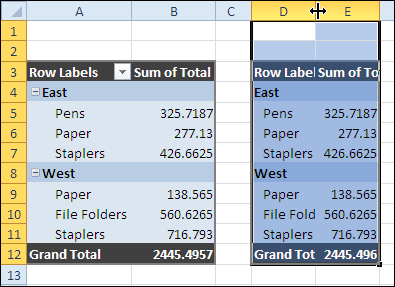
The result is something that looks like the original pivot table, without the link to the source data.
For more information on PivotTable Styles and pivot table formatting see the Contextures Pivot Table Format page.
Copy Pivot Table Format and Values Video
To see the steps to copy pivot table format and values, watch this short Excel tutorial video.
_____________
Cool..
made my life easier!
In Excel 2010, I have found a method to just paste the data and format without the link back to the pivot data source.
If you try to copy the whole pivot table, it doesn’t seem to work and the link to the data source is copied as well as the formatting.
To only paste values and formatting, put your cursor on the first cell of the “Row Labels” row of the pivot table. Click on that cell and then scroll down to your grand total figure and Shift+click that cell to define your data to be copied. The area you want to copy should now be highlighted. Invoke the copy feature or use Ctrl+C. Move to the new worksheet or area where you want to paste the data and click on the cell where you want it pasted. “Paste” or Ctrl+V (regular paste icon)to your new worksheet or area. The table data and the formatting are pasted without the link to the data source.
When I am copying and pasting the existing excel table into the words doc, the table gest distorted with the last column missing.
Is there is a function to insert existing excel table into the words document?
Thank you! Thank you! Thank you!
Excellent
This worked for me a few time, but now has stopped working.
I am assuming it has something to do with setting. Can anyone tell me what might be the issue?