
To keep your data details confidential, you might want to send someone a copy of a pivot table, without the link back to its source data. It’s easy to copy a pivot table, and paste it as values,but it is difficult to copy pivot table format and values.
No Formatting
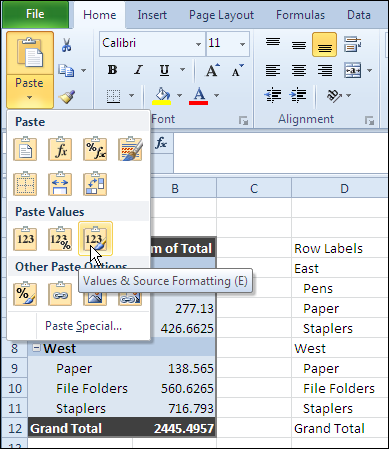
After you copy a pivot table, if you try to paste the values and source formatting, you’ll be disappointed by the results. The values are pasted, but not the PivotTable Style formatting.
Use the Clipboard
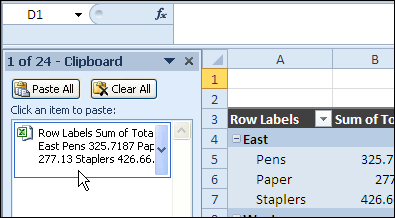
Fortunately, John Walkenbach discovered that you can paste from the Office Clipboard, instead of using the Paste Values command, and the PivotTable Style formatting is pasted too.
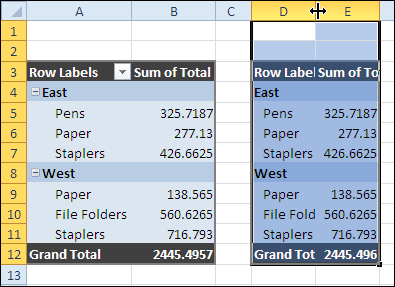
The result is something that looks like the original pivot table, without the link to the source data.
For more information on PivotTable Styles and pivot table formatting see the Contextures Pivot Table Format page.
Copy Pivot Table Format and Values Video
To see the steps to copy pivot table format and values, watch this short Excel tutorial video.
_____________
Extremely unfortunate. Could easily be patched but why do that when they can just leave it messed up?
That’s a great tip and I’ve used it a few times.
However, doing it with VBA doesn’t seem to work. If you record yourself doing it, you get:
Application.CutCopyMode = False
ActiveSheet.Paste
but when you try to run that code again, it goes bang on the .Paste line (I guess because it sees the Excel clipboard as empty, following the first line??).
This remains a royal PITB when automating report publishing from Pivot Tables.
Anyone have any ideas?
Yard, I’ve posted some code that will copy the pivot table values and formatting to a new worksheet:
Excel VBA Pivot Table Paste Format and Values
Hi Debra,
Thank you so much but i have multiple worksheets within the workbook can you help me create a code which will paste all sheets instead of me doing it one by one?
Copy Pivot Table into Word – will result in a table in Word with same formatted look as Excel Pivot Table
Then select Word table, copy and paste in new Excel worksheet – result – values only with formatting.
I have a question – what about pasting pivot table in Word with same formating -sign with subcategories — like I have a list of departments who engaged 7 vendors – and there are 18 dept with each having different vendors engaged as found by Pivot table . how I can paste the source formatting into the target (Word document Table with
-Department
vendor1
vendor2
vendor3 that my boss exactly knows that a every department have some vendors in front of it in word. 🙂
Your site is amazing!
I would like to use the code you posted here on multiple pivot tables in the same sheet. Any ideas?
http://www.contextures.com/excel-vba-pivot-table-paste-format.html
Thanks!