
One of the tasks you have to do quite often in Excel is to count things. Here’s how to count cells greater than set amount with Excel COUNTIF function.
Student Test Scores
In this example, we have a list of students and their test scores.
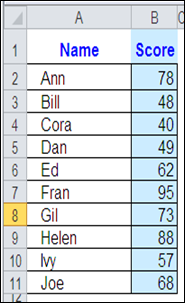
If the passing score is 50, how can you get Excel to count the number of students who passed the test?
Use COUNTIF and an Operator
The Excel COUNTIF function will count cells, based on the criteria that you enter. As part of the criteria, you can use an operator, such as greater than, or less than, to count a specific range of numbers.
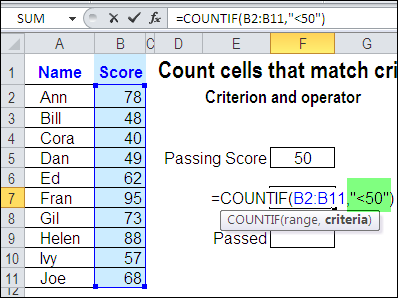
In this example, the passing score is 50. To find the students who failed the test, you’d count the scores that are less than 50 — <50.
To include this operator in the COUNTIF criteria, enclose the operator and number in double quote marks.
=COUNTIF(B2:B11,”<50″)
Use a Cell Reference with COUNTIF Criteria
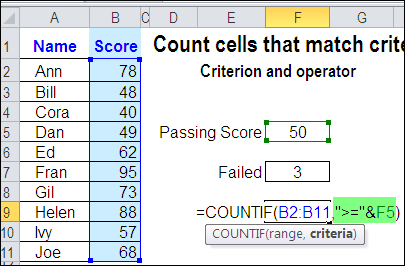
Instead of typing a number in the COUNTIF criteria, you can use a cell reference. In this example, cell F5 contains the passing score.
To find the students who passed the test, you’d count the scores that are greater than or equal to the value in cell F5 — >=F5.
To include a cell reference and operator in the COUNTIF criteria, enclose the operator in double quote marks, and use an ampersand before the cell reference.
=COUNTIF(B2:B11,”>=” & F5)
Cell Reference Automatically Updates
An advantage to using a cell reference in the COUNTIF criteria is that the result will automatically update, if the value in the referenced cell changes.
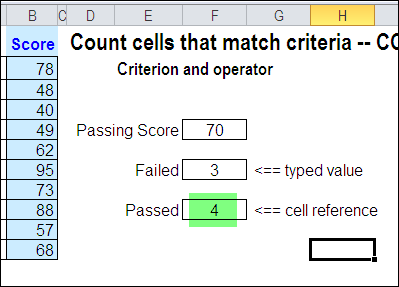
In the screenshot below, you can see that the passing score has been increased from 50 to 70. Because the Passed formula uses a reference to cell F5, the count is automatically updated.
The Failed formula has the passing score of 50 typed into the criteria, so that value would have to be changed, before the result is updated.
Watch the COUNTIF Video
To see the steps for creating a COUNTIF formula with an operator, you can watch this short Excel tutorial video.
_________________________
I am hoping you can assist. I am trying to add any 4 numbers, where I have over 1000 numbers and reach a total of less or equal to 100. I want to know how many instances I can do this and how to identify the specific numbers. How do I write such a formula. Any assistance is appreciated. Thank you.
I am trying to work out a formula , I have a countif statement, that counts the number of says some one attends to lets say the person can attend 1 day for £30 or up to 7 days at £210, if they attend all 7 days, I can then give them a discount of 10%..anyone help
I am trying to work out a formula , I have a countif statement, that counts the number of Days someone attends a class, so lets say the person can attend 1 day for £30 or up to 7 days at £210, if they attend all 7 days, I can then give them a discount of 10%..anyone help
thank you sir!
How to give a format to those values whose sum is less than a value we put (like: 1000)
Help needed please! I have to calculate how often a monitor reading exceeds a limit value (0.30) for more than three minutes. To be clear the continuous monitor is measuring values every 5 seconds and if the value exceeds 0.3 continuously for more than three minutes that counts as a fail. I download a huge data set each month two colums ‘Value’ and time