
Occasionally, I get calls from clients who don’t understand why their Excel file isn’t working. They’re clicking buttons, or selecting from drop down lists, but none of the usual magic is happening. Is the file broken?
When you open a workbook in Excel 2007, a security warning bar might appear above the worksheet, telling you that macros have been disabled.
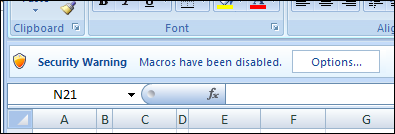
Unfortunately, the security bar blends into the Ribbon a little too well, and if you’ve created the workbook for someone else, they might not even notice the warning.
When I ask my clients with the broken workbooks if they see the warning, usually the answer is yes. A couple of clicks later, the file is working again. It’s annoying though, and makes smart people feel not so smart.
Bypass the Security Warning
For Excel workbooks that you know are safe to open, you can bypass the security warning by putting the files into a trusted folder. It’ll take you a minute or two to set it up, and that little bit of effort will save you countless hours and aggravation.
To set up a trusted folder:
- Click the Office Button on the Ribbon, then click Excel Options.
- In the list of categories, click Trust Center, then click Trust Center Settings.
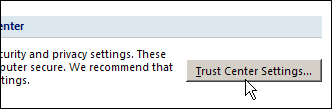
Trust Center Dialog Box
- In the Trust Center dialog box, click Trusted Locations.
- You can see the list of current trusted locations, and buttons to Add New Location, Remove or Modify items in the list.
- Click the Add New Location button
- Click Browse, select the folder that you want to trust, then click OK.
- Your folder is now in the list of trusted locations.
- Click OK to close the Trust Center and Excel Options dialog boxes.
Now, when you open the files from that folder, the macros will be automatically enabled. No more missed Security Warning bar, or mysteriously broken Excel files.
No Macros in the Excel Workbook
If the workbook doesn’t have macros, and you’re seeing a macro warning, follow the instructions here: Remove Excel Macros Security Warning.
__________
This doesn’t work in office 2013, I set the trusted folder and it still nags me about how some files can be harmful to my computer even when the file is in a folder marked as “trusted”. I also disabled all other security options and still get nagged everytime I click on a hyperlink.
i want to ask that a micro enabled excel file open well every time without asking security question.But when someone open a micro enabled excel file on another pc then there is a question for user to enable the macro attached to the file. i want to ask that micro enabled file should run automatically on any pc.how it can be possible please explain.
Hi,
there are two radio buttons and drop down box are there.when i click on first radio button.then corresponding drop down down box should be enabled.or else other drop down box should be disabled.so how to disable drop down box.help me plzzz.
Thanx in advance
Sneha
help, when I try to enter the trusted folder location, I get an error saying I cannot enter a remote server location as a trusted location.. any ideas?