
If you’re entering dates on an Excel worksheet, you don’t have to enter each date individually. Just enter the first date, in the top cell. Then, if there is data in the next column, you can use the Fill handle to quickly enter the rest of the dates. See how to AutoFill Excel dates in series or same date, with just a couple of clicks.
Start a Date Series
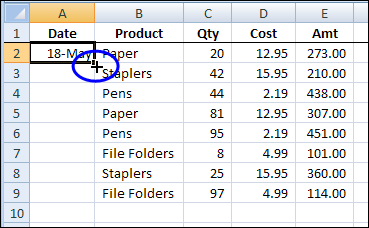
Enter the first date in the date column — cell A2 in this example. Then point to the Fill handle, which is the small black square at the bottom right corner of the selection.
When the pointer changes to a small black plus sign, double-click.
Dates Series
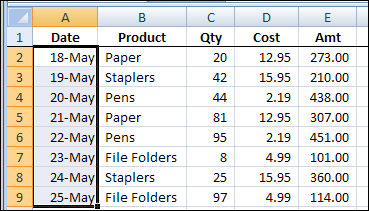
When you double-click the Fill handle, Excel automatically fills the dates down to the first blank cell in the next column.
By default, the dates are entered in a series of 1 day intervals.
Change to Same Date
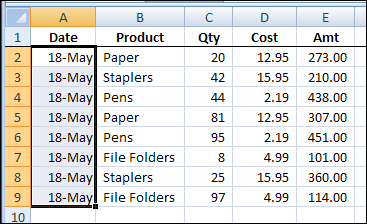
If you want all the date cells to have the same date, do one more step:
- Keep the range of date cells selected (cells A2:A9 in this example)
- Press Ctrl+D on the keyboard.
That is the keyboard shortcut for Fill Down. When you use that shortcut, Excel copies the date from the active cell (cell A2), into all the selected cells below.
Watch the Video
To see the steps for filling the dates, watch this very short video. The video shows how to create a date series with the Fill handle. Then it shows how to use a keyboard shortcut, to enter the same date in all the selected cells.
I created this with the latest version of Camtasia Studio, which has a new feature that captures keyboard shortcuts, and can show the key combinations in the video.
More Excel Shortcuts
See more Excel keyboard shortcut on my Contextures website. There is an interactive list of shortcuts that you can search and filter. You can also download an Excel workbook with a list of shortcuts.
______
Hi,
as an alternative to double-clicking, you can also drag the fill handle down. The default behaviour in this scenario is the incrementation by 1 per row, but if you hold down the Ctrl-key while you drag, it changes to a simple copy down behaviour. You can hit Ctrl mid-drag, if you want, and watch the value preview change (in 2007 and later).
cheers, teylyn
Wow..this is amazing
Why in Hades can’t Microsoft give instructions as simple and clear as posted here?
Great information, however it took me a hour of reading useless information to find it. I’ve bookmarked it so i can use it again.
I love the double-click feature but we just added 2010 to work and I cant get the double-click to work. It continues to the end of the worksheet instead of stopping at the empty adjacent space. Can someone tell me what to fix? Thank you
thanks, this was helpful for me
hello friends….if ur mouse stopped working….try this shortcut to autofill number series……first enter first to numbers, then select range u want to fill series in, then if u r using previous versions b4 office2007, PRESS ALT+e+I+s, and then alt+f then press enter
Hi Frnds,
How can fill date in series like this type format….
21/06/2014,
22/06/2014,
…20/07/2014.
Is it possible in Ms-office’10(excel)?