
Sometime in the 1840s, probably because of the famine, my dad’s ancestors left Ireland, and boarded a ship to Canada.
The details are sketchy, but I’m sure they had first class accommodations, and sat at the Captain’s table every night.
Flag of Ireland in Excel
So, in honour of those ancestors, and to celebrate St. Patrick’s Day, I’ve made an Excel chart that represents the Flag of Ireland.
Chandoo suggested that we create our country’s flag in Excel, and I decided that the tri-colour flag of Ireland would be much easier than Canada’s Maple Leaf flag.
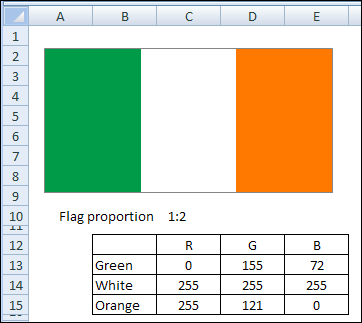
How To Make the Flag
Have you tried to make your country’s flag?
To make the Flag of Ireland, I did the following:
- typed 100 in three cells on the worksheet
- made a column chart from that data.
- set the gap width to zero, to remove the space between the columns
- selected each column individually, and changed its colour, using the RGB settings shown above
- set the maximum for the vertical axis to 100
- removed all the gridlines, axes, labels and titles
- dragged the plot area, so it filled the entire chart area
- changed the size of the chart to 3″ wide by 1.5″ high
And after you finish your flag, you can learn how to pronounce Éirinn go Brách, just in time for your St. Patrick’s Day parties.
Vote for Spreadsheet Day
Speaking of Excelebrations, last month I suggested that we pick a day to celebrate as Spreadsheet Day. There were a few dates suggested, and Jimmy Peña wants a poll, to pick a date.
So, please go to my Debra D’s Blog, and vote for Spreadsheet Day. [Update: October 17th was the winning date.]
Canadian Irish Music
In no way related to Excel, but as part of our St. Patrick’s Day Excel-ebration, here’s some Canadian Irish music, from Great Big Sea, playing with The Chieftains.
_________
Hi Debra,
A slightly more difficult flag. This tests a couple of things;
1) Flag created in Excel 2010 – I still prefer 2003 for charts (I must fit in the ‘old fogey’ basket by now)
2) xlsx uploaded to Office Live workspace.
Click on the file to open it in the browser – a creditable job of rendering the worksheet, but not quite there.
Click the SaveAs button to download the file and open in Excel on your PC – a better looking flag (still no prizes because I don’t really want to spend more than 15 mins on this)
Sorry for the tiny url
http://tinyurl.com/ygy5p7k
Office Live gives you this url, which I think is a bit less usable;
http://workspace.office.live.com/?id=pACRhYmQwOWQ5MC0yOWZjLTQ4MDAtYjgyMi0wODZkN2Y1MmJkNWQAe2VmpJiVcGhHkSLsQAS7ny19ACBlZmVycmVyb0BhbmdsaWNhbmJyaXNiYW5lLm9yZy5hdQAAABTAIAsiYmN1yGZ0fgXv2_2TPVeoNAAA&cid=40
Counting down until Jon Peltier shows up and critiques your chart… I’m guessing he’ll say it should be a pie chart.
Beannacht Lá Fhéile Pádraig!
@John, I think it’s illegal to criticize anything Irish today, so I should be safe.
@Ed, nice work! If you could create that Australian flag in Excel, maybe I should try the Canadian one. Canada Day is in July, so that should give me enough time.
@Dave, thanks! Happy St. Patrick’s Day to you too.
The flag of Saint Pierre and Miquelon would be an interesting one. I’m going to start on Libya!
Russell, the flag of Libya looks like a good place to start. Good luck with the Saint Pierre and Miquelon flag! It might take a while.