
Did you eat too many Christmas cookies over the holidays? An extra dessert or two?
If it’s time to get back into shape, use this Excel weight loss tracker. It can store weekly weight records, calculate your weight loss, and show your progress in a weight loss chart.
Get the Excel Weight Loss Tracker
There’s a link at the end of this post, where you can download the Excel Weight Loss Tracker sample file.
NOTE: I’m not a trained medical professional, so use the Excel Weight Loss Tracker at your own risk, and for entertainment purposes only, etc.
Choose Your Measurement System
[Update] The latest version of this workbook lets you select pounds or kilograms as the measurement.
There is also a stone/pounds version of this workbook. Read about it here: Excel Weight Loss Tracker in Stone and see the link at the end of this article.
Use the Excel Weight Loss Tracker
On the first worksheet in the Excel Weight Loss Tracker file, there are cells where you can enter your personal data and goals.
In the Excel Weight Loss Tracker sample file, I’ve entered the data for my daughter’s favourite Toronto Blue Jays baseball player. He probably had a few extra cookies over the holidays too, and needs to get in shape before the baseball season starts.
Data is entered in the green cells, and calculations, such as Target Date, are in the white cells.
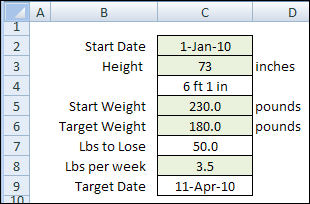
This shows the good news for the Blue Jays. If this player can work off about 3.5 pounds per week, he’ll be ready!
BMI Calculations
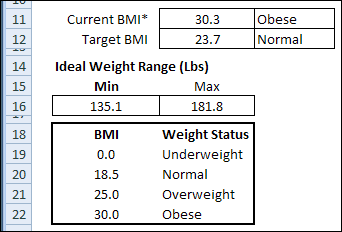
The first sheet in the Excel Weight Loss Tracker also has information on Body Mass Index (BMI) from the Center for Disease Control and Prevention. It calculates your current BMI, and target BMI, and shows the ideal weight range for your height.
The BMI table is used as a lookup table for the ratings for the current BMI and Target BMI. The Minimum and Maximum ideal weight range is calculated from your height, and the Normal range in the BMI table.
Weight Tracking
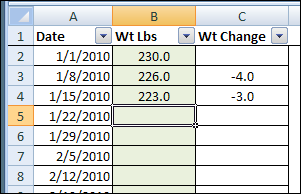
The second sheet is the Weight Tracker sheet, where weekly weights are entered. It also calculates the weekly weight change. Just enter your weight in column B each week, and the change is automatically calculated.
Weight Loss Dashboard
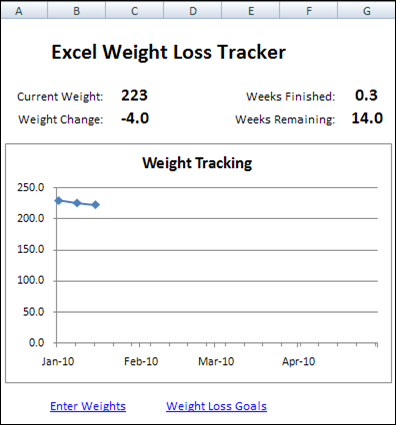
The final sheet is the Dashboard, with a simple line chart to show the recorded weights, and a summary of the weight loss.
It calculates the total weight change, and shows how many weeks are left until you reach the target end date.
Download the Excel Weight Loss Tracker
You can download a zipped copy of the Excel Weight Loss Tracker, and try it for yourself.
The sheets are protected, with the green cells unlocked, and there’s no password on the worksheets.
______________________
I am wanting to create an excel sheet for several members on same sheet will calculate the % lost from week to week. The formula to calculate % lost is (Start weight -Current weight) / Start weight. That will give it in decimals which is OK.
I can do it for just me but I want to put several people’s names on same sheet and keep a record of this from week to week. It is for a team challenge we’re doing.
Thanks so much if you can help.
This is a fantastic tool thank you for sharing. I use the stone one. Do you have one for inch loss as well?
chest
arm
hip
waist
belly button level
leg
HOW CAN I USE THIS FOR ALL MY CLIENTS, MEANING I WANT TO MERGE MANY INTO THIS TRACKER / DASHBOARD ALONG WITH HAVING THEIR INDIVIDUAL TRENDS