
A common pivot table question is “How can I create a pivot table from data that’s on separate sheets in my workbook?
Sometime people have a workbook set up with a separate sheet for each region, or for each salesperson.
Eventually, they want to pull all the data together, and create a summary report in a pivot table, from multiple sheets.
Multiple Consolidation Ranges
Excel has a feature (well hidden Excel 2007) that lets you do this, using Multiple Consolidation Ranges.
A pivot table created this way has limited features, and isn’t much use in summarizing Excel data.
I usually recommend that you move all the data onto one worksheet, if it will fit, or store it in a table in Access, then use that as the source for the pivot table.
Create a Union Query
Another solution is to create a Union query from the separate tables, and use that as the source data.
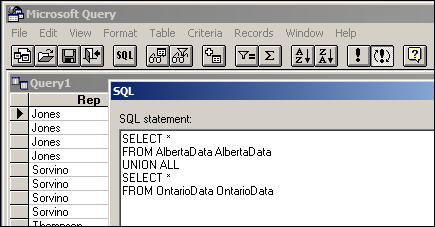
Normal Pivot Table
With this solution, you’ll end up with a normal pivot table, with none of the limitations. However, it’s a bit tedious to set up, especially if you have more than a couple of tables.
Automate the Union Query
Instead of setting this up manually, you can use the code in a sample file from Excel MVPs, Kirill Lapin (KL), with amendments by Héctor Miguel Orozco Diaz. (You might remember Héctor’s innovative Filter Pivot Table Source Data example, posted earlier this year.)
To adjust their sample code to work in your file, you’d replace the sheet names in the CreateConnection code.
To go to the CreateConnection code, right-click on the “Create Empty Table” button, and click Assign Macro, then click Edit.
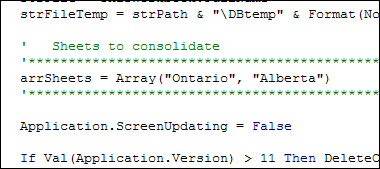
You can also adjust the location where the pivot table will be added. This line is further down in the CreateConnection code.
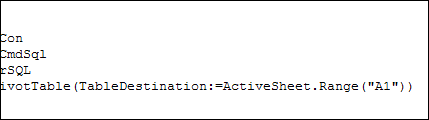
After those small changes, save the code changes. Then go back to Excel, click the button on the worksheet, and a summary pivot table will be automatically created.
Download the Sample File
Thanks Kirill and Héctor, for making a complicated task easier. You can download their sample file from the Contextures website: PT0023 – Pivot Table from Multiple Sheets
(Also, please check the update section below, for a newer version of the file)
Update — December 2011
The solution described in this article was created as a conceptual prototype and targeted mainly advanced VBA users. The code has minimal error handling and compatibility checks.
Given the massive response from all kinds of users willing to adopt this solution in their own applications, we would like suggest a similar solution based on ADO.
Advantages:
- No need for temporary file generation
- The code is faster and less prone to errors
Disadvantages:
- No manual refresh of the PivotTable
- Need to rebuild connection from the scratch to update the cache with new data
Download the ADO Sample File
You can download the new ADO version of the file from the Contextures website: PT0024 – Pivot Table from Multiple Sheets – ADO version
Update — August 28, 2012
In the comments below, Kirill posted code that will automatically detect the sheet names. The blog formatting changed his minus sign to a long dash, and also deleted the Less Than Greater Than operator. Here is the correct code, with Kirill’s instructions:
In the code, replace this line:
' Sheets to consolidate
'*****************************************************************************
arrSheets = Array("310_BWATTS_P Pastujova", "310_BWATTS_Maria Sanchez")
'*****************************************************************************
with the following code:
' Sheets to consolidate
'*****************************************************************************
Dim ws As Worksheet
ReDim arrSheets(0)
For Each ws In ThisWorkbook.Worksheets
  If ws.Name <> ActiveSheet.Name Then
    arrSheets(UBound(arrSheets)) = ws.Name
    ReDim Preserve arrSheets(UBound(arrSheets) + 1)
  End If
Next ws
ReDim Preserve arrSheets(UBound(arrSheets) - 1)
'*****************************************************************************
________________
Hi Kirill,
First of all, Thanks so much for the great piece of code.
I am facing the same Run time 1004 as Laura on line Set PT = .CreatePivotTable(TableDestination:=rng(6, 1))
Number of columns in each table are 52 and number of files I am trying to combine are 4.
Issue is that, if I try with upto 2 files, the code works perfect. The moment I try the code with 3 files, I get this error.
Please help.
Thanks,
Sharma
Hi Sharma,
Do your tables have identical structure and column headings? Have you tried the new ado file here: http://www.contextures.com/ExcelTemplates/VBA_PT_NormalMultipleSheets%20EN%2007.zip ?
Hi Kirill,
Yes, the tables have identical structure and the same column headings. I checked the code that you have attached here. I think this code is for multiple sheets in the same workbook while I am trying to create the pivot from multiple files/workbooks.
The reason why I would like to maintain different workbooks instead of having different worksheets in the same workbook is that the file size that I have is pretty large hence keeping only one workbook with many worksheets slows down the speed.
The error I get is 1004: [Microsoft][ODBC Excel Driver] Too many fields defined and when I debug, it takes me to the line:
Set PT = .CreatePivotTable(TableDestination:= rng (6, 1))
I had downloaded the folder for multiple files pivot on page http://blog.contextures.com/archives/2010/08/30/macro-creates-excel-pivot-table-from-multiple-files/
Thanks for the prompt response and help. 🙂
Best,
Sharma
Kirill,
Thanks so much for the amazing code. I’m having a peculiar issue with the ADO file (plug-and-play) and was hoping you could help me sort it out.
I’m using the file to compile 32 sheets into a pivot. Two of the data columns receive the “number stored as text” error repeatedly, even after I have reformatted the cells. I’ve tried refreshing the table as well as saving, closing and reopening the file after reformatting the cells with no luck. The strangest thing about this error is that it only happens when compiling multiple sheets. The table has no problem performing calculations as long as only one sheet is being used as input at a time. To add to the mystery, this is only occurring with two specific columns of data. The rest all work magnificently.
Any ideas as to what could be happening?
Thanks so very much.
Best,
Bill
Bill
January 9, 2012 at 10:30 am · Reply:
hi bill
I had this issue and worked out that it was because of the alignment on the cells. something to do with if you centre align Excel will take it that its text and not numbers bo matter what ‘number format’ you give it . I aligned everything numerical to the right and solved my problem – hope it does yours.
Laur
Hello,
The code is working wonderfully for me so far. One error I am encountering is an Out of Memory message. I am incorporating 3 tabs into 1 pivot table and noticed the 3rd tab is not showing data in the pivot table. Can you help with this?
Hi Kirill,
I would like to ask where to actually edit these lines:
‘ Sheets to consolidate
‘*****************************************************************************
arrSheets = Array(“Ontario”, “Alberta”)
‘*****************************************************************************
Set PT = .CreatePivotTable(TableDestination:=ActiveSheet.Range(“A16”)
I could not find any macro recorded in this file. However, when I right click the buttons (like the “Create Empty Table”, “Delete Table” etc), I clicked the “Assign Macro” then “edit”. A window popped up and I suppose that is where I should edit? However, when I try to save it, it always tell me this error:
“some cells or styles in this workbook contain formatting that is not supported by the selected file format. These formats will be converted to closest format available.”
I clicked “continue” nonetheless. The buttons would not then work. The error messages states that “connection could not be established.” and “Pivot table ‘mypivot’ not found”.
Can you please advice me as I have an urgent project to submit and it is required to use database from two different worksheets in the same workbook.
Many thanks! Hope to hear from you soon.
Andrea.
@Andrea, did you try the updated ADO version of this sample file?
You can download it from the Contextures website:
PT0024 – Pivot Table from Multiple Sheets – ADO version