
Excel is certainly packed with features, but I use a few free add-ins that make Excel even better.
[Update] I’ve created a list of all the free Excel add-ins that were suggested in the comments. Thanks for sharing your favourites!
Name Manager
by Jan Karel Pieterse of JKP Application Development Services
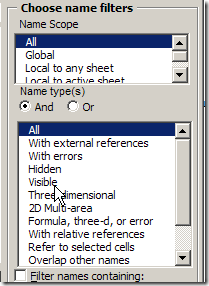
If you use names in Excel, you need this tool. You can quickly find names with errors and delete them, or track names that link to another workbook.
There are many more features, so download Name Manager, and see what it can help you with.
Excel Utilities
by Rob Bovey of AppsPro
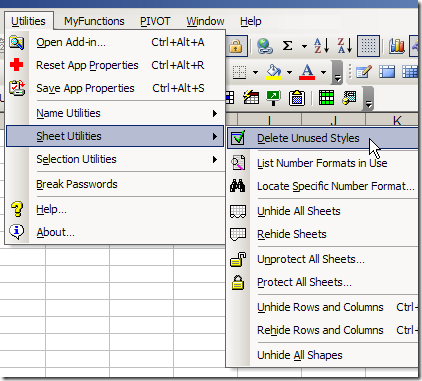
Rob’s add-in has handy tools for working with named ranges, worksheets and selections.
You can quickly protect and unprotect all the sheets in a workbook, remove unused styles, and my favourite – centre across a selection, without merging cells.
There are many more features, and you can read the full description on Rob’s page for Excel Utilities.
Pivot Power
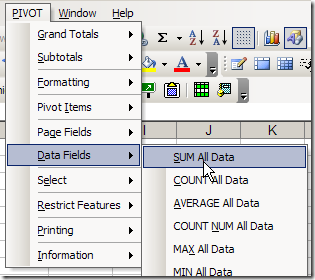
Since I work with pivot tables so often, I created my own pivot table add-in, that you can download.
The commands that I use most often are Clear Old Data, and Sum All Data.
Your Favourite Free Excel Add-Ins
What are your favourite free add-ins for Excel? Any of the ones that I’ve listed? Have you created some of your own?
_________________
I developed a small add-in that let’s me unhide multiple worksheets at once. I use it all the time for big workbooks. Same GUI as Excel’s unhide feature, but now I can select one or more hidden and/or veryhidden worksheets from a listbox. Currently using XL2000 on a company laptop by the way (don’t ask).
Some other add-ins I use:
*Password remover from straxx.com
*Bill Manville’s Find Links
Bob P. “Inno Setup as an Excel addin is pushing it a bit “
It’s actually pushed over the edge, I had just pasted that in from J-W’s list and hadn’t bothered to edit it out :-~
P.
Here is my list in descending order.
ASAP Utilities
Name Manager
Flexible Find & Replace
JMT Excel Utilities
Ultimate Add-in
I use several of those utilities already mentioned, John Walkenbach’s row delete, Excel utilities from http://www.appspro.com/ and findlinks.
One which I do not think has been mentioned is Navigator Utilities from http://www.navigatorutilities.com, the links part is wonderful as you can actually go to the linked cell.
[…] Center Across Selection In Favourite Free Excel Add-Ins, one of the commenters (and Debra) complains about the Center Across Selection being buried in the […]
[…] mentioned Jan Karel Pieterse’s Name Manager before, as one of my favourite Excel add-ins. If you’re working with names, in any version of Excel, you should download and install it. […]