
Excel is certainly packed with features, but I use a few free add-ins that make Excel even better.
[Update] I’ve created a list of all the free Excel add-ins that were suggested in the comments. Thanks for sharing your favourites!
Name Manager
by Jan Karel Pieterse of JKP Application Development Services
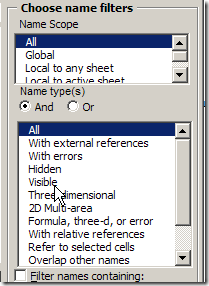
If you use names in Excel, you need this tool. You can quickly find names with errors and delete them, or track names that link to another workbook.
There are many more features, so download Name Manager, and see what it can help you with.
Excel Utilities
by Rob Bovey of AppsPro
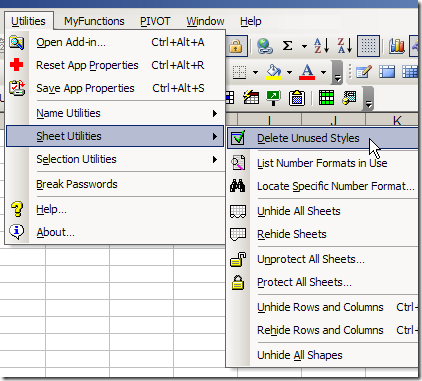
Rob’s add-in has handy tools for working with named ranges, worksheets and selections.
You can quickly protect and unprotect all the sheets in a workbook, remove unused styles, and my favourite – centre across a selection, without merging cells.
There are many more features, and you can read the full description on Rob’s page for Excel Utilities.
Pivot Power
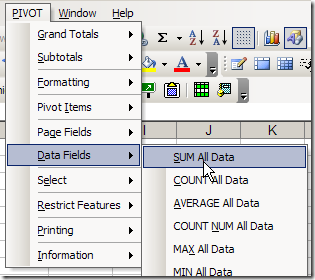
Since I work with pivot tables so often, I created my own pivot table add-in, that you can download.
The commands that I use most often are Clear Old Data, and Sum All Data.
Your Favourite Free Excel Add-Ins
What are your favourite free add-ins for Excel? Any of the ones that I’ve listed? Have you created some of your own?
_________________
Patrick: describing Inno Setup as an Excel addin is pushing it a bit
Generally, Am I the only one who doesn’t use Smart Indenter? I have never found a need for it personally.
Thanks Bob, there is a 2007 version on my site, but send away!
Oh is there? I thought I had read that you didn’t have 2007 so invited others to update it for you.
Yes, Dick Kusleika tested it for me and it seems to work.
Bob P – Notice I spelled it both ways. The normal way for my own words, and the longer way as the title of an add-in.
Bob R – Center Across Selection is great, but you need at least a macro if you want a simple button click to do it for you.
Thanks for all the suggestions and links!
Bob R, in the good old days (Excel 97?) there was a Centre Across Selection button on the Formatting toolbar. Suddenly, it disappeared, and was replaced by the evil Merge and Centre button.
Now, as you pointed out, the only way to get to that Centre Across Selection setting is to dig down into the Cell Formatting dialog box. Who has time for that? 😉