
After I create formulas in Excel, sometimes I want to lock in the results of those formulas, so I use the Paste Values command.
For example, I might use the RAND function to create a set of random numbers. After creating them, I don’t want them to change every time the sheet calculates.
Ribbon Commands
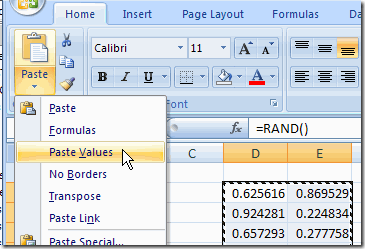
Here’s how I’d use the Ribbon commands to replace formulas with values.
- Select the cells that contain the formulas
- On the Ribbon’s Home tab, click the Copy command
- On the Ribbon’s Home tab, click the lower half of the Paste command, to open the list of options
- Click Paste Values
Old Commands
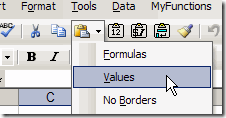
The steps are similar in earlier versions of Excel, but the commands are on the Standard toolbar, and the arrow is to the right of the Paste button.
Use Mouse Shortcut Menu
An even quicker way to paste values is by using a mouse shortcut:
- Point to the border of the selected range, and the pointer should change to a four-headed arrow.
- Press the right mouse button, and drag the cells slightly to the right.
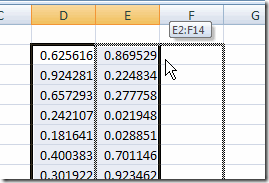
Use Mouse Shortcut Menu - Keep pressing the right mouse button, and drag the cells back to their original location.
- Release the right mouse button and a shortcut menu will appear.
- Click on Copy Here as Values Only.
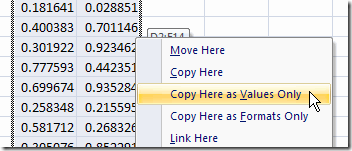
The formulas are replaced by the values of their results.
Video: Mouse Shortcut Paste Values
This technique is a bit tough to explain, so if the written explanation didn’t make sense, here’s a very short video and I made.
____________________
Using Office 2003. I have always used Ctrl C to copy and Ctrl V to paste….But within the last week, Ctrl V has defaulted to “Paste Value.” This is a problem for me, because I cut & paste a LOT of formulas….And I’m so fast/habitual with Ctrl C / Ctrl V, that I often have pasted multiple times before I realzie I have pasted as Values, instead of formulas….Help.
How do I assign the paste values to a short cut?
Making a macro and assigning it a shortcut key is by far the easiest way to do this, but it still really, really sucks because there’s no undo for a macro.
With this, and the addition of about 10 more clicks just to add real error bars to a graph, I think Microsoft is really just trying to send Excel users a message that they’re only for pretty pictures for bullshit meetings, and scientific and technical users need to just go learn R already.
Alt + HVV works great in 2007, I’ll be using that from now on. thx for tip (yes I’m aware this post is over a year old 🙂 )
Dustin, glad you finally found this Excel keyboard shortcut — even if it took more than a year. 😉
That is a sweet little trick!