
When you’re analyzing data in an Excel pivot table, you might want to see the detail behind one of the numbers.
To extract the data, you can double-click a data cell and a new worksheet is created, with the related records.
This is a nice feature, but you’ll end up with extra sheets in your workbook, and will need to clean things up occasionally.
Filter the Source Data
If the pivot table source data is in the same workbook, you can use the following macro, written by Héctor Miguel Orozco Díaz. It filters the source data, based on the pivot items connected to the double-clicked cell.
For example, if you double-click the cell circled in screenshot below:
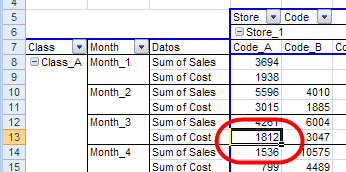
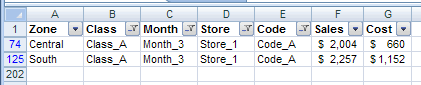
the source data is filtered for Class_A, Month_3, Store_1, Code_A cost.
This lets you focus on the detail records, without creating new worksheets.
Download the Sample File
Héctor’s code is shown on my Contextures site, and you can download the sample file to filter a pivot table’s source data.
There is also a sample file with a shorter version of the code.
________________
Debra
What a brilliant piece of coding by Héctor Miguel Orozco Díaz.
Please pass on my congratulations to him for writing this code and for his willingness to share this code through your site.
As a personal preference, I would like to be taken to the source data showing the filtered subset at the end of the routine, so I have added
Sheets(xSht).Activate
to the end of the main Sub in my copy.
Agreed. This is brilliant. I’m surprised the code is so long. I’ll be interested in stepping through it.
Thanks, Roger and Dick, I’ll pass along your comments. Hector also provided a shorter version of the code, I’ve now posted a link to that.
Deb
Hey,
this is brilliant code. I’m trying to use this on a file I’ve created that has 7 different pivot tables from one raw data set. I’m not so good with macros, but I’ve tried to simply copy in all my pviot tables and then paste my source data in the middle of his data, but the code keeps giving me an error. Any idea no how I can tweak the code to get it to work for me?
This code is exactly what I’ve been looking for, however I am unable to get it to work properly with my source data and pivot table. I keep getting a Runtime error ‘1004’: Application defined or object defined error at this line
With .RowRange: Set rowsF = Intersect(rowsD, .Resize(, .Columns.Count – lblFlds)): End With
Hi Tom
Whilst I am not the author of the code, I would be happy to take a look and see if I can figure what is going wrong.
Send me a copy of your file to
roger at technology4u dot co dot uk
Change the at and dots to make a valid email address
Regards
Roger
could you help me im getting the same error