
In an Excel file with lots of worksheets, how do you help users navigate through the workbook?
Here are a few of the methods I’ve used. and I’d be interested in hearing about them. I’m sure you’ve found your own creative ways to deal with the Excel workbook navigation problem.
Add Drop Down List of Sheets
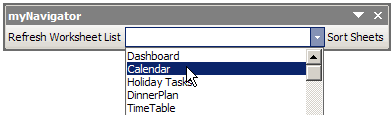
One workbook navigation solution is to install an add-in that lists all the sheets in the active workbook, in a toolbar drop-down list.
For example, Dave Peterson created a Navigation Toolbar for Excel 2003, that you can download from my Contextures site
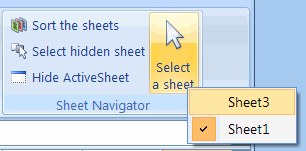
Excel Ribbon Version
Later, Ron de Bruin adapted Dave’s VBA code, to create a Navigation Command for Excel 2007.
Go to that link to download Ron’s sample file, from my Contextures site.
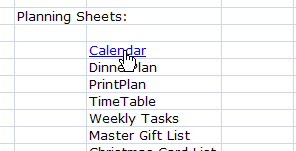
Create List of Hyperlinks
A non-programming option is to create a list of sheets on a worksheet, then change each sheet name into a hyperlink.
Create the Hyperlinks
To create your own list of worksheet hyperlinks, follow these step:
- Click on a cell that contains a sheet name.
- On Excel’s Ribbon, click the Insert tab (In Excel 2003, click the Insert Menu.)
- Click Hyperlink, to open the Insert Hyperlink dialog box.
- In the Link To list, click on Place in This Document
- In the list of places in the document, click on a sheet name, then click OK.
It will take you a few minutes to set up all the hyperlinks in a large Excel workbook, but they’ll make it easy to navigate through the sheets.
Get the Hyperlink Workbook
Based on sample code from Sam and Andrew in the reader comments below, I’ve posted an Excel Table of Contents workbook in which you can create a popup list or or a list with sheet hyperlinks.
Go to the Excel Sample Files page on my Contextures site, and in the UserForms & VBA section, look for UF0007 – Create a Table of Contents
More Hyperlinks Info
To see more hyperlink tips, videos, and macros, go to the Hyperlinks and Hyperlink Function page on my Contextures site.
There are hyperlink tips, videos, and macros, and sample files to download.
______________________
Thanks for all the excellent tips. If you also make the ‘Web’ toolbar visible, you can use the ‘Back’ button to jump back to the Table of Contents after hyperlinking off to another sheet (also works in Word with any internal TOC or crossreference links).
I need a code that will update a TOC when a new workbook is created… any advice i can get would be great!
plz i m looking databse code
i have made userform through VBA in Excel
but i unable tract the code as i made in list as name ,location,date of joing ,and basic salry
its lake simple data base,
we need enter data through userfrom and will enter dirctly that excel sheet
plz forward me some
code for this
hoping for posotive reply
Can I create a content page within one worksheet? I have one workshet and it is very long.
Yes, you can create the hyperlinks at the top of the sheet, instead of putting them on a different sheet.