Multiple Selection Drop Down With Codes

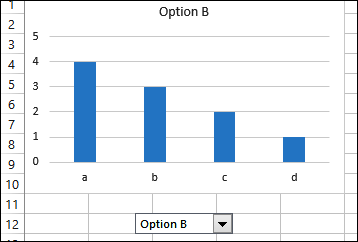
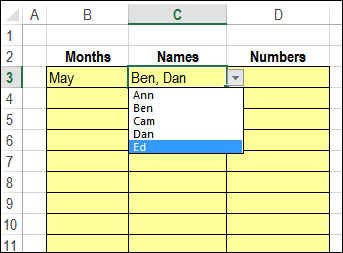
There is a sample file on my website that has VBA code for selecting multiple items from a data validation drop down list. You can insert all the selected items into the active cell, or down the adjacent column, or across a row. Today’s example shows how to make a multiple selection drop down with codes

Continue reading “Multiple Selection Drop Down With Codes”

Excel Roundup 20140120

If you’ve ever been disgruntled with your bank, you might enjoy Ben Orlin’s vision of how he would run a bank, on his Math With Bad Drawings blog. Instead of annual compounding, he’ll offer other options, such as:

  • Compounded Madoff-ly: After years of dubiously high interest, it will come out that I’m just typing random numbers into the spreadsheet.
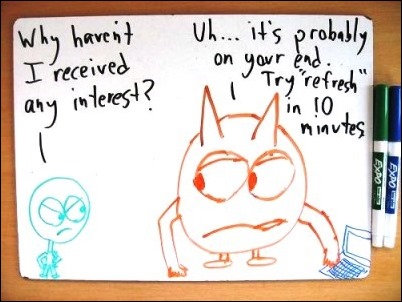
  • Compounded sporadically: Your balance grows whenever I remember to update the spreadsheet.

Each option is illustrated with a bad drawing, like this one.

Your balance grows whenever I remember to update the spreadsheet. https://mathwithbaddrawings.com

Contextures Posts

Here’s what I posted last week:

  • Finally, for a humorous peek at what other people are saying about Excel, read this week’s collection of Excel tweets, on my Excel Theatre blog.

Other Excel Articles

Here are a few of the Excel articles that I read last week, that you might find useful:

  • Alex Roe, in the Italy Chronicles blog, wonders if Excel can save Italy, as one of their political leaders suggested.
  • Winston Snyder couldn’t find a pivot table style that he liked, so he wrote a macro to format specific ranges in the table.

Upcoming Courses

No matter how long you’ve been using Excel, there’s always something new to learn.

  • Sign up for one or more of the free Business Analytics webinars offered in the 24 Hour PASS series, sponsored by Microsoft, Cisco and Dell. Topics inlclude: “Advanced Analytics in Excel 2013”, “Querying in DAX”, and”Predictive Analytics for Absolute Beginners”. The online sessions run on Feb 5th and 6th, and you can see the schedule here: 24 Hour PASS Schedule
  • Mynda Treacy’s Excel Dashboard course is open for registraion, and I highly recommend this online course, which has excellent content, and great student support from Mynda. Click the banner below, for more information.

Excel Dasboard Course

What Did You Read?

If you read any other interesting Excel articles last week, that you’d like to share, please add a comment below.

Please include a brief description, and a link to the article.

__________________________________

Learn Excel Dashboard Course

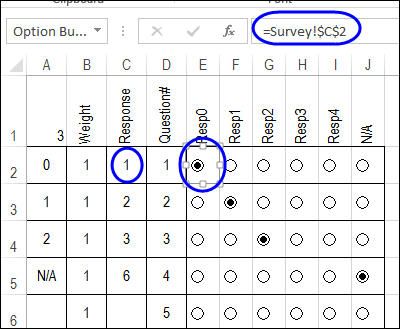
Link Check Boxes to Cells With a Macro

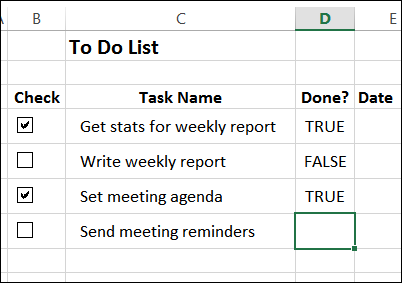
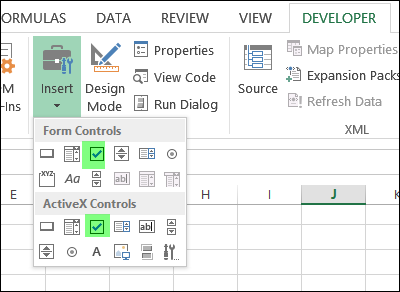
You can use check boxes on a worksheet, and link the results to a cell. If the box is checked, the cell shows TRUE, and if it’s not checked, the cell shows FALSE or the cell is empty. This makes it easy for someone to give a quick answer to a question, or select an option. You can even link check boxes to cells with a macro, so something happens automatically when the box is clicked.

Continue reading “Link Check Boxes to Cells With a Macro”

Excel Roundup 2014013

In The Guardian’s Data Blog column, where the tagline is “Facts are Sacred”, things took a less lofty turn last week. You can go back to the good old days in math class, where you entertained your friends by writing words on your calculator.

In the screen shot below, you can see the cheerful greeting from our Sharp Compet CS-1130 financial calculator. I’m not sure how old it is, but it’s probably from the 1980s, and still working well. Are you still using an old school calculator?

calculatorhello

Contextures Posts

Here’s what I posted last week:

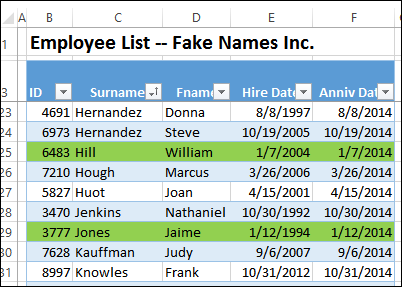
  • Calculate upcoming anniversaries for employee hire dates, and highlight them with Excel conditional formatting.
  • Dynamic date range filters aren’t available in pivot table Report Filters — only in Row and Column filters. Use this workaround show a date range, without the date details.
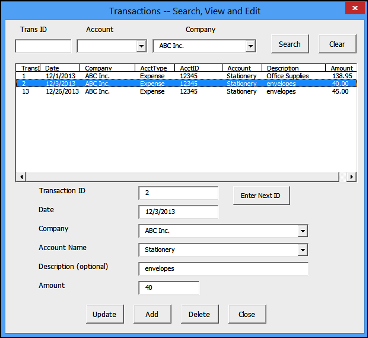
  • There’s a new sample file in my Excel UserForm course, with search boxes that let you find specific records, then update or delete them.
  • Finally, for a humorous peek at what other people are saying about Excel, read this week’s collection of Excel tweets, on my Excel Theatre blog.

More Excel Articles

Here are a few of the Excel articles that I read last week, that you might find useful:

  • Apparently there is a problem with promiscuous spreadsheet headings, especially in the government. Were you aware of this? Are you guilty of this bad behaviour?
  • On the Data Scopic blog, Oz du Soleil asks a few spreadsheet experts, where are Excel & Google Spreadsheet Headed? You can read Part 1 and Part 2

Power BI Articles

It was a busy week for articles about Microsoft’s Power BI tools, so I’ve given them a separate section. Also, see the 24 Hour PASS webinars in the Upcoming Courses section, below.

  • Maybe this is what prompted all the articles — Microsoft announced its Power BI pricing last week, and you can see the plans and prices here.
  • Dick Moffatt describes the challenges and satisfaction of moving a high-maintenance Excel solution to a zero-maintenance PowerPivot model. Take a minute and leave a comment, to let Dick know what you think.

Upcoming Courses

No matter how long you’ve been using Excel, there’s always something new to learn.

  • Sign up for one or more of the free Business Analytics webinars offered in the 24 Hour PASS series, sponsored by Microsoft, Cisco and Dell. Topics inlclude: “Advanced Analytics in Excel 2013”, “Querying in DAX”, and”Predictive Analytics for Absolute Beginners”. The online sessions run on Feb 5th and 6th, and you can see the schedule here: 24 Hour PASS Schedule
  • Mynda Treacy’s Excel Dashboard course opens for registration tomorrow, Jan 14th. I highly recommend this online course, which has excellent content, and great student support from Mynda. Click the banner below, for more information.

Excel Dasboard Course

What Did You Read?

If you read any other interesting Excel articles last week, that you’d like to share, please add a comment below.
Please include a brief description, and a link to the article.
__________________________________
Learn Excel Dashboard Course

Highlight Upcoming Employee Service Anniversaries

Here at Contextures, there aren’t very many employees to keep track of. There’s just me, and I always remember my hire date anniversary, and take myself out for a nice lunch. However, you might have more people on your employee list, and you can use Excel to highlight upcoming employee service anniversaries.

Continue reading “Highlight Upcoming Employee Service Anniversaries”

Update to the Excel UserForm Course

Over the holidays, I added a new bonus file to my Excel UserForm course, and if you’ve previously purchased the course, you’ll receive the update automatically.

[Update: This course is no longer available]

The new file shows how to add Search boxes at the top of the form. Then, click a button to show a list of all the matching records in the database worksheet. Click on an item in the list, and its details appear in the text boxes below.

searchboxes01b

The sample uses transaction data, but you could adapt it for other types of records.

See the Course Details

Click here to see the course details, and watch the Search Boxes demo video: Excel UserForm Course

NOTE: The course price is going up on January 15th, so if you’re thinking about buying the course, don’t wait too long!

_________________

Excel Roundup 20140106

Happy New Year! I hope you had time to relax over the holidays, and didn’t have to endure too much cold weather and snow.

It’s a little late for a holiday poem, but I enjoyed this one on the Code? Boom. blog. – I’m an Excelebrity, get me out of here. The poem is a variation on Night Before Christmas, and ends with:

And I heard them exclaim, as they walked out of sight—
“Excel’s not that bad” “Yeah, I think it’s alright.

There are also some downloadable files, with Excel activities for grade school students.

codeboom_excelebrity

Contextures Posts

I took some time off blogging, to enjoy the holidays, and just made a few posts since the last roundup:

My old mouse started acting up, so I had to get a new one. Which do you prefer, wireless mouse or wired? The wired one has the advantage of never needing batteries, but that long tail can get in the road sometimes!

For a humorous peek at what other people are saying about Excel, read the December 27th collection of Excel tweets, on my Excel Theatre blog.

And here is a link to the January 3rd edition: Excel Tweets collection. There’s usually a tweet or two that sounds like something I’d comment on! How about you?

Other Excel Articles

Here are a few of the Excel articles that I read last week, that you might find useful:

Excel Errors: Good news – the Daily Dose of Excel blog is up and running again, after some server problems. Dick Kusleika takes a look at error handling via an error class.

Sports: If you like soccer (football), you might enjoy Jough Donakowski’s article on keeping sports statistics in a spreadsheet.

Charts: The always informative and entertaining Science Goddess finds quick ways to improve the appearance of Excel charts. In another post, she tackles line charts.

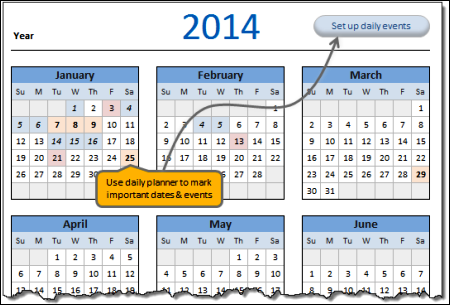
Calendar: If you’re planning your activities for 2014, you can download a free Excel calendar template from Chandoo’s website. You can see a screen shot of the calendar below

Tables: For more details on Excel’s named tables, you can read the Customizable Spreadsheet Table Styles patent application that was published last week.

Power Query: Chris Webb shows how to use local groups in Power Query, with an example of grouping by time ranges.

chandoocalendar2014

What Did You Read?

If you read any other interesting Excel articles last week, that you’d like to share, please add a comment below.

Please include a brief description, and a link to the article.

__________________________________
Excel Roundup 20131223

What happened in the world of spreadsheets last week? Here’s the latest roundup.

Contextures Posts

Here’s what I posted last week:

To narrow down the choices for data entry worksheets, you can remove used items from a data validation drop down list. That’s a big help in some sheets, where you shouldn’t choose the same item twice.

An updated version of my data validation combo box technique, that lets you add new items on the fly.

Finally, for a humorous peek at what other people are saying about Excel, read this week’s collection of Excel tweets, on my Excel Theatre blog.

Other Excel Articles

Here are a few of the Excel articles that I read last week, that you might find useful:

Excel Card: If you haven’t sent your Christmas cards yet, you could use this Excel greeting card, from Jordan Goldmeier.

Totals: Apparently it was sporadic totals week, and nobody told me! To see how to achieve this, you can watch videos by Chandoo, Mr. Excel and Kevin Lehrbass. Pick just one, or watch all three! There is a screen shot of sporadic totals below, if you’re not sure what they are.

REST API: Microsoft’s Excel team shows how you can get started using the Excel Services REST API in the cloud.

Excel Books: Simon Murphy wonders if he should write a book about Excel development. What do you think? Maybe he could start with a chapter or two, sold as a mini-book on his website, and see how that goes.

Excel Bug: Charles Williams has found a Status Bar Calculate bug in Excel 2013, and he hopes it’s fixed soon.

Excel Front End: Scott Lyerly is looking for your input on his Excel as a front end solution. What do you think about his idea of keeping SQL statements in a database table, and using those to update the code in an Excel file?

sporadictotals01

What Did You Read?

If you read any other interesting Excel articles last week, that you’d like to share, please add a comment below.

Please include a brief description, and a link to the article.

__________________________________
Add New Items to Data Validation Combo Box

There are a few versions of the data validation combo box technique on my website. The files use programming to make a combo box appear when you click, or double-click, on a cell that has a drop down list. The latest version shows how to add new items to data validation combo box lists.

Continue reading “Add New Items to Data Validation Combo Box”