
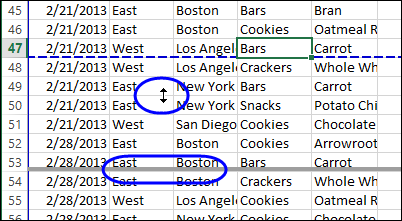
Have you seen this? When you open an Excel file, or switch to a different worksheet, there’s a large “Page 1” watermark in the middle of the sheet. What is it, and how did it get there?
Author: Debra Dalgleish
Nesting IF Functions in Excel
The IF function lets you test something in Excel, and show one result if the test result is TRUE, and another result for FALSE. For example:
=IF(“Debra met Excel MVPs last week”,”Show Picture”,”No Picture”)
And yes, I did meet some Excel MVPs last week, and you can see a picture at the end of this article.
Check Cell Value
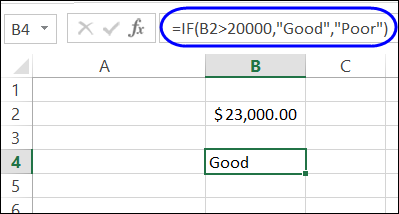
As another example of the IF function, you can check the value in a cell, and show “Good” if the value is $20,000 or more. For lower amounts, the result is “Poor”.
=IF(B2>20000,”Good”,”Poor”)
Nested IF Functions
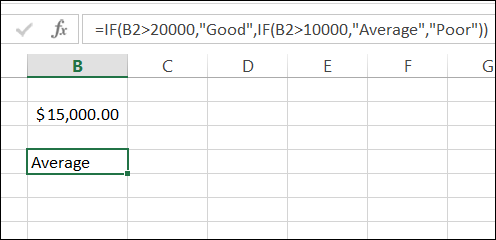
You can use more than one IF function in a formula too. Instead of just Good or Poor, you can nest a second IF in the formula, to test for a lower amount – $10,000 – and rate those results as “Average”.
=IF(B2>20000,”Good”,IF(B2>10000,”Average”,”Poor”))
Watch the IF Order
The key to nested IF functions is to put the tests in order of difficulty.
- In this example, 20000 is the highest amount that we’re testing for, so that test comes first.
- Next, we test for the lower amount, 10000, and any value that is over that amount is rated as “Average”.
- Finally, any amount that fails both tests is rated as “Poor”.
=IF(B2>20000,”Good”,IF(B2>10000,”Average”,“Poor”))
Meeting at Microsoft Canada
Last week, I attended an MVP Open Day at Microsoft Canada, and enjoyed spending time with fellow Excel MVPs, Vittorio Covato, Domenic Tamburino, and Eduardo Pineiro.
They’re all formula experts, who share their Excel expertise in the online forums. “IF” you’ve asked a formula question online, there’s a good chance that they’ve helped you with a solution.
Excel MVPs
In the photo below, you can see Vittorio and Domenic, who kindly allowed me to share this picture with you. Okay, I might have strong-armed them into agreeing, but I thought that you’d like to meet them too.

____________
Find and Replace Line Breaks in Excel
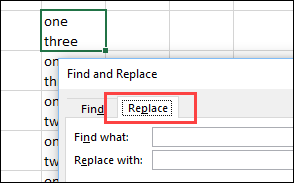
When you want to create a line break (line feed) in a cell, you press Alt + Enter, to start a new line. You can put one or more line breaks in a cell, to make the contents easier to read. But how can you find and replace line breaks in Excel?
Continue reading “Find and Replace Line Breaks in Excel”
Was Your Career Helped by Excel?
Last week someone sent me a lovely email, describing a young woman’s career beginnings. They said I could share the story with you, but asked to remain anonymous.
Maybe your career began in a similar way.
- Did you start out with an Excel career in mind?
- Did you struggle at first, and did Excel help you move forward?
- Did you help someone else get ahead, by giving them a few Excel pointers?
The Story
Here’s the story from the email:
My daughter had a very rough first year of work after completing a marketing degree, basically having to act as a receptionist and assistant dogsbody to lots of people.
Then she landed a job at a small firm where she found they were doing things extremely manually. I introduced her to pivot tables, and with a bit of help, she has completely transformed their spreadsheets so they can do in minutes what took them days and weeks, without any errors.
The best part is that her new skills and spreadsheets have, for the first time, given her something she can call her own, and respect from her colleagues. She is fiercely proud of her work, and keen to learn more. What a transformation!
It’s hard to imagine that pivots could be girl power, but here they were.
Go pivots!
Did you know what a dogsbody was? I’d never heard that before, but Wikipedia explained that it’s someone who does grunt work.
It’s great to see that people are getting recognition for their Excel skills, and saving time, and reducing errors in their work.
Excel Resources
If you’re trying to learn more about Excel, but don’t have a free consultant at home, you’ll find lots of free tutorials here on this blog, on my pivot table blog, and on my Contextures website.
And for the latest Excel courses, Excel books and Excel tools, go to the Debra’s Excel Picks page, on my Contextures website

____________
Sum a Filtered List with AGGREGATE Function
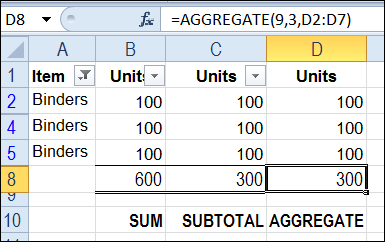
The SUBTOTAL function is great for calculating totals on a filtered list in Excel. Unlike the SUM function, SUBTOTAL ignores the values in rows hidden by the filter, and can even ignore manually hidden rows, so the total includes only the visible cells.
Continue reading “Sum a Filtered List with AGGREGATE Function”
Quickly Clear Objects from Worksheet
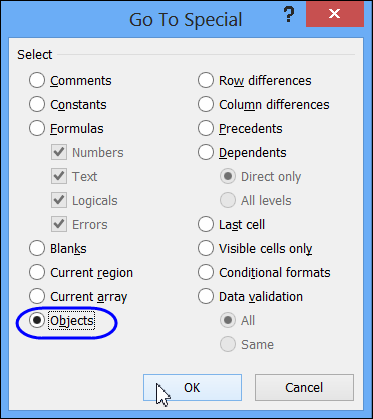
Earlier this week, I copied a list of Excel keyboard shortcuts from the Microsoft website, and pasted it into Excel. Then I noticed that a few objects had come along with the shortcuts list.
Use Slicers to Filter a Table in Excel 2010
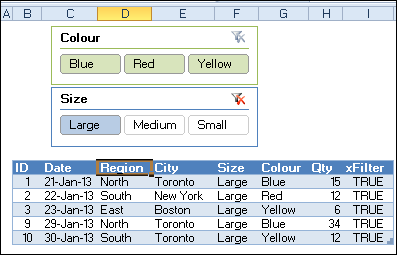
Pivot table filtering was improved in Excel 2010, when Slicers were introduced. Instead of using the drop down lists in the pivot table headings, you can click on a Slicer, to quickly filter the pivot table. You couldn’t use Slicers to filter a table in Excel 2010 though.
Continue reading “Use Slicers to Filter a Table in Excel 2010”
Get Mileage from Excel Lookup Table
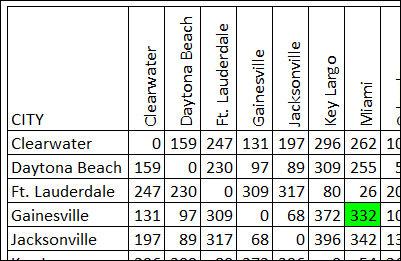
There is a new sample file on my website, in response to a lookup question that someone asked on my Contextures Facebook page. The sample file shows how to get mileage from Excel lookup table, when you pick two cities.
Calculate Annual Costs and Savings in Excel
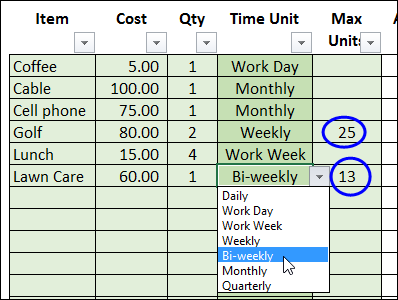
This workbook shows how to calculate annual costs and savings in Excel. It’s amazing how all those little expenses can add up over a year.
Continue reading “Calculate Annual Costs and Savings in Excel”
Counting Query Tables in Excel
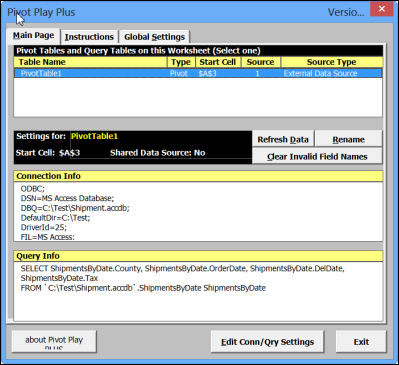
A few years ago, Ron Coderre created his PivotPlay PLUS Add-in that you can download from my Contextures site. This free add-in was designed for Excel 2003, and lets you view and edit the connection strings for pivot tables and query tables that are based on external data queries.