
If you have a list on your Excel worksheet, and a date in each row, you can use a formula to count items in a date range. For example, how many Pencil shipments went out in September, based on the Ship Date column?
Count Items in a Date Range
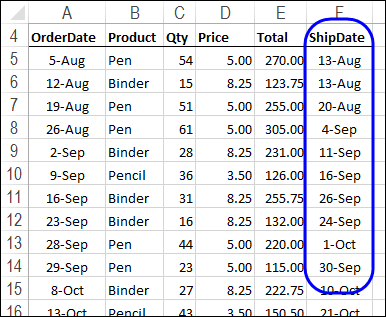
This screen shot shows a few rows of the list with the order details for this example. We’ll add a start and end date for a date range, and count items in that date range.
Use COUNTIFS and Cell References
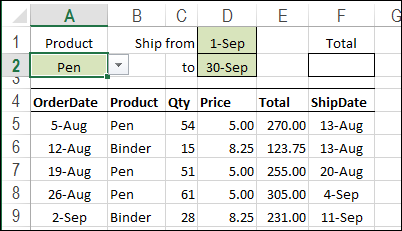
The easiest way to find the number of shipments is to use the COUNTIFS function (Excel 2007 and later) and enter the product name, and the start and end dates on the worksheet.
In this example, there is a drop down list of products in cell A2. The Start date is entered in cell D1, and the End date in cell D2.
Create the COUNTIFS Formula
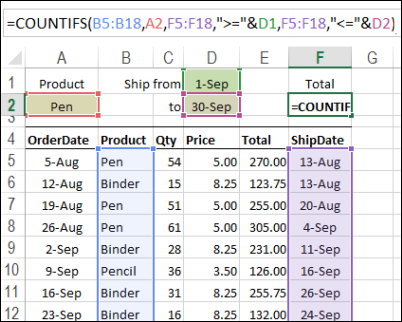
To calculate the number of Pen shipments in the date range, enter this formula in cell F2:
=COUNTIFS(B5:B18,A2,F5:F18,”>=”&D1,F5:F18,”<=”&D2)
- The first argument, B5:B18, is the first range to check for criteria.
- The 2nd argument, A2, is the range with the value for criteria 1 (Product)
- The 3rd argument, F5:F18, is the range to check for criteria 2.
- The 4th argument, “>=”&D1, is the cell with the value for criteria 2 (the Start date), and the operator to use with that value (greater than or equal to)
- The 5th argument, F5:F18, is the range to check for criteria 3.
- The 6th argument, “<=”&D2, is the range with the value for criteria 3 (the End date), and the operator to use with that value (less than or equal to)
The result will show a count of the number of times that all the criteria are met.
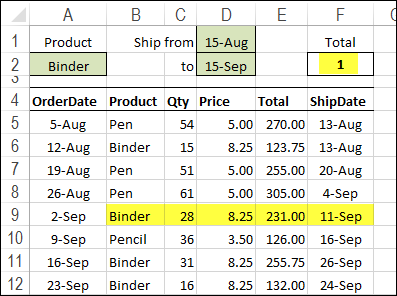
To get the total units for a different date range, change the product name or start and end dates in the heading section. In the next screen shot, the result shows that there was 1 Binder shipment between August 15th and September 15th.
Video: Sum in a Date Range
Using a different example, this video shows how to sum items that fall within a specified date range.
Video: Count Numbers in a Range – COUNTIFS
Using a different example, this video shows how to use the COUNTIFS function to count cells based on a range of numbers.
The minimum and maximum numbers are entered on the worksheet, so it’s easy to change the number range, when needed.
More Excel Date Tips
Fix Excel dates that won’t change Format
AutoFill Excel dates in series or same Date
How to prevent grouped dates in Excel
Excel filter for date range 2 Ways
________________
I have two range in Column A(date) & Column B(Inventory no.). Date and inventory are not unique. I need count of inventory if falls under same date in column A. Please help..
Sir,
I am using excel 2013. I am not getting the result by this formula. Want to count how many records are there in between two dates (D2 and E2). Please solve my problem and send me a excel templet.
D2 = Start Date
E2 = End Date
Table2 = Name range
COUNTIFS(Table2[IN DATE & TIME],”>=”&D2,Table2[IN DATE & TIME],”<="&E2)
Hello there,
I really appreciate the detailed information present on your Website i am stucked at one place in excel want to know if there is any Formula or VB Script which can help me.
I am making a Leave management excel Template from my Office everything is perfect except the date.
eg. if User X has applied leaves from 01-01-2019 till 15-01-2019
I Blocked User Y to apply the Leaves from 1st Jan till 15 via Data Valitation not between field so now he can apply after (15-01-19 till 25-01-19)
Now on the third row for User z i don’t know what to do if i want to block dates for User X + User Y (i.e. User Z should not choose any dates from 01-01-2019 till 15 Jan 2019 & 15-01-2019 till 25-01-2019).
I hope i made it clear.
Thank you in advance.
Regards,
Muzamil.
What would be the formula if I were need to count no. of ShipDate that falls on Sep only?
A2 cell contains date range: 01.2.2019-25.2.2019 how to count number of days in excel
I am trying to find a formula for a spreadsheet that covers the fiscal year with numerous entries per day. I want to have a running total for the year which is easy but then I also want a formula to number rows for the month then by the day. So far I am doing the daily manually but know there has to be a simpler way.
In addition to this I would like to set up an auto count of my rows per day per specific data in another column. Is there a simple way to do this?
Any assistance is greatly appreciated.