
Last week, we had a giveaway for the new Excel Tips Workbook from Vertex42. Thanks to Jon Wittwer for donating the prizes, and here are the winners:
- Tim, with comment 5
- Ute-S, with comment 34
Congratulations, and I will email you later today, to arrange sending your copy of the file.
PivotPower Premium
We’ve been fortunate to have some great prizes for the summer giveaways, and I really appreciate the generosity of my Excel colleagues.
Now it’s my turn to provide the prizes. This week, you’ll have a chance to win a copy of my Excel add-in for working with pivot tables – PivotPower Premium (Ribbon Version). There will be 2 winners, so be sure to enter!
[Update: This product is no longer available]
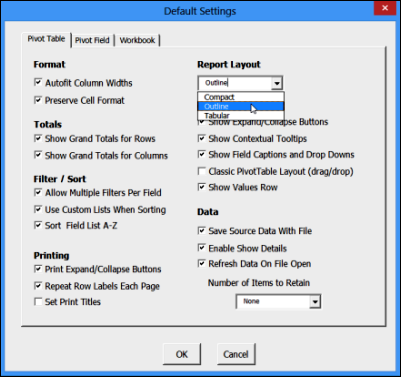
The add-in is easy to install, and is designed for Excel 2007 and later (Windows only). One of its time-saving features is Set Defaults, which lets you store your favourite pivot table settings. Then, select any pivot table, click Apply Defaults, and all those settings are applied.
More Tools for Pivot Table Work
There are many more tools in the PivotPower Premium add-in, including number formats, and a button that changes all the fields to Sum. That’s handy when Excel decides that half of your fields should be “Count of”.
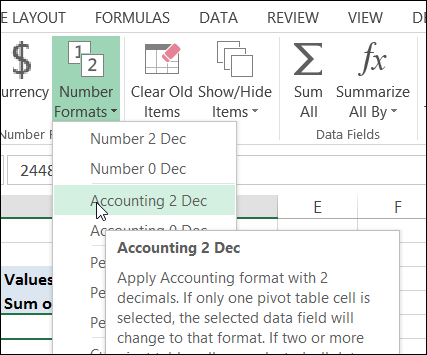
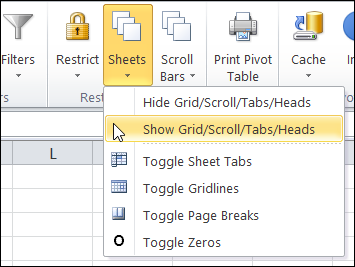
There are even a few tools for changing your workbook and worksheet settings, so your pivot tables can look their best. The screen shot below shows the Ribbon in Excel 2010, and the one above is in Excel 2013.
Enter the Giveaway
I’m picking 2 winners for this giveaway. If you’d like a chance to win a copy, please read the rules, and then make a comment below.
- In your comment, tell me one thing that you love about pivot tables, AND/OR one thing that pivot tables should do better.
- Include your email address, so I can contact you if you win. Your contact information won’t be publicly visible, and it won’t be used for any other mailings.
- The deadline is Wednesday, August 21st, 2013, at 12 noon Eastern Daylight Time.
- One entry per person.
- The 2 winners will be announced on Thursday, August 22nd, 2013.
- Each winner will have 24 hours to claim the prize, and if not claimed, another name will be selected.
__________________________
PivotTables allow for such complex calculations without writing any code.
Creating calculatedfields can be a bit tedious.
I have seen a demo of a power pivot one day. This is a powerful tool.
I like that pivot tables are powerful, so much so that 20 years or so after my first use of pivot tables, I still haven’t made the time to investigate them fully.
I don’t like that I don’t find it particularly easy to get the necessary help tips in various screens related to pivot tables as I’m building or modifying them.
Although I do like using Pivot Tables within Excel, the thing that has proven most useful for me is using them to access data in an Access database and other external files. Data beyond the usual size limit, even in the newer Excel’s, can be accessed. Initial access can be slow, but subsequent manipulations are reasonable. Power Pivot potentially takes it much further, but I haven’t had to use it yet.
The thing that I like the most about Pivot Tables is the quantity of data that can be summarized in just a few clicks, and also the calculated fields. I can’t remind any thing about Pivot Tables that I think should be improved.
Thanks,
Arturo López.
Guadalajara, México.
The thing that I like most about pivot tables is the ability to very quickly modify the entire table by tweaking just one setting (or several settings). What would have taken half an hour (or more) with a standard table can very easily be accomplished in a matter of seconds with a pivot table. It’s a great tool for data manipulation.