
Last week, you had a chance to win John Walkenbach’s new book – 101 Excel 2013 Tips, Tricks & Timesavers, thanks to Katie Mohr at Wiley. Thanks for all your comments – those were great tips!
And the winning entry, chosen in a random draw, in Excel, of course, is:
- Neil, with comment 22.
Congratulations Neil! After Katie sends an email to Neil, he has 24 hours to claim the prize. If not claimed, we’ll go to the next name in the randomly sorted list.
This Week’s Giveaway – Excel Chart Utility
This week, you’ll have a chance to win Jon Peltier’s time-saving and feature-packed Excel Chart Utility, which includes a Waterfall chart builder, along with 7 other custom chart types. If you build charts, this tool can save you countless hours.
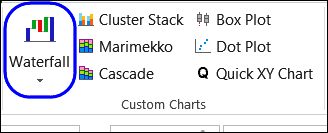
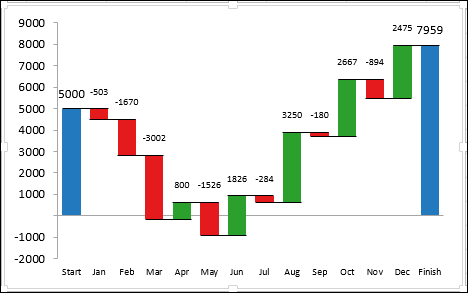
For example, to build a Waterfall chart, you just select your data, click the Waterfall Chart command on the Ribbon, set a few options, and click OK, and your waterfall chart is ready. It even works if the total values are negative, as you can see in the example below.
Charting Tools and More
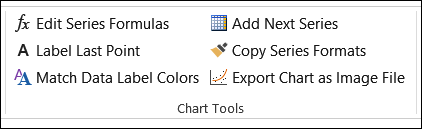
In addition to the 8 custom charts, there are 6 useful charting tools.
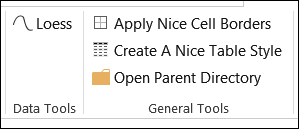
There is a data tool too, and 3 general tools, to make your Excel work easier.
You can see how well the Excel Waterfall Chart builder works, in this short video.
Enter the Giveaway
Jon Peltier has kindly provided a copy of his Excel Chart Utility for this giveaway. If you’d like a chance to win this awesome add-in, make a comment below.
- In your comment, tell us which of the utility’s features you’d use most often, and why.
- Include your email address, so Jon or I can contact you if you win. Your contact information won’t be publicly visible, and it won’t be used for any other mailings.
- NOTE: Deadline is extended to Monday, August 5th at 12 noon, Eastern time. (PREVIOUS DATE: The deadline is Wednesday, July 31, 2013, at 12 noon Eastern Daylight Time.)
- One entry per person.
- NOTE: Winner will be announced on Tuesday, August 6th. (PREVIOUS DATE: The winner will be selected in a random draw, and announced here on Thursday, August 1st.)
- The winner will have 24 hours to claim the prize, and if not claimed, another name will be selected.
NOTE: Because there were problems with the comments, the deadline is extended to Monday, August 5th at 12 noon, Eastern Time. The winner will be announced on Tuesday, August 6th.
___________________________________
I would most likely try to find an application for each distinct utility, but the main one that comes to mind is the waterfall chart. I currently create manual charts to “bridge” the gap between actual and plan activity on a monthly basis. I’m sure this utility would greatly simplify the process.
Installed on my own PC I would use the waterfall chart the most and get away from the dependency of a shared corporate licence for Thinkcell!
I’d use the waterfalls most for tracking stock incoming, outgoing, sold, brought, total etc which is something i already have to do for monthly reports but this would save me quite a bit of time and finally allow me to get rid of the cheat tab i have to include as a template to build it from
Waterfall and Boxplot…
I would definitely be using BoxPlot
The waterfall chart. The best graphic to analyse variances to a target.