
To make it easy for people to enter data on a worksheet, you can insert a check box control, using the Form Control tools on the Developer Tab. Then, use check box result in Excel formula solutions.
Form Controls on Developer Tab
If you don’t see a Developer tab, there are instructions here for showing it.
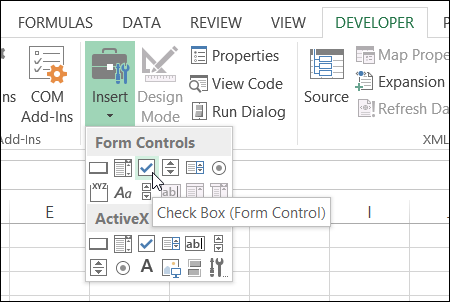
Adding these controls to a worksheet can make it easy for people to enter data – they just click to select the option that they want.
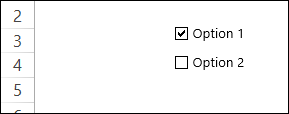
But, after they’ve checked that box, how do you capture that information, and use it in your formulas?
Link the Check Boxes to Cells
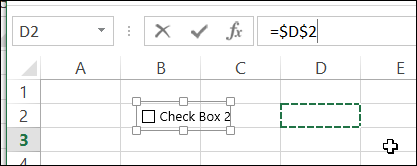
When you add a check box to the worksheet, it isn’t automatically linked to a cell. If you want to use the check box result in a formula, follow these steps to link it to a cell:
- To select a check box, press the Ctrl key, and click on the check box
- Click in the Formula Bar, and type an equal sign =
- Click on the cell that you want to link to, and press Enter
Check Box Result is TRUE or FALSE
If you have multiple check boxes, you can link each one to a separate cell on the worksheet.
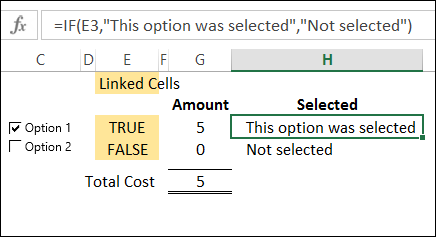
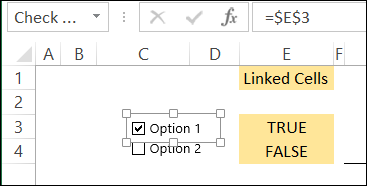
In the screen shot below, Option 1 check box is linked to cell E3, and Option 2 is linked to cell E4. When the box is checked, the linked cell shows TRUE, and if it is not checked, the linked cell shows FALSE.
Use the Check Box Result in a Formula
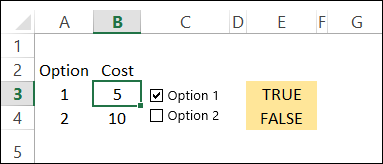
In this example, each option has a price, and I’ve entered the prices in column B.
In a worksheet formula, if you use TRUE or FALSE in a calculation:
- TRUE has a value of 1.
- FALSE has a value of 0.
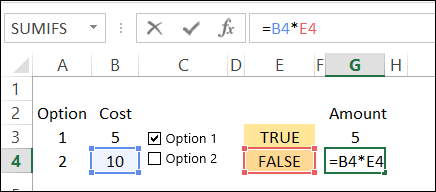
So, we can use the results in the linked cells, to calculate the cost for each option. We’ll multiply the cost in column B, by the check box result in column E.
- The formula in cell G3 is: =B3 * E3 and the result is 5, because 5 multiplied by 1 equals 5.
- In cell G4, the result is 0, because 10 multiplied by 0 equals 0.
Test the Result with IF
If your formula is fancier than a simple multiplication, you can use the IF function to test the result in the linked cell.
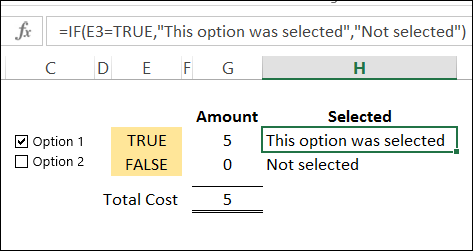
In cell H3, the following formula shows a text string if cell E3 is TRUE, and a different message if it is not TRUE.
=IF(E3,”This option was selected”,”Not selected”)
Another Check Box Formula Example
To see another example of using a check box result in a formula, take a look at Dave Peterson’s loan table formula on my Contextures website. There is a sample file that you can download.
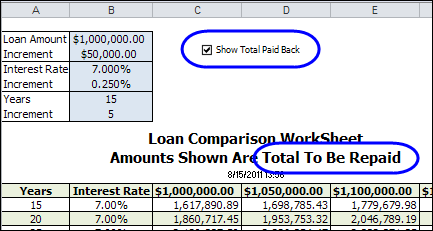
A check box at the top of the worksheet is linked to cell C1. Check that box if you want to see the total amount that will be paid back, instead of the monthly payment required.
If cell C1 is TRUE, then the monthly payment in the table is multiplied by the number of payments. If C1 is FALSE, the monthly payment is multiplied by 1.
This is the formula in cell C12:
=-PMT($B12/12,12*$A12,C$11)*IF($C$1,$A12*12,1)
_____________________
Hi, I’m building a checking account ledger and want to link a my balance to a checkbox. I don’t want the balance column to adjust unless the check-box is selected. Like a reconcile function you see on some finance apps. Thanks.
Hi,
I am trying to create a score sheet for a project, I have a group of yes/no check boxes that if 1 is yes the score is 1, but if two or more are checked the score is 2. I can do the true/false and count, but not sure how to make a group of 5 only equal 2
I’m trying to find a way to add a check box option, but only if a certain selection is picked from a drop down menu. For example:
If “2017” is selected from a drop down menu list in Column A then a check box needs to appear in Column B.
Is this possible?
Hi,
Do you have any idea why suddenly in my spreadsheet, all cells linked to TRUE & FALSE are not calculated when i tick/untick the checkbox?
Thank you.
1 box = 8picess convert excel formulas, totel tiles 3 box, 2box 5 picess sales (3-2.5=3picess) stock 3picess how to formula for excel pls formula send
1 box = 8picess convert excel formulas, totel tiles 3 box, 2box 5 picess sales (3-2.5=3picess) stock 3picess how to formula for excel pls formula send
Hi I have one box link to a cell and I wouyld liek to create a formula which works as:
if the box is ticked and cellA is> the cellB then Xvalue but if cellB>0, then value Z
Coudl you help me to create the formula which could work?
Like I have one tick box link to a If formula but I want to Hav 3 options as answer and not only true or false