
In the screen shot below, one of the report filters in a pivot table is about to be changed. If you have multiple pivot tables in a workbook, you can use programming to update all (or some) of the pivot tables, if one pivot table’s filters are changed.
Pivot Table Report Filter
Here is one of the pivot tables, with a Report Filter being changed.
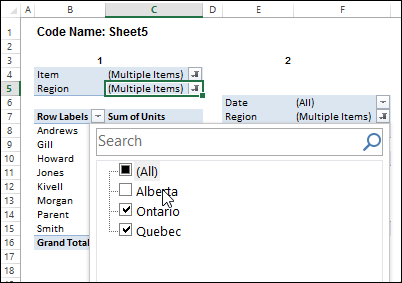
I’ve written sample code that updates multiple pivot tables, and one is changed, and last year, Jeff Weir shared his version of the code, which runs very quickly.
Pivot Table Code Benefits
Jeff’s code has another advantage too – in his version, you can specify:
- any sheets you DON’T want the macro to check
- any specific pivot tables that you DON’T want the macro to synchronize.
NOTE: Jeff’s code is intended for pivots that DO NOT all share the same cache. If your pivots all share the same cache, then you can use my approach set out here: Filter Multiple Pivot Tables With Excel 2010 Slicers
To confirm whether or not your pivots share the same cache, you can use my code here: Excel Pivot Caches
Improved for Excel 2010 and Later
This week, Jeff is sharing his latest version of his code. It now checks the Excel version that you are using.
- If you are using Excel 2010 and later, the code uses Slicers to change any pivot tables that share the same cache, as this is much faster. Any other pivots are then processed without slicers.
Download the Sample File
To download this version of the sample file, with Jeff’s code, please visit the Sample Files page on the Contextures website.
In the Pivot Tables section, look for: PT0029 – Change Pivot Table Fields on Specific Sheets
The file is in xlsm format, zipped, and contains macros. Enable the macros when opening the file, if you want to test the code.
Note: Jeff’s sample file was updated on June 16, 2013, so please download the new version if you have an older copy of the file.
__________________
Hi Leigh. Sorry for the delayed response. Can you confirm the following:
1. What version of Excel are you using?
2. Do the PivotTables have different data sources? (Bonus question: do you know what cache each of them belongs to)
Jeff,
1. Excel 2010
2. There are 4 pivottables actually, with 2 using the same one (PivotCache 2) and then 2 using the same one (PivotCache 3).
Thanks,
Leigh
Ok. Do you have some slicers in the workbook that are connected to these pivots? My original code doesn’t account for that. I have a revised routine that I haven’t quite finished that takes a different approach: it syncs one PivotTable in cache A to another PivotTable in cache B, and it relies on Slicers to sync all other Pivots in Cache A with each other, and all other Pivots in Cache B with each other. That routine is in a book I’m working on, and the book should be available soon. I might ask Deb if I can post the code on her site too
Jeff,
Yes I do have slicers in the workbook connected. I thought your code uses slicers when possible. Am I misunderstanding? Sorry for the confusion.
Thanks, Leigh
Yes, my code does use slicers. It just doesn’t take into account the fact that you might already have some set up. Hence the error. My new approach – which isn’t quite ready for public consumption – is much more efficient. Flick me an email at [email protected] and I’ll send you a sample workbook of what I’ve got so far in regards to it. (I still plan to make it even better over the next couple of weeks.)
Jeff,
I have multiple pivot tables all connecting to different data sources and I’m looking for a way to sync them with a filter or slicer on the dashboard. They all have a common category “Portfolio” which would be what the filter is based on. I have pretty limited VBA knowledge, but have been searching through the comments on here and related posts trying to find an answer. It seems like you had something that might work going on last year – do you mind posting it?
Thanks so much!
Christy
Hi Christy. I’m in the process of turning this into a commercial addin, so I can’t publicly share the code, I’m afraid. But if you’re interested in buying the commercial add-in, flick me an email at the above address.