
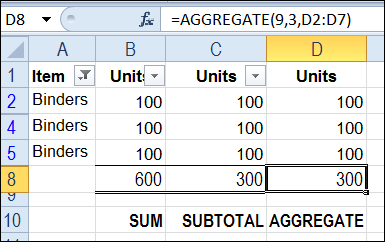
The SUBTOTAL function is great for calculating totals on a filtered list in Excel. Unlike the SUM function, SUBTOTAL ignores the values in rows hidden by the filter, and can even ignore manually hidden rows, so the total includes only the visible cells.
A new function, AGGREGATE, introduced in Excel 2010, is similar to SUBTOTAL, and has a couple of advantages.
More Functions in AGGREGATE
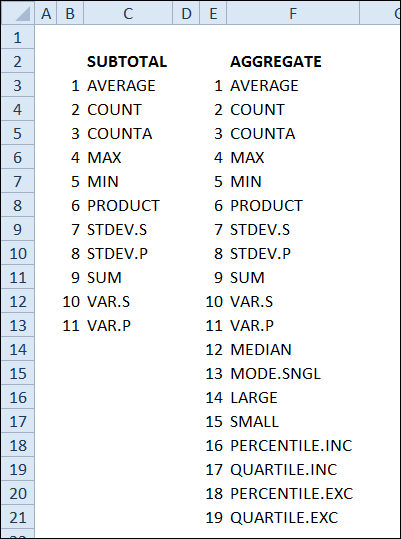
The first advantage is that AGGREGATE has 19 functions, compared to SUBTOTAL’s 11 functions.
Ignore Errors with AGGREGATE
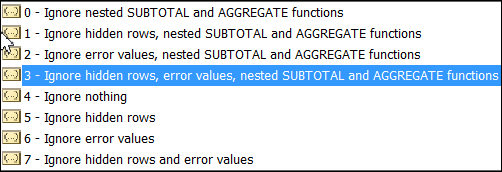
Another advantage is that AGGREGATE can ignore errors, as well as hidden rows. You can choose from a list of options, for what to ignore.
Watch the Video
Watch this short video to see the steps for setting up an AGGREGATE total, and see how it differs from SUM and SUBTOTAL
Download the Sample File
To download the sample file, please visit the Excel Sum Functions Examples page on my Contextures website.
___________
Haven’t come across it before – but that’s a rather excellent function. Pity they don’t it available for pivot tables. I’ve been asked more than once about using a median in a pivot table and I’ve usually sent them over to your solution 🙂 Thanks for excellent video – really well explained and clear as usual. Anne
@Anne, you’re right — it would be wonderful to have all those functions available in pivot tables too.
@Bob – really like that idea. So true – people don’t remember what 9 – nice solution..
very useful, thanks Debra
Thanks !!!
now if they could just add “COUNTIF” and “SUMIF” to that list…