
In Excel 2010, you can use Slicers to change the filters in several pivot tables, with a single click.
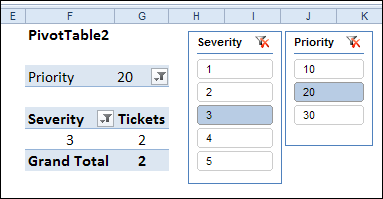
If you don’t have Excel 2010, or don’t want to use Slicers, you can use programming to change multiple pivot table filters with a single click.
Yes, it’s more work than adding a Slicer, but better than manually changing all those pivot tables!
Change All Pivot Tables
Last December, I described how to add code to your workbook, so if you changed one pivot table filter, all the other pivot tables in the workbook would change too.
Click here to read that article, and the comments: Change All Pivot Tables With One Selection
In those comments, people asked how to modify the code, so only the pivot tables on the active sheet were affected, or only a specific field was changed.
In response to those comments, I’ve created a new version of the sample file.
Change All Pivot Tables or Active Sheet Only
The latest sample file for changing pivot table fields has 3 variations on the “Change All Page Fields” code.
It also changes the “Multiple Item Selection” settings to match changed page fields (Excel 2007 and Excel 2010 only).
The three variations are:
- Change any page field in a pivot table, and all matching page fields, on all sheets, are changed.
- Change any page field in a pivot table, and all matching page fields, on the active sheet only, are changed.
- Change a specific page field in a pivot table, and that page field, on the active sheet only, is changed.
Download the Sample File
To see the code, and try the variations, you can download the sample file from the Contextures website. The file will work in Excel 2007 or Excel 2010, if you enable macros.
PT0027 – Change All Page Fields – All Sheets or Active Sheet
You can also download the other sample files, showing how to change a specific field, or all fields, in the workbook’s pivot tables.
PT0008 – Change Multiple Page Fields
PT0015 – Change Multiple Different Page Fields
PT0016 – Change Page Fields With Cell Dropdown
PT0021 – Change All Page Fields
PT0025 – Change All Page Fields with Multiple Selection Settings
______________
Thanks for this coding example! I am trying to use PT0025 to update a number of pivot tables/charts with like report filters in the same workbook. I found that a couple of the charts break if they are not on the active sheet when the filters are changed. They are charts with a secondary axis and/or two different chart types for different each different data series. It seems to reset the chart so that all data is the same type and on a single axis. Any idea if there is a way to prevent that reset from occurring when the filter is changed on another pivot?
Am very new to this and realise how poor my knowledge is. The above is great for pivot to pivot updating. My PivotTables don’t share the same data sources (meaning I can’t use Slicers). Is it possible to code a filter update and point it at a cell that is a formula that changes when a drop down validation box is selected in another sheet? Thanks for looking.
cujimmi: take a look at my routine at http://blog.contextures.com/archives/2013/06/18/update-multiple-pivot-tables-20130618/ which should let you do what you need. It chains the Pivots together, and handles pivots on different caches.
thanks for your help, pointed me in the right direction. I have solved the problem in a different way as I can’t use slicers(multiple data sets that can’t be amalgamated into one). I attached a simple macro to my dropdown box, so when a different budget holder was selected that new budget holder was input into the pivot table selection field. The relevant line of code that works (I don’t know if it is efficient and is bound to be improved on).
Sheets(“orders os”).PivotTables(1).PivotFields(“budget holder”).CurrentPage = Sheets(“M”).Range(“j24”).Text, where the pivot table sits on “orders os” and the updated budget holder on sheet “M” cell “j24”
There is only one pivot the sheet “orders os” therefore (1) is OK, on sheet “M” I have used an index to produce the budget holders name at cell “j24”.
I suspect that the line of code could be added to my worksheet calculate event to reduce the clutter, but at the moment it works.
Thanks for the code – it’ saved me a lot of aggravation. I may be missing something very simple, but is there a reason why it won’t work for PTs on the same sheet when all cells are locked, the sheet is protected, but users have permission to use PivotTable reports? Thanks.
Hi – we are working with a large Excel 2010 spreadsheet that uses the same data source over several tabs and all tabs have pivot tables that are intended to calculate different aspects of the data. Some sheets we want to calculate by quarters, others by half year, etc. The current issue is that when we change one filter, it changes all of the filters on all of the other tabs. I would love to use your “Change any page field in a pivot table, and all matching page fields, on the active sheet only” solution. The challenge is that while I *used* to be a power user of Excel, my focus has shifted over the past few years and I’m only smart enough to be dangerous about this solution at this point. =) I opened the code for this macro in the VBA window, but what do I do next? Do I copy it into the “ThisWorkbook” macro window of my workbook? Sorry to ask such a basic question! So frustrating that I can’t remember. =( Thanks in advance for the help!